
The traditional process of converting laser-scanned data into an accurate and usable BIM model is heavily manual, requiring skilled modelers to interpret dense point clouds, identify building elements, and recreate geometry with precision. This process is not only time-intensive and costly, but also prone to inconsistencies caused by human interpretation, varying scan quality, occlusions, and complex existing conditions which especially in MEP-heavy or legacy structures.
Scan to BIM automation is the integration of Machine Learning (ML) and Artificial Intelligence (AI) to automatically detect, classify, and extract 3D geometry from point cloud data. Instead of relying solely on manual interpretation, automated Scan to BIM systems analyze point cloud data algorithmically, classify building components, extract features, and generate parametric BIM objects with minimal human input. By automating repetitive and computationally intensive tasks, Scan to BIM automation significantly improves speed, scalability, and consistency while reducing overall project risk and delivery timelines.
This article provides a comprehensive guide to scan to BIM automation. It explains how automated workflows function step by step, explores the tools and technologies involved, evaluates the benefits and limitations of automation, and examines where the industry is headed. The guide also outlines practical considerations for accuracy, high LOD requirements, and real-world implementation, offering a clear framework for understanding how scan to BIM automation is transforming BIM delivery today and in the future.
What is Scan to BIM Automation?
Scan to BIM automation is the process of converting laser scan or photogrammetry point cloud data into BIM models using artificial intelligence (AI), machine learning (ML), and specialized computer vision algorithms. This technology enables the automatic extraction, classification, and creation of parametric BIM objects from raw point cloud data, streamlining the workflow from reality capture to a detailed digital model. In traditional workflows, the Scan to BIM process is manual, time-consuming, and highly dependent on the skill of the modeler. Scan to BIM automation, however, accelerates this process while minimizing human error, improving consistency, and reducing costs associated with labor-intensive manual modeling.
In its current state as of 2025, Scan to BIM is primarily a semi-automated process rather than a fully autonomous “one-click” solution. While AI-powered platforms like BIMIT Engine 3.0 can now automatically generate architectural models at a rate of one hour per gigabyte of point cloud data, complete end-to-end automation remains elusive for complex or non-standard structures. Human expertise is still essential for Quality Assurance (QA) and Quality Control (QC) to verify misalignments and interpret intricate mechanical, electrical, and plumbing (MEP) systems. This “human-in-the-loop” approach ensures that while AI handles the heavy lifting of feature extraction, professional modelers maintain the rigorous precision required for Level of Development (LOD) 350-400 construction documentation.
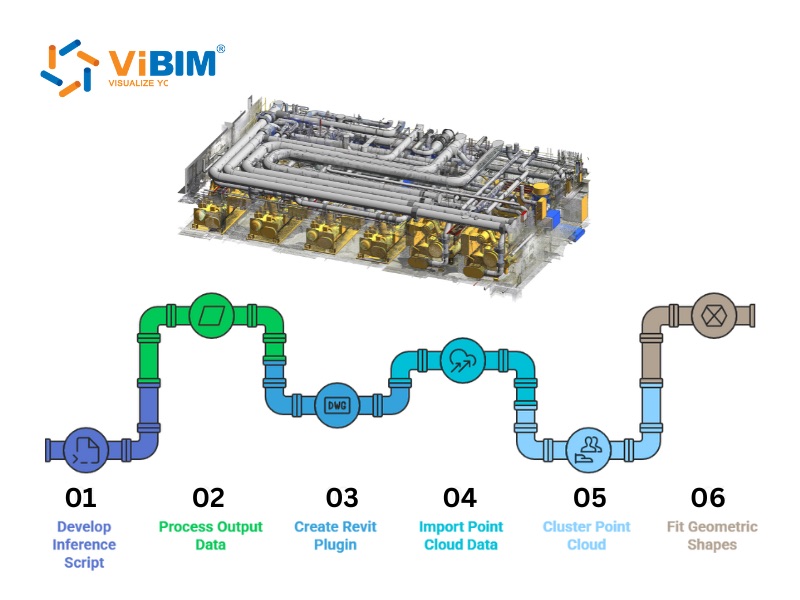
Deciding which passes to automate and which to model by hand is a delivery choice, not a software setting. The Scan to BIM services ViBIM runs make that split explicit per project and put every automated pass through independent QC, at LOD 100 to 500.
How Does Automated Scan to BIM Work?
The automated Scan to BIM workflow follows a systematic 5-stage process to convert unstructured point cloud data into intelligent, parametric BIM models. This structured sequence emphasizes factual certainty and data precision to ensure that the final digital twin accurately reflects the physical as-built conditions.
Stage 1: Intelligent Point Cloud Data Processing
Before modeling begins, the raw data from Terrestrial Laser Scanners (TLS) or mobile mapping systems must be cleaned and registered (stitched together). Automation in this stage focuses on removing “ghosts” and aligning scans without manual target selection.
Algorithms Behind the Automation:
- ICP (Iterative Closest Point): The industry standard algorithm for automated registration. It iteratively minimizes the distance between two point clouds until they align perfectly, replacing the need for manual “target picking” in many scenarios.
- SOR (Statistical Outlier Removal): An algorithm designed to clean the data. It analyzes the average distance of every point to its neighbors; points that are statistically too far away (like a bird flying through a scan or a reflection on glass) are identified as noise and automatically deleted.
- SLAM (Simultaneous Localization and Mapping): Used primarily in mobile mapping (like NavVis or GeoSLAM devices), this algorithm builds the map and tracks the scanner’s location in real-time, allowing for “drift-free” data capture without static tripod setups.
Software Implementations:
- Leica Cyclone REGISTER 360: Uses “Visual Alignment” and automated link creation to stitch dozens of scans together while automatically filtering out moving objects (like people walking by).
- Autodesk ReCap Pro: Features “Auto-Register” capabilities that use cloud computing to match overlapping scan data patterns.
Stage 2: AI-Powered Semantic Segmentation
In the second stage, deep learning models analyze the unstructured “sea of dots” to perform point cloud segmentation. This process analyzes the unstructured “sea of dots” and classifies every single point into meaningful categories like “wall,” “floor,” “ceiling,” or “window.”
Algorithms Behind the Automation:
- PointNet++: A pioneering deep neural network architecture designed specifically for 3D point clouds. Unlike traditional image processors, PointNet++ respects the unstructured nature of 3D data, learning to recognize features at multiple scales to differentiate between a “column” and a “wall.”
- RandLA-Net: An efficient algorithm designed to handle massive point clouds (millions of points) instantly, enabling real-time segmentation of large-scale environments.
Stage 3: Automated Feature Extraction and Object Recognition
Once segmented, the software extracts geometric features like planes, cylinders, and edges. Object recognition engines then group these features into meaningful building components by comparing the extracted geometry against standardized BIM libraries.
Algorithms Behind the Automation:
- RANSAC (Random Sample Consensus): The “engine” for detecting geometric primitives. It identifies the best-fitting mathematical models for walls (planes) and pipes (cylinders) by ignoring outliers.
- Hough Transform: Excels at detecting linear features, making it the primary engine for extracting long runs of piping and ductwork in MEP-heavy projects.
- Region Growing: This algorithm starts from a “seed” point (e.g., on a flat wall) and expands outwards, grouping all connected points that share the same normal vector (facing direction). This accurately defines the boundaries of surfaces like floors and ceilings.
Stage 4: Parametric BIM Object Generation
This is the pivotal stage where raw geometric shapes are transformed into intelligent, manipulatable BIM elements. The system utilizes constraint logic to execute the point cloud to Revit conversion, mapping extracted shapes directly to native BIM families (such as Revit families) rather than just static 3D meshes.
The Algorithms Behind the Automation:
- Template Matching: Compares a segmented cluster against a library of known shapes. If a cluster matches a standard I-beam profile by 90% or more, the algorithm flags it as a structural column.
- NURBS (Non-Uniform Rational B-Splines): For heritage projects or organic architecture where standard straight lines don’t apply (e.g., sagging beams or vaulted ceilings), NURBS algorithms generate complex, free-form surfaces that accurately represent the irregular reality.
Stage 5: Human Verification (QA/QC)
Despite advancements, AI is not infallible. The final stage involves a human-in-the-loop approach where expert modelers verify the automated output. Interestingly, even this “checking” phase is now being automated.
The Algorithms Behind the Automation:
- Heatmap Deviation Analysis: Algorithms compare the generated BIM geometry against the original point cloud, calculating the distance between the two surfaces. The result is a color-coded heatmap (Red = deviation, Green = accurate) that instantly highlights errors.
- Clash Detection Logic: Automated scripts run interference checks to ensure that the newly generated auto-elements (like pipes) do not physically intersect with existing structures (like beams).
To understand the rigorous methodologies used to validate these high-precision digital twins, you can explore our detailed guide on Scan to BIM quality control.
Tools and Software for Automating Scan to BIM Processes
Several best Scan to BIM software facilitate different levels of automation:
- Aurivus: An AI-powered tool that acts as a plug-in for Revit, allowing users to “speed draw” pipes and beams by having the AI detect and fit objects from the point cloud automatically.
- ClearEdge3D EdgeWise: Renowned for its ability to automate the extraction of piping, conduit, and structural elements. It uses pattern-matching algorithms to fit pipe runs and connect elbows, significantly reducing manual modeling time for MEP projects.
- PointNet & Deep Learning Frameworks: On the research and development side, architectures like PointNet and KPConv are the foundation for custom AI solutions that classify 3D data directly.
- ai: Focuses on generating as-built BIM models directly from point clouds using deep learning to handle the heavy lifting of segmentation.
Benefits of Implementing Scan to BIM Automation
Adopting automated Scan to BIM workflows offers tangible advantages for AEC firms and facility managers:
- Accelerated Project Delivery: Automation can reduce modeling time by up to 50-70% for repetitive elements like pipes and structural framing.
- Cost Reduction: By minimizing the manual labor hours required for “grunt work” (like tracing walls), skilled modelers can focus on complex details, optimizing the overall project budget.
- High-Precision Accuracy and Consistency: One of the most significant benchmarks for automation is its ability to maintain high fidelity across massive datasets. Research published in ScienceDirect, titled “Automated Reconstruction of BIM Models from Point Clouds“, demonstrates that advanced deep learning models can achieve a 94.6% accuracy rate in correctly identifying and classifying structural elements like walls, floors, and columns. By utilizing these algorithms, firms eliminate the “modeling drift” and subjective interpretations that occur when multiple human modelers work on the same project. This ensures a consistent, mathematically verified output that adheres to strict project tolerances.
- Scalability: Automated tools allow firms to handle larger datasets and more complex facilities (like data centers or factories) without linearly increasing their workforce.
What are the Current Limitations of Automated Point Cloud Modeling?
The transition from raw spatial data to a fully automated BIM model faces several foundational technical challenges, primarily involving the inherent “noise” of real-world environments and the difficulty of training AI to interpret non-standard architectural features. While automation significantly accelerates the modeling process, current algorithms often lack the cognitive flexibility to resolve ambiguous data or “fill in” missing information without a high risk of error. These challenges result in specific limitations that necessitate a “human-in-the-loop” approach to maintain the rigorous standards required for construction-level documentation.
Here are key challenges of Scan to BIM automation:
- Occlusion Handling: AI struggles to model objects that are partially hidden behind furniture or ceilings. If the scanner didn’t see it, the AI cannot accurately guess it exists without potential errors.
- Complex Architectural Details: Unique, non-standard geometries (like heritage moldings or custom joinery) often confuse algorithms trained on standard modern building components.
- Integration of Systems: Aligning automated outputs with complex MEP routing logic (e.g., ensuring gravity pipes have the correct slope) remains a challenge that often requires manual adjustment.
- Data Scarcity for Training: Developing robust AI models requires massive labeled datasets of point clouds, which are difficult and expensive to produce.
A 3D scan to Revit workflow still needs human review wherever occlusion, unusual geometry, or ambiguous existing conditions prevent reliable automatic classification.
The Future of Scan to BIM: From Semi-Auto to Fully Autonomous
The trajectory of AEC technology is moving rapidly toward a fully autonomous environment where digital twins are generated in near real-time with minimal human intervention. Current trends in Scan to BIM indicate a shift from reactive “scan-then-model” workflows toward proactive, AI-driven data processing at the “edge”—meaning data is processed directly on the scanning device as it is captured.
This future state will leverage the following advancements:
- Generative AI and Semantic Enrichment: Future systems will use Large Language Models (LLMs) and generative algorithms to infer missing structural data—such as beams hidden behind walls—based on standard architectural logic and historical project data.
- Real-Time Model Synchronization: Mobile mapping devices integrated with SLAM (Simultaneous Localization and Mapping) will allow for “drift-free” data capture that updates the BIM model instantaneously as the technician walks through the site.
- Automated Code-Compliance: Autonomous models will be subjected to automated code-checking algorithms, instantly flagging safety or structural violations during the as-built verification phase.
This evolution will transition the industry from the current “semi-automated” methodology to a state where Information Responsiveness is maximized, allowing for immediate decision-making in facility management and large-scale urban planning.
ViBIM’s Approach to Scan to BIM Automation
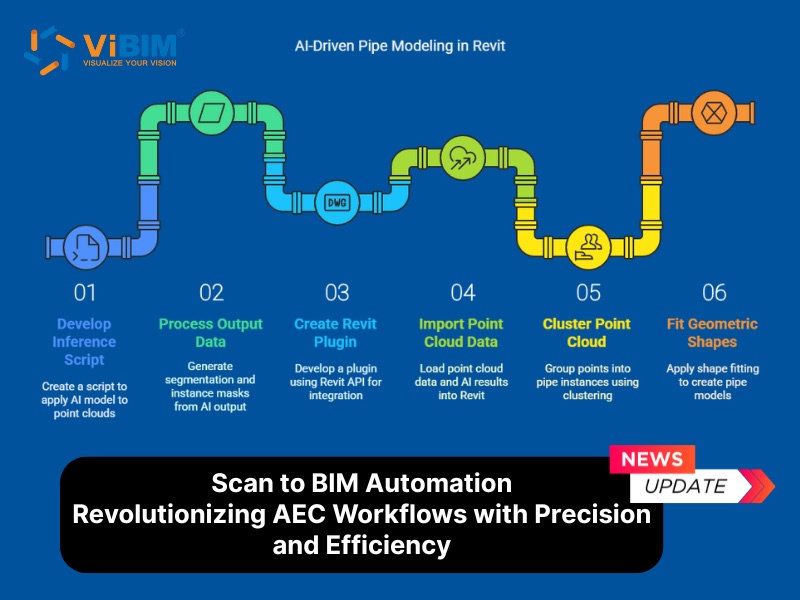
At ViBIM, which specializes in providing Scan to BIM services, we are actively investing in and developing advanced automation modeling capabilities through AI. Our integrated workflow for Scan to BIM automation (specifically for Pipe Modeling) encompasses several key technological and solution-driven principles.
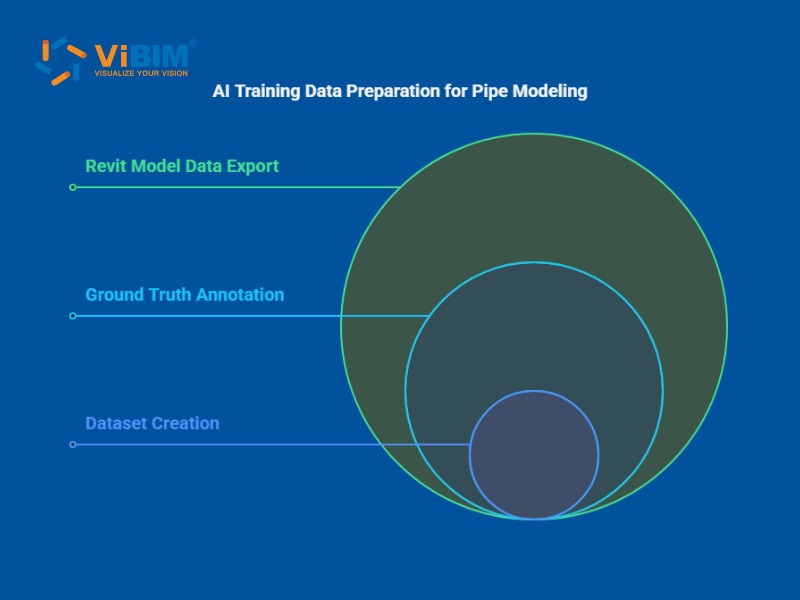
- Precision Data Labeling for AI Training: To train our AI models effectively, we employ meticulous data labeling. This involves both semantic segmentation, classifying each point in the point cloud as either “pipe” or “non-pipe,” and instance segmentation, which are core techniques in point cloud segmentation, assigning a unique ID to every individual pipe segment.
- Advanced AI Model Training with Deep Learning: Our core automation is powered by robust deep learning models. We utilize Sparse Convolutional Neural Networks (Sparse CNNs), ideal for handling sparse point cloud data, and Point Transformer Networks, which enhance accuracy through attention mechanisms. The training process is optimized using various loss functions (e.g., Cross-Entropy, Lovasz), optimizers like AdamW, and sophisticated learning rate schedules.
- Seamless AI Integration into Revit: A custom-developed Revit plugin (built with C#) serves as the bridge between our AI models and the Revit environment. This plugin is designed to:
- Receive segmented data directly from the AI.
- Apply advanced clustering algorithms to group points into distinct pipe segments.
- Utilize Geometric Fitting libraries (such as Open3D or PCL) to accurately identify the geometric properties of pipes (e.g., circular pipes, elbows, tees).
- Automatically generate true Pipe objects within Revit using the Revit API, complete with accurate dimensions and properties.
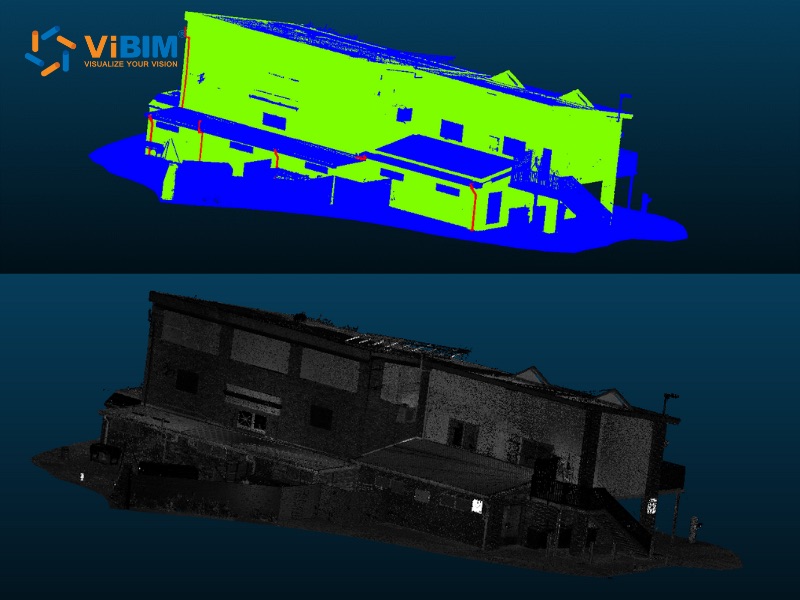
- Automated Output and User Interaction: The final stage focuses on user experience and validation. Our system displays segmentation results, allowing for a clear comparison between ground truth and AI predictions. Furthermore, a user-friendly interface within Revit provides quick and intuitive interaction with our AI-powered tools.
Partner with Expert Modelers for Your Automated Scan to BIM Projects
While AI automation handles 70-90% of feature extraction, expert validation and refinement remain critical for high-quality deliverables. Connect with ViBIM as your trusted Revit BIM Modeling Service Provider to ensure your automated workflows deliver accurate, project-ready models with rigorous QA/QC standards.
FAQs
Can the Scan to BIM Process Be 100% Automated?
No, not yet. While software can automate a significant portion of the work, especially for geometrically simple elements, 100% automation is not currently feasible for most real-world projects. The complexity of building systems, the imperfections in scan data, and the need for expert-led QA/QC mean that skilled human professionals remain essential to the process.
Does Scan to BIM automation reduce accuracy?
If unsupervised, yes. Automated tools can misinterpret noise as geometry or fit straight walls to leaning structures. However, when used as a foundation for human verification automation actually increases overall consistency and accuracy by removing manual drafting fatigue errors.
Does it work for high LOD (LOD 350-400)?
Automation is excellent for LOD 200 (approximate geometry). Achieving LOD 350-400 (fabrication-ready detail with hangers, precise connections, and insulation) requires significant manual refinement. Automation generates the skeleton; skilled modelers add the muscle and skin required for high-LOD deliverables.
Which software is best for automated pipe modeling?
ClearEdge3D EdgeWise is widely considered the industry leader for automated pipe modeling due to its advanced pattern recognition that can extract pipe runs and elbows with high precision. Aurivus is also gaining traction for its AI-driven, user-friendly approach to identifying MEP systems directly within the Revit environment.
Scan to BIM automation is undeniably revolutionizing workflows within the AEC industry. The key to success lies not in completely replacing human professionals, but in the intelligent collaboration between powerful tools and the deep expertise of engineers and technicians. Adopting a well-managed, semi-automated process allows for increased speed, reduced costs, and an unprecedented level of accuracy in as-built models.
If you are looking for a reliable partner to help you harness the power of Scan to BIM automation, contact ViBIM to discuss your project requirements and deliver an optimal modeling solution.











