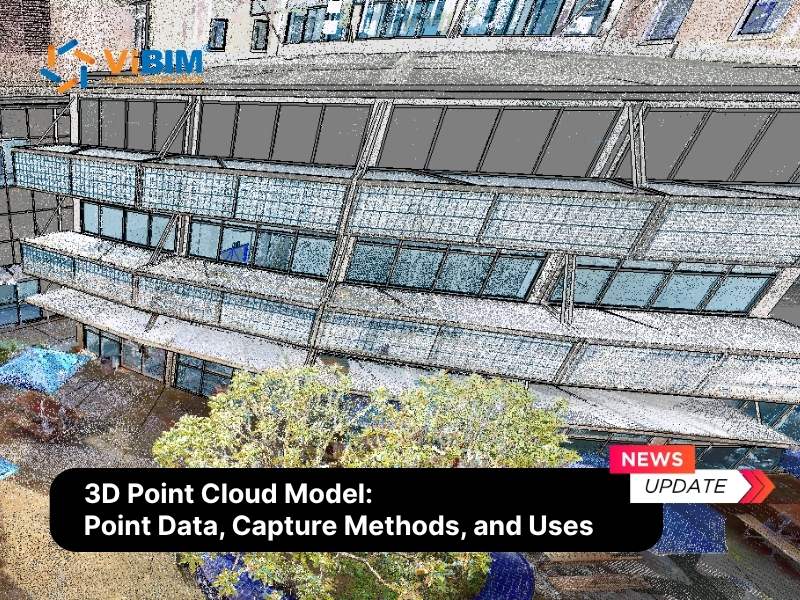
Scan to BIM software is a specialized category of AEC digital tools designed to convert raw 3D laser scan data (Point Clouds) into intelligent, parametric Building Information Models (BIM). Utilizing formats like RCP, E57, and RVT, this software infrastructure bridges the gap between physical reality and digital design, enabling professionals to create accurate digital twins for renovation and facility management.
However, raw scan data is massive and unstructured. Firms risk facing significant data incompatibility and geometric inaccuracies if they lack a synchronized software ecosystem. Therefore, choosing the right toolset requires ensuring interoperability across the entire data lifecycle—from initial site capture to final model handover.
At ViBIM, software selection is the cornerstone of optimizing turnaround times and costs for our outsourcing partners. Leveraging data from 11+ years of experience and over 2,000 completed Scan to BIM projects, we have curated the most efficient platforms for high-velocity production. This guide provides a technical review of the 15 best software tools and outlines criteria for selecting the right ecosystem, categorized by their specific role in the workflow.

What is Scan to BIM Software and How Does it Work?
Scan to BIM software is a specialized suite of digital tools designed to convert raw 3D laser scan data (Point Clouds) into intelligent, parametric Building Information Models (BIM). Pioneered by industry leaders like Autodesk, Leica Geosystems, and Trimble, these applications bridge the gap between physical reality and digital design, enabling surveyors to create accurate digital twins from site measurements.
To see how these tools fit into the full capture-to-model process, start with what is Scan to BIM. The software stack then breaks into three technical categories:
- Registration Software: Processes, cleans, and aligns raw scan files to generate a unified 3D point cloud dataset within a shared coordinate system.
- Modeling Software (BIM Authoring): Serves as the platform where users trace and convert point cloud data to 3D model geometry, producing parametric elements like walls, pipes, and structures using intelligent families.
- Validation Software: Audits the final model against the original point cloud to ensure tolerance compliance and detect clashes.
To achieve high-precision results, professionals rely on an integrated stack rather than a single tool. Below are the 15 essential software tools selected through a dual-criteria approach: global market dominance and ViBIM’s operational data from delivering over 2,000 projects.
Quick Comparison: Top 15 Scan to BIM Software Tools by Workflow Stage:
Category | Software Name | Best Use Case | Key Capability |
| 1. Registration (Data Processing) | Leica Cyclone REGISTER 360 | Survey-grade projects | High-precision bundle adjustment |
| Autodesk ReCap Pro | Autodesk Ecosystem | Unified indexing (RCP/RCS) | |
| FARO SCENE | On-site registration | Real-time verification & VR | |
| CloudCompare | Forensic analysis | Advanced geometric comparison | |
| 2. Modeling (BIM Authoring) | Autodesk Revit | Commercial & MEP | Multi-disciplinary coordination |
| Graphisoft ArchiCAD | Heritage & Architecture | Flexible GDL objects | |
| Tekla Structures | Industrial Steel | Fabrication-ready detailing (LOD 500) | |
| Bentley MicroStation | Civil Infrastructure | Massive dataset handling | |
| 3. Automation (Revit Plugins) | Leica CloudWorx | Large-scale facilities | Zero-latency JetStream streaming |
| FARO As-Built | General Architecture | Precise wall & floor fitting | |
| Undet for Revit | Heritage BIM (HBIM) | Lightweight Raster slicing | |
| ClearEdge3D EdgeWise | MEP & Piping | Automated pipe run extraction | |
| 4. Validation (QA/QC) | Autodesk Navisworks | Clash Detection | Hard clash identification |
| Solibri Model Checker | Data Compliance | OpenBIM/IFC rule checking | |
| Verity (ClearEdge3D) | Construction Verification | Automated tolerance heatmaps |
4 Point Cloud Registration Software for Data Processing
Point Cloud Registration Software is specialized technology designed to align and stitch fragmented laser scans into a single, unified 3D coordinate system. Acting as the prerequisite for accurate modeling, the following 4 tools are selected based on their global industry popularity and market dominance in handling high-precision datasets:
1. Leica Cyclone REGISTER 360
Widely regarded as the gold standard for survey-grade projects, Leica Cyclone REGISTER 360 utilizes advanced bundle adjustment algorithms to handle massive datasets without compromising accuracy. It excels in managing complex constraints and survey control networks, providing a robust environment where users can visualize and verify the alignment of thousands of scan positions before export. Its ability to process high-fidelity data ensures that downstream modeling teams work with a “digital truth” that deviates less than 5mm from physical reality.
- Strengths:
- JetStream Technology: Features a proprietary engine that renders billions of points instantly, reducing processing time by up to 40% compared to traditional registration workflows.
- Visual QA: Provides intuitive, color-coded error links that allow technicians to instantly identify and rectify misalignments or “slippage” in the registration network.
- Limitations:
- High Investment: Represents a significant cost barrier for smaller firms due to expensive licensing.
- Steep Learning Curve: Requires a solid understanding of surveying principles to fully utilize its constraint-based features.
- Compatibility:
- Input: Leica native raw data (BLK, RTC360), E57, PTX.
- Output: LGS, RCP (via plugin), E57.

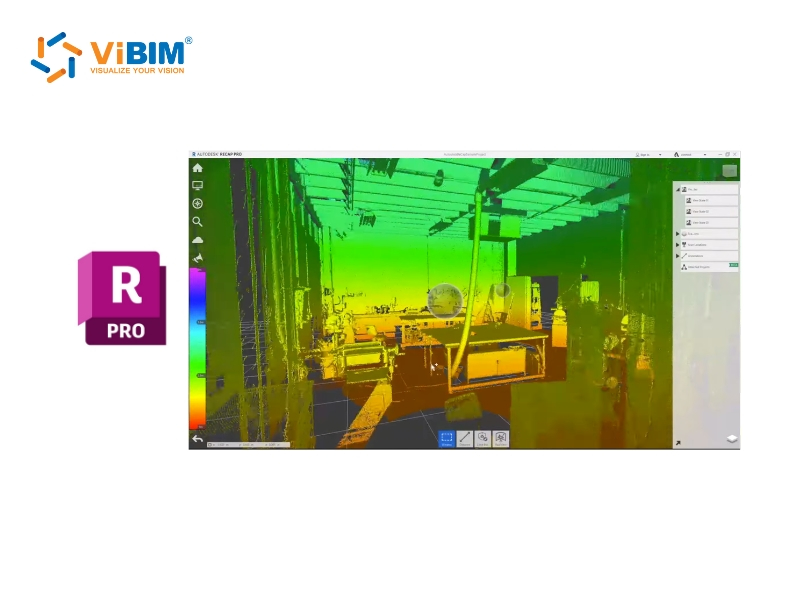
2. Autodesk ReCap Pro
Autodesk ReCap Pro serves as the essential bridge between site capture and the design environment within the Autodesk ecosystem. Its primary function is to index raw scan data into RCP and RCS formats, which are optimized for performance within Revit and Navisworks. By converting heavy raw files into lightweight, indexed point clouds, ReCap Pro ensures that modelers can navigate and trace complex environments without experiencing viewport lag or software crashes.
- Strengths:
- Seamless Integration: As the native processing tool for the Autodesk AEC Collection, it offers the most stable workflow for preparing data for Revit modeling.
- Intelligent Cleanup: Features automated services to remove “ghost points” (moving objects like cars or people), ensuring modelers reference only the static as-built conditions.
- Limitations:
- Basic Registration: While capable, its cloud-to-cloud registration tools are less rigorous than Cyclone for survey-grade adjustments.
- Limited Analysis: Lacks advanced deviation reporting or flatness analysis features found in specialized software.
- Compatibility:
- Input: FLS, PTX, LAS, E57.
- Output: RCP, RCS (Autodesk Native).
3. FARO SCENE
FARO SCENE is engineered for efficiency and on-site validation, particularly for workflows utilizing FARO laser scanners. It emphasizes a seamless “field-to-office” process by allowing operators to process and register scans wirelessly on tablets immediately after capture. This real-time capability ensures that data completeness is verified before the team leaves the site, significantly reducing the costly risk of return visits due to missing data or occlusion shadows.
- Strengths:
- Target-Based Precision: Excel at automatically detecting spheres and checkerboard targets, which is critical for distinguishing similar geometries in complex industrial plants.
- Virtual Reality Integration: Allows users to inspect registered scans in VR mode instantly, providing an immersive quality check of the site conditions.
- Limitations:
- Hardware Optimization: Performance is heavily optimized for FARO hardware formats (FLS); processing third-party data can be less efficient.
- System Requirements: Real-time colorized rendering requires high-end workstations to maintain smooth operation.
- Compatibility:
- Input: FLS (Faro Native), E57.
- Output: E57, RCP/RCS, VR Support.

4. CloudCompare
CloudCompare acts as a powerful, open-source for point cloud manipulation and forensic analysis. Despite being free software, it offers advanced algorithms—such as M3C2 distance computation—that allow users to perform scientifically accurate change detection between two datasets (e.g., comparing an As-Built scan against an As-Designed model). It is the go-to tool for deep geometric analysis that commercial “black box” software often cannot provide.
- Strengths:
- Advanced Analysis: Capable of computing detailed geometric characteristics like roughness and curvature, essential for analyzing material degradation in heritage projects.
- Performance: Extremely lightweight, capable of opening and processing massive files exceeding 100 million points on standard hardware.
- Limitations:
- User Interface: The interface is technical and non-intuitive, presenting a steep learning curve for non-specialist users.
- Desktop Only: Lacks built-in cloud sharing or collaboration features found in commercial suites.
- Compatibility:
- Input: BIN, ASCII, PLY, E57, LAS, LAZ.
- Output: E57, DXF, CSV.

4 Industry-Standard BIM Modeling Software
BIM Modeling Software serves as the digital workspace where registered point clouds are traced and converted into parametric, intelligent building elements. Representing the core production phase of the workflow, the following 4 platforms are curated directly from ViBIM’s production pipeline, selected for their specific strengths in handling Architecture, Structure, and MEP disciplines at high Levels of Development (LOD):
5. Autodesk Revit
As the primary engine of the global AEC industry, Autodesk Revit features a powerful parametric change engine that coordinates changes across all views, schedules, and sheets instantaneously. For Scan to BIM workflows, Revit allows modelers to link indexed RCP files directly, enabling the creation of intelligent multi-disciplinary models (Architecture, Structure, MEP) within a single environment. Its ability to host massive plugin ecosystems makes it the most versatile choice for converting complex geometries into parametric families with high informational value.
For an end-to-end view of how that authoring stage fits the as-built process, see the 3D laser scan to Revit workflow from field capture through model validation.
- Strengths:
- Multi-Discipline Coordination: Capable of handling Architecture, Structure, and MEP simultaneously, facilitating real-time clash avoidance during the modeling phase.
- Extensive Plugin Support: Supports the widest range of Scan-to-BIM plugins (like CloudWorx, As-Built), which accelerates the modeling of pipes and walls by up to 50% compared to manual tracing.
- Limitations:
- Resource Intensity: As an in-memory system, Revit can experience performance lag when handling point cloud files exceeding 10GB without proper workset management.
- Complex Surface Modeling: Native tools are less efficient for modeling non-geometric, organic shapes found in heritage buildings compared to other platforms.
- Compatibility:
- Input: RCP, RCS (Native), IFC, DWG.
- Output: RVT, IFC, DWG, NWC.
ViBIM’s Verdict: Revit is our “workhorse,” used in over 90% of our projects ranging from residential to complex industrial facilities. We choose Revit because its parametric family system allows us to deliver high LOD models (LOD 300-400) that are immediately ready for construction documentation.

6. Graphisoft ArchiCAD
Graphisoft ArchiCAD is renowned for its design flexibility and superior handling of OpenBIM standards. It utilizes the proprietary Geometric Description Language (GDL) to create highly customizable parametric objects, which is particularly valuable when modeling unique, non-standard historic details from scan data. Unlike other platforms, ArchiCAD generally offers smoother navigation of dense point clouds on consumer-grade hardware, making it a preferred choice for architectural design firms focused on heritage preservation.
- Strengths:
- Superior IFC Handling: Delivers high-fidelity IFC export/import, ensuring data interoperability when collaborating with consultants using different software.
- GDL Scripting: Enables the creation of intelligent, custom parametric objects for ornate architectural details that native tools cannot easily generate.
- Limitations:
- Limited MEP Tools: While capable, its native tools for complex industrial MEP routing are less robust compared to the specialized systems in Revit.
- Scripting Barrier: Unlocking the full potential of custom object creation requires knowledge of GDL scripting, which has a steep learning curve.
- Compatibility:
- Input: E57, XYZ, DWG.
- Output: PLN, PLA, IFC, BIMx.
ViBIM’s Verdict: We deploy ArchiCAD specifically for European clients and Heritage BIM (HBIM) projects where the visual fidelity of architectural elements and OpenBIM compliance are the top priorities.

7. Tekla Structures
Tekla Structures is the specialist platform engineered for structural detailing and fabrication-ready modeling. It excels in handling massive datasets of steel and concrete with high precision, allowing modelers to convert point clouds into constructible models with Level of Detail up to LOD 500. Its ability to manage millions of structural components without performance degradation makes it the definitive tool for modeling industrial plants, steel bridges, and precast assemblies.
- Strengths:
- Industrial Precision: Specialized tools for fitting standard steel profiles to scan data with millimeter accuracy, essential for retrofitting industrial plants.
- Fabrication Ready: Automates the generation of shop drawings and CNC data directly from the as-built model, bridging the gap between survey and manufacturing.
- Limitations:
- Discipline Specific: It is strictly a structural and construction tool; it lacks the libraries and features necessary for general architectural design or MEP modeling.
- Complexity: The interface is engineering-focused, requiring specialized knowledge of structural connections and fabrication standards.
- Compatibility:
- Input: POT, LAS, E57.
- Output: IFC, DWG, NC (CNC data), Tekla BIMsight.
ViBIM’s Verdict: Tekla is our designated tool for BIM structural modeling services on industrial retrofit projects. When a client needs to replace a specific steel beam in a factory, we use Tekla to model the existing structure with exact connection details derived from the scan.

8. Bentley MicroStation
Bentley MicroStation serves as the enterprise-grade platform for massive infrastructure and civil engineering projects. It distinguishes itself with the capability to federate and reference terabytes of point cloud data simultaneously without the memory constraints typical of other BIM authoring tools. This makes it the only viable option for modeling large-scale assets such as bridges, rail systems, and city-scale digital twins where the context is as important as the individual elements.
- Strengths:
- Massive Scalability: The DGN file format and file-based architecture allow for the management of extremely large datasets and complex geometries found in civil infrastructure.
- Hybrid Workflow: Seamlessly supports 2D drafting, 3D modeling, and point cloud referencing in a single interface, offering flexibility for transition projects.
- Limitations:
- Overkill for Buildings: The interface and toolset are overly complex for standard commercial or residential building projects, making it inefficient for smaller scopes.
- Fragmented Ecosystem: Requires navigating a large array of specialized modules (OpenBuildings, OpenRoads), which can be daunting for new users.
- Compatibility:
- Input: POD (Native), LAS, E57, DGN, DWG.
- Output: DGN, DWG, IFC, i-model.
ViBIM’s Verdict: We utilize MicroStation exclusively for infrastructure projects like bridges and tunnels. Its stability when handling kilometer-long point cloud scans ensures that our civil engineering clients receive data they can trust for maintenance and expansion.

What Are the Best Scan to BIM Plugins for Autodesk Revit?
While Autodesk Revit is the central authoring environment, its native tools for handling massive point clouds rely heavily on manual tracing, which can be resource-intensive. To resolve this bottleneck, ViBIM integrates specialized Revit plugins that function directly within the interface. These tools leverage Scan to BIM automation algorithms to extract features and stream data, reducing modeling time by 30-70% depending on the discipline.
9. Leica CloudWorx for Revit
Leica CloudWorx transforms Revit into a high-performance environment capable of handling massive datasets that typically strain standard hardware. Utilizing the proprietary JetStream engine, it allows modelers to stream billions of points directly into the Revit viewport with zero latency, eliminating the need to load heavy physical files.
- Strengths:
- Zero-Lag Performance: Eliminates regeneration delays, enabling smooth orbiting of datasets exceeding 50GB.
- Fit-to-Cloud: Automates the fitting of columns, pipes, and walls to the exact center-line of the point cloud data.
- Limitations: Requires the Leica software ecosystem (Cyclone) for maximum efficiency.
- Compatibility: Input (LGS, RCP) => Function: High-speed Data Streaming
ViBIM’s Verdict: CloudWorx is indispensable for our large-scale commercial projects like airports and campuses. It ensures our teams can model extensive square footage without hardware performance bottlenecks.

10. FARO As-Built for Autodesk Revit
FARO As-Built serves as a comprehensive feature extraction tool for architectural and structural modeling. It enhances Revit workflows by allowing users to semi-automatically fit wall lines, pipes, and structural beams to the scan data with precise alignment algorithms.
- Strengths:
- Surface Analysis: Visualizes the flatness of floors and walls (Deviation Analysis) directly in Revit, critical for validation.
- Photo-to-Plan: Extracts geometry from oriented 360-degree images, providing clearer context than raw point dots.
- Limitations: Semi-automated workflow still requires user verification for each element.
- Compatibility: Input (RCP, E57) => Function: Architectural Feature Extraction
ViBIM’s Verdict: We deploy FARO As-Built for 90% of our architectural projects. Its “Fit Wall” functionality ensures our models accurately reflect the real-world inclinations and varying thicknesses of existing structures.

11. Undet for Revit
Undet for Revit bypasses the heavy processing load of 3D points by utilizing Rasterization technology. Instead of loading millions of points, Undet generates lightweight, high-clarity raster images (slices) of floor plans and sections directly within the Revit view, offering superior visibility for tracing intricate details.
- Strengths:
- Visual Clarity: Raster slices cut through “ghost points” and noise, providing a clean background for 2D-centric tracing.
- Hardware Efficiency: Runs smoothly on mid-range workstations by reducing GPU load.
- Limitations: Less effective for complex 3D piping collision checks compared to volumetric tools.
- Compatibility: Input (E57, RCP, FLS) => Function: Raster Slicing & Drafting
ViBIM’s Verdict: Undet is our primary tool for Heritage BIM (HBIM). When modeling ornate cornices or historic moldings, its raster clarity reveals details that are often obscured in standard point cloud views.

12. ClearEdge3D EdgeWise
ClearEdge3D EdgeWise is the industry leader for automated feature extraction, specifically revolutionizing MEP and Industrial modeling. It uses advanced pattern recognition algorithms to automatically detect, extract, and connect thousands of pipes and conduits from scan data before import, significantly reducing manual modeling labor.
- Strengths:
- Batch Automation: Extracts entire piping runs and connects elbows automatically, saving hundreds of hours on industrial projects.
- Intelligent Family Mapping: Automatically maps extracted geometry to the correct Revit families and specifications (e.g., ANSI standards).
- Limitations: Automated extraction requires a robust QA process to verify connections and remove false positives.
- Compatibility: Input (E57, RCP) => Output (Revit Families)
ViBIM’s Verdict: For industrial plant retrofits and MEP-heavy projects, EdgeWise is non-negotiable. It allows our team to reduce MEP modeling time by up to 75% by automating the creation of standard piping networks.
To understand the foundational workflow these tools accelerate, explore our step-by-step guide on how to convert point cloud to Revit model geometry.

3 Software for QC, Validation & Collaboration
A Scan to BIM model is only valuable if it accurately reflects physical reality. QC & Validation Software serves as the automated auditing layer that verifies the geometric accuracy of the BIM model against the original point cloud. Acting as the final gatekeeper for deliverable integrity, the following 3 tools are essential for ensuring models are error-free and compliant with ISO 19650 standards:
13. Autodesk Navisworks Manage
Autodesk Navisworks Manage is the industry standard for geometric coordination. It functions as a powerful federation engine, aggregating models from Revit, Tekla, and other sources into a single lightweight environment (NWD). In Scan to BIM workflows, it is critical for running “Hard Clash” detection between new design elements and the existing conditions captured in the point cloud.
- Strengths:
- Clash Detective: Automates the detection of “Hard Clashes” (physical intersections) between modeled elements and the point cloud, identifying errors that manual checks might miss.
- Model Federation: Aggregates over 60 file formats (NWD, RVT, IFC, RCP) into a single navigable file, making it the ideal platform for inter-disciplinary coordination meetings.
- Limitations:
- Geometric Focus: While excellent for spatial checks, it lacks deep rule-based auditing for non-geometric parameter data (LOI).
- Manual Reporting: Creating detailed issue reports often requires manual annotation unless paired with issue-tracking plugins.
- Compatibility:
- Input: NWD, NWC, RVT, IFC, RCP.
- Function: Spatial Coordination & Clash Detection.
ViBIM’s Verdict: Navisworks is our primary internal QC tool. Before any file leaves our server, it undergoes a Navisworks “Clash Test” to ensure the MEP systems we modeled do not intersect with the existing structural beams captured in the scan.

For a broader understanding of its role, explore our foundational guide on what Navisworks software is to see how the entire platform streamlines project review.
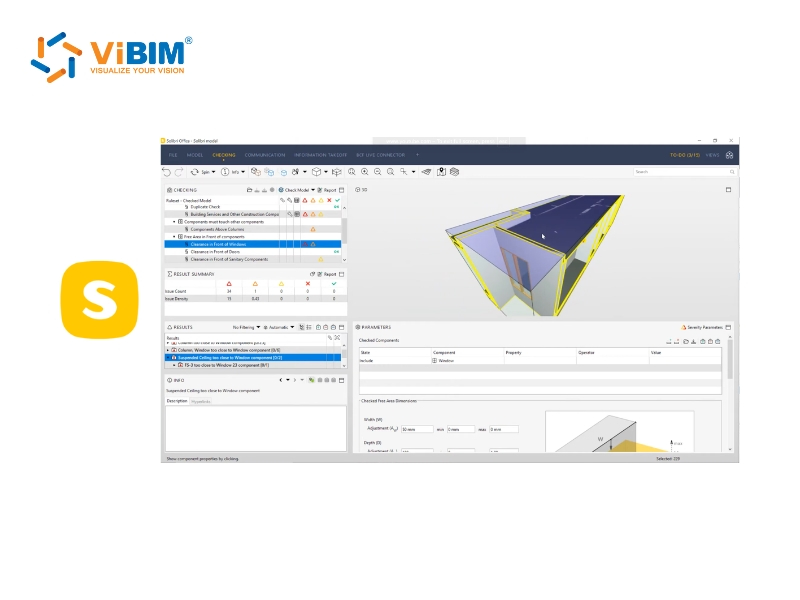
14. Solibri Model Checker
While Navisworks handles geometry, Solibri Model Checker acts as the “Data Auditor”. It is a rule-based validation platform that inspects the informational quality (LOI) of the model. Solibri ensures that all elements contain the correct classifications, naming conventions, and parameters required by the BIM Execution Plan (BEP).
- Strengths:
- Logical Validation: Automates complex checks, such as verifying that all “Fire Rated Walls” actually extend to the structural slab above, or that all spaces meet ADA accessibility width requirements.
- IFC Assurance: It is the gold standard for validating IFC deliverables, ensuring data is not lost when exporting from Revit to other platforms.
- Limitations:
- Learning Curve: Setting up custom rulesets (Ruleset Manager) requires a deep understanding of logical operators and BIM standards.
- Not for Point Clouds: It is designed for model-to-data validation, not for overlaying dense point clouds for visual inspection.
- Compatibility:
- Input: IFC, SMC.
- Function: Data Integrity & Compliance Audit.
ViBIM’s Verdict: We deploy Solibri for government and institutional projects (like UK BIM Level 2 mandates) where data consistency and COBie compliance are just as critical as the 3D geometry itself.
15. Verity (by ClearEdge3D)
Verity automates the tolerance verification process by computationally comparing the As-Built model against the raw point cloud data. Unlike visual inspection, Verity analyzes every modeled element to determine if it sits within the specified tolerance (e.g., ±15mm), generating heatmaps and variance reports that provide mathematical proof of accuracy.
- Strengths:
- Automated Variance: Instantly flags elements that deviate from the point cloud beyond a set tolerance (e.g., >15mm), creating a “Pass/Fail” report for thousands of objects in minutes.
- Visual Heatmaps: Colors modeled elements green (within tolerance), yellow (warning), or red (error) based on their alignment with the scan, making QA status immediately visible.
- Limitations:
- Processing Time: Running a full analysis on a massive, complex facility can be time-consuming due to the computational load.
- Cost: It acts as a premium plugin for Navisworks, adding to the software overhead.
- Compatibility:
- Input: Navisworks (NWD/NWF) with Point Clouds.
- Function: Automated Tolerance Verification.
ViBIM’s Verdict: Verity is our tool of choice for high-stakes industrial projects. It allows us to provide clients with a “Verification Report” alongside the model, offering mathematical proof that our work matches reality.
To explore the full spectrum of BIM platforms beyond Scan-to-BIM workflows—including their core capabilities for design, collaboration, and project delivery across all construction phases—discover our comprehensive overview of Building Information Modeling software and how to choose the right solution for your specific project needs.
How to Choose the Right Scan to BIM Software Ecosystem?
Choosing the right Scan to BIM software ecosystem is not about finding a single “best” application, but rather selecting an interoperable stack of tools that aligns your capture hardware with your deliverable requirements. The optimal decision balances technical compatibility, project complexity, and total cost of ownership to ensure a seamless data flow from the physical site to the digital model without data loss or geometric corruption.
To build a high-performance workflow, you must evaluate the following critical criteria:
- Evaluate Hardware & Data Origin: Your registration software must natively support the raw data formats from your laser scanners (e.g., using Cyclone for Leica RTC360 or SCENE for FARO Focus) to preserve metadata and scan quality. Furthermore, ensure the registration tool can export indexed formats (like RCP or E57) that your chosen modeling platform can digest without requiring time-consuming file conversions.
- Define Discipline & Deliverable Standards: Select the modeling platform based on the specific asset type and required Level of Development (LOD). For general commercial buildings and MEP coordination, the Autodesk Ecosystem (Revit) is the global standard. However, for industrial steel fabrication, Tekla Structures provides necessary detailing tools, while Bentley MicroStation is required for massive civil infrastructure projects where file size exceeds typical building limits.
- Verify Ecosystem Interoperability: The most common point of failure is the “handshake” between software stages. You must verify that your registration tool exports files that your authoring tool can link directly (e.g., ReCap to Revit), and that your authoring tool can export validation files (e.g., NWC for Navisworks) without geometric errors. A disjointed ecosystem leads to rework and coordination failures.
- Analyze Cost vs. Operational Frequency: High-end software stacks (like the full Leica or Autodesk collections) represent a significant capital expenditure involving licensing, maintenance, and workstation upgrades. For firms where Scan to BIM is not a daily operation, the Total Cost of Ownership (TCO) often outweighs the benefits, drastically impacting the total Scan to BIM cost. In such cases, partnering with a specialized outsourcing provider who already possesses this advanced infrastructure is often the more strategic financial decision.
Why ViBIM Choose the Autodesk Ecosystem for Outsourcing?
ViBIM selects the Autodesk Ecosystem as our primary production backbone because it offers the highest level of interoperability and stability for global AEC standards. However, our experience over 11+ years has taught us that no single tool is perfect; each application possesses unique strengths suited to specific project typologies. Therefore, we do not rely on a rigid, one-size-fits-all approach. Instead, we have engineered flexible, optimized workflows that combine the stability of Autodesk with the specialized capabilities of third-party plugins and our own internal technology to minimize costs while guaranteeing deliverable quality.
This commitment to process optimization is continuous, evolving alongside technological advancements to ensure our clients always receive the most efficient Scan to BIM Service available.
ViBIM’s Optimized Scan to BIM Workflow
To deliver consistent quality across thousands of projects, ViBIM operates on a standardized yet adaptable technical workflow:
- Data Processing: We standardize all input data using Autodesk ReCap Pro to create unified RCP/RCS files, ensuring zero-latency performance.
- Intelligent Modeling: We utilize Autodesk Revit as the central authoring tool, augmented by specialized third-party plugins (such as Leica CloudWorx or FARO As-Built) to accelerate complex geometry extraction.
- Multi-Layer Validation: We execute a rigorous QA/QC process using Autodesk Navisworks Manage for geometric clash detection, ensuring the digital model perfectly aligns with physical reality.
Proprietary Technology & AI Integration
Beyond commercial software, ViBIM differentiates itself through the development of internal proprietary tools designed to handle tasks that standard software cannot efficiently manage.
- Custom Automation Tools: We have developed a suite of internal add-ins specifically for modeling, quality checking, and system management. These tools automate repetitive, monotonous tasks, drastically reducing manual labor and eliminating the risk of human error during the detailing phase.
- AI-Driven Solutions: ViBIM is actively developing and integrating internal AI solutions into our pipeline. These AI models are already providing effective support in project execution, helping to identify patterns and streamline data processing steps that traditionally required significant time investment.
By combining the industry-standard Autodesk ecosystem with our unique internal technology stack, ViBIM delivers Scan to BIM models that are not only accurate but also 30% faster than the market average.
Ready to Transform Your Point Cloud Data into Accurate BIM Models?
With 11+ years of proven expertise and proprietary AI-driven technology, ViBIM delivers Scan to BIM solutions that are 30% faster than the market average without compromising quality. Our optimized workflows combine the reliability of Autodesk ecosystem with custom automation tools to ensure your project stays on schedule and within budget.
Contact ViBIM today for a free consultation and discover how our advanced Scan to BIM services can accelerate your project delivery while maintaining the highest accuracy standards.
ViBIM – Revit BIM Modeling Service Provider
- Address: 10th floor, CIT Building, No 6, Valley 15, Duy Tan street, Cau Giay ward, Hanoi, Vietnam
- Phone: (+84) 944.798.298
- Tax Number: 0106715752
- Email: info@vibim.com.vn