A Common Data Environment (CDE) is a centralized digital platform where all construction project information is collected, managed, and distributed through a single, governed process. ISO 19650 defines it as the “agreed source of information for any given project or asset.” In practice, a CDE serves as the single source of truth that replaces scattered emails, local drives, and disconnected file systems.
The construction industry needs this. 95.5% of captured project data goes unused [1]. Up to 30% of data created during design and construction is lost by project closeout [2]. 13% of working hours go toward searching for project data and information [1]. The downstream cost: $177.5 billion in labor costs spent on non-optimal activities in the U.S. alone [3].
A CDE addresses this through a structured, gated workflow — moving information through 4 states (Work in Progress, Shared, Published, and Archived) with approval gates at each transition. This process prevents uncoordinated or unapproved data from reaching construction teams. ISO 19650 makes a CDE mandatory for BIM data management, connecting BIM models, point cloud data, contracts, and schedules within one governed platform.
This guide walks through what a CDE is and how it works under ISO 19650, why it matters for construction teams, how CDE and BIM connect — including Scan to BIM workflows — what data types it manages, the features that define an effective platform, how to implement one on a live project, and the common challenges teams face during adoption.

What is a common data environment?
A Common Data Environment (CDE) is a centralized digital platform that serves as the single source of truth for all construction project information. It collects, manages, and distributes both graphical data — BIM models, CAD drawings, point cloud files — and non-graphical data — contracts, specifications, schedules, reports — through a managed, structured process.
ISO 19650 (clause 3.3.15) defines a CDE as the “agreed source of information for any given project or asset, for collecting, managing and disseminating each information container through a managed process” [4]. An information container is any named, persistent set of information: a file, a dataset, or a model.
The CDE concept originated in BS 1192:2007 in the UK. It evolved through PAS 1192-2:2013 under the BIM Level 2 mandate and is now standardized internationally under the ISO 19650 series. That means a CDE is not a single software product — it is a process and a platform combined, governed by an international standard.
A CDE is not limited to BIM data. Modern CDEs house every piece of project information across the full asset lifecycle — from early design through construction, operations, and decommission. Architects, structural engineers, MEP engineers, contractors, scanning companies, BIM modeling firms, facility managers, and building owners all access and contribute to the same environment.
How does a CDE differ from storing files on a cloud drive? A CDE adds managed workflow, version control, access permissions, audit trails, and structured metadata on top of storage. Google Drive stores files. A CDE governs them. That governance changes how construction teams operate — from how they access information to how they coordinate across disciplines and project phases.
Why Is a CDE Important for Construction Teams?
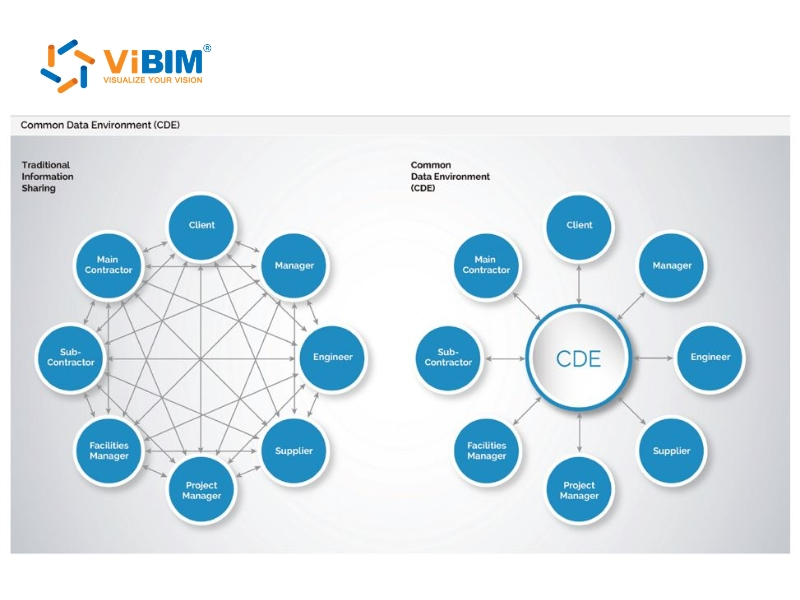
A CDE eliminates the condition where project teams make decisions from incomplete, outdated, or conflicting information. When every stakeholder works from the same governed dataset, 6 measurable outcomes follow.
(1) Single source of truth: Every discipline accesses one current version of every document, model, and dataset — eliminating conflicting drawing sets and outdated email attachments. A contractor on-site and a designer in the office reference the same file at the same revision.
(2) Cross-discipline collaboration: Design, construction, and operations teams coordinate within a shared, structured environment instead of fragmented email chains. An architect in New York, a structural engineer in London, and an MEP team in Ho Chi Minh City work from the same model simultaneously.
(3) Reduced rework: Only approved, coordinated information reaches construction teams — which directly cuts rework caused by building from superseded documents. Academic and industry research consistently shows rework accounts for 5–10% of total project cost [5]. On a $50 million project, that represents $2.5–$5 million in preventable waste.
(4) Complete audit trail: Every upload, edit, approval, and download is logged with user identity and timestamp. This record is unalterable — it supports contractual compliance and dispute resolution equally. When a disagreement arises over who authorized a design change, the CDE answers it in seconds.
(5) Recovered productivity: FMI Corp’s research found that construction teams spend 13% of working hours searching for project data and information [1]. A CDE eliminates that search time by making every file findable through structured metadata.
(6) Controlled access: Role-based permissions ensure each stakeholder sees only the information they are authorized to access. Encryption, two-factor authentication, and SSO integration protect sensitive project data from breach.
Construction amplifies these risks — multiple subcontractors, geographically dispersed teams, overlapping disciplines, and handoffs between project phases all multiply data fragmentation. For Scan to BIM companies collaborating with on-site scanning crews across timezones, a CDE ensures both parties work from identical point cloud data and model files throughout the project.

How Does a CDE Work in Construction Projects?
A CDE moves information through a gated sequence — each piece of data progresses from draft to official status only after passing defined approval checkpoints. The process is structured, not open. No information reaches construction teams until it has been reviewed, coordinated, and authorized.
Here is what that looks like on a live project. A structural engineer completes a framing model in Revit and uploads it to the CDE. The task team manager reviews it internally and approves it for coordination. The model then becomes visible to the architect and MEP engineer, who run clash detection — checking structural beams against ductwork routes, pipe runs against ceiling heights. Once coordination issues are resolved, the appointing party authorizes the model for construction use. From that point, contractors access it as the official reference. If a newer version later replaces it, the original moves to read-only archive for audit purposes.
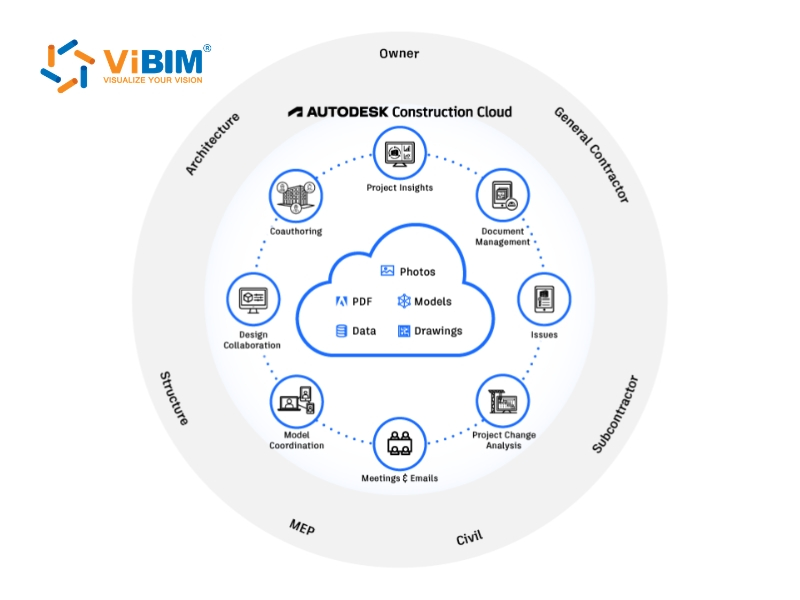
Providers of Revit BIM outsourcing services routinely use CDE platforms like Autodesk Construction Cloud (ACC), BIM 360, and Cintoo Cloud to coordinate with scanning partners across North America, Europe, and Asia-Pacific — keeping point cloud data and BIM models synchronized from first upload to final delivery.
ISO 19650 formalizes this process through 4 information states — Work in Progress, Shared, Published, and Archived — each with specific access rules and gate requirements. The following sections detail each state and the metadata system that keeps every file traceable.
The 4 CDE Workflow States Under ISO 19650
ISO 19650 organizes CDE information through 4 states: Work in Progress (WIP), Shared, Published, and Archived. Each state has a specific purpose, defined access restrictions, and a gate — an approval step — controlling transition to the next state.
Work in Progress (WIP) restricts information to the task team that created it. BIM models, drawings, specifications, and reports develop here — invisible to other disciplines or external stakeholders until the task team manager completes internal review. The status code is S0. No data leaves WIP without that manager’s approval, which acts as the first gate in the CDE sequence.
Shared state opens information to cross-discipline coordination after internal approval. The status code shifts to S1–S4, typically labeled “Suitable for Coordination.” This is where clash detection identifies conflicts — but more importantly, it is the first point where multiple task teams see and respond to each other’s work. The gate to leave Shared requires authorization by the appointing party: the client or the lead appointed party.
Published state holds the official, contractual data that drives construction decisions, procurement, and execution. The status code: A1–An (“Authorized”). Only Published information should inform construction activities — a contractor accessing the CDE should pull from this state exclusively. The gate to leave Published is verification upon supersession, triggered when a newer version replaces the current one.
Archived state stores superseded information as a read-only record. Archived files are not deleted. They remain accessible for dispute resolution, as-built documentation, and regulatory compliance — providing a complete history of how project information evolved from first draft to final deliverable.
Why does the CDE need gates between states instead of open access to all data? Gates prevent unverified, uncoordinated, or unapproved information from reaching construction teams. Without gates, a contractor could build from draft drawings. The result: rework, cost overruns, safety risks. Gates enforce discipline.
Metadata and Naming Conventions in the CDE
ISO 19650 requires every information container in the CDE to carry structured metadata — including a unique identifier, state, status code, revision number, and classification — enabling traceability and fast retrieval across the entire project lifecycle.
Each file in the CDE is tagged with 5 metadata elements: (1) a unique identifier following a standard naming convention, (2) its current state — WIP, Shared, Published, or Archived, (3) a status code indicating its suitability and permitted use, (4) a revision number tracking version history, and (5) a classification code using a recognized system such as Uniclass 2015 or ISO 12006-2.
Following BS EN ISO 19650-2 National Annex, a typical information container ID follows this structure: Project–Originator–Volume/System–Level–Type–Role–Number. A practical example: PROJ-VBM-ZZ-01-M3-A-0001 — where PROJ is the project code, VBM identifies the originator, ZZ indicates all volumes, 01 is the level, M3 means 3D model, A represents Architecture, and 0001 is the sequential number.
Standardized naming eliminates confusion when dozens of disciplines upload hundreds of files across months or years. A team member in any timezone can locate the correct, current file without asking. The metadata tells them the file’s state, purpose, and version immediately. Metadata and naming conventions are defined upfront in the BIM Execution Plan (BEP) before any files enter the CDE.
How Do CDE and BIM Work Together?
Building Information Modeling (BIM) is the process of creating, managing, and coordinating digital building models; a CDE is the governed platform that stores, controls, and distributes those models — along with every associated document and dataset — across the project team. BIM produces the information. The CDE manages its lifecycle.
BIM files are structurally different from standard documents — a federated Revit model with embedded data attributes and live clash reports cannot be managed through a file server or email. It requires a governed platform with model viewing, version control, and gated approvals. ISO 19650 codifies this dependency, making a CDE mandatory for BIM-based information management.
The following sections detail how CDE supports BIM across the 4 lifecycle phases and how CDE functions within Scan to BIM projects — where geographically distributed teams depend on governed point cloud and model exchange.
How CDE Supports the BIM Lifecycle
CDE supports BIM across 4 lifecycle phases — Design, Construction, Handover, and Operations — by maintaining a continuous information model that grows richer at each stage. Without a CDE, BIM data fragments at every phase transition. With one, the model evolves as a living dataset from first sketch to decade-long facility operations.
During the design phase, each discipline develops models in the CDE’s WIP area. Once approved internally, models move to Shared state where the CDE assembles them into a federated view for cross-discipline review. Clash detection and coordination happen against this federated assembly. IFC (Industry Foundation Classes) exports maintain interoperability when teams use different authoring tools. At each gate transition, the model’s version, status code, and access permissions update automatically.
In the construction phase, Published BIM models serve as the reference for field teams. Contractors access current models on tablets through the CDE’s cloud interface, pulling the exact revision authorized for construction. Issue tracking links field observations directly to model elements, keeping execution aligned with design intent.
At handover, the CDE delivers the completed Project Information Model (PIM) to the client. The PIM contains all as-built geometry, equipment specifications, and maintenance data — forming the foundation for a digital twin. This transfer happens within the CDE itself, not through external drives or email attachments.
During operations, facility managers access the Asset Information Model (AIM) through the CDE for maintenance scheduling, space planning, and renovation decisions. PIM captures project data during design and construction. AIM captures asset data during operations. Both reside in the CDE — the PIM feeding directly into the AIM at handover, creating an ideal foundation when leveraging Scan to BIM for FM to maintain updated digital twins of existing structures over time.
The Role of CDE in Scan to BIM Projects
In Scan to BIM projects, the CDE serves as the central platform managing data from initial laser scanning through final BIM model delivery. Point cloud files, registered scans, Revit models, QA/QC markups, and 2D drawing exports all flow through the CDE’s gated workflow.
Scan to BIM converts point cloud data from 3D laser scanners into accurate BIM models in Revit. The CDE workflow for this process follows a specific sequence: the scanning company captures and registers site conditions, then uploads point cloud files (.RCP, .E57) to the CDE. The BIM modeling team accesses these point clouds and builds the Revit model directly from the scan data. The model progresses through WIP, Shared, and Published states — following the same gated approvals as any other information container in the CDE.
CDE is particularly critical for Scan to BIM because these projects routinely span multiple locations. The scanning company operates on-site. The BIM modeling team works remotely — sometimes on a different continent. The end client sits elsewhere. When considering how to manage and transfer massive point cloud datasets securely between these distributed groups, a governed CDE becomes indispensable to prevent version mismatches. Without it, a modeler might work from an outdated scan, or a field team might reference the wrong deliverable.
What Types of Data Does a CDE Store?
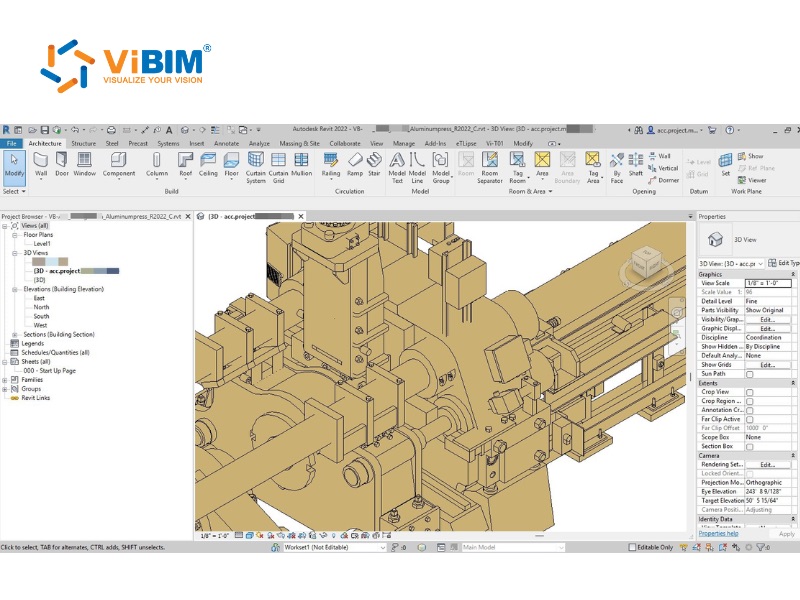
A CDE stores 3 categories of project data — graphical, non-graphical, and multimedia/field-captured — covering everything from 3D BIM models and CAD drawings to contracts, specifications, site photographs, and IoT sensor data. The scope extends beyond BIM: any data generated during the project lifecycle belongs in the CDE.
- Graphical data includes BIM models (.RVT, .IFC), CAD drawings (.DWG), 3D point cloud files (.RCP, .E57, .LAS), clash detection reports, and design renderings. These files carry the geometric and spatial information that drives design coordination and construction execution.
- Non-graphical data covers contracts, specifications, method statements, meeting minutes, RFIs (Requests for Information), submittals, change orders, cost estimates, schedules, and health and safety documentation. On most projects, non-graphical files outnumber graphical files and carry equal contractual weight.
- Multimedia and field data includes site photographs, drone survey imagery, 360° panoramas, progress videos, and IoT sensor data. Within advanced CDE implementations, field-captured data links directly to BIM model elements — creating a visual record tied to specific locations and timeframes.
Key Features of an Effective CDE Platform
An effective CDE platform combines 6 core capabilities: version control, access permissions, audit trail, collaboration tools, data structuring, and cloud-based access. These capabilities work together to ensure the right people access the right information at the right time.
- (1) Version control tracks every revision of every file. When an architect updates a floor plan, the CDE preserves the previous version and surfaces the current one. All stakeholders work from the latest revision — eliminating outdated-document risk.
- (2) Access permissions determine who can view, edit, download, or approve specific files through role-based controls. An MEP subcontractor accesses Published MEP drawings but cannot modify architectural models. Permissions align with contractual obligations.
- (3) Audit trail logs every action — upload, download, edit, approval, share — with user identity, timestamp, and action type. This unalterable record provides accountability, supports dispute resolution, and satisfies regulatory compliance.
- (4) Collaboration tools enable review and coordination directly within the CDE — built-in markup on drawings and models, commenting threads tied to specific elements, and issue-tracking workflows with configurable approval steps.
- (5) Data structuring organizes information through standardized folder hierarchies, naming conventions, and classification systems such as Uniclass 2015. A structural engineer in month 18 can locate a document uploaded by a geotechnical consultant in month 2 — without asking anyone.
- (6) Cloud-based access enables retrieval from any device — desktop, tablet, or mobile — from any location. Field teams access current drawings on-site. Remote BIM modelers pull point cloud data from another continent.
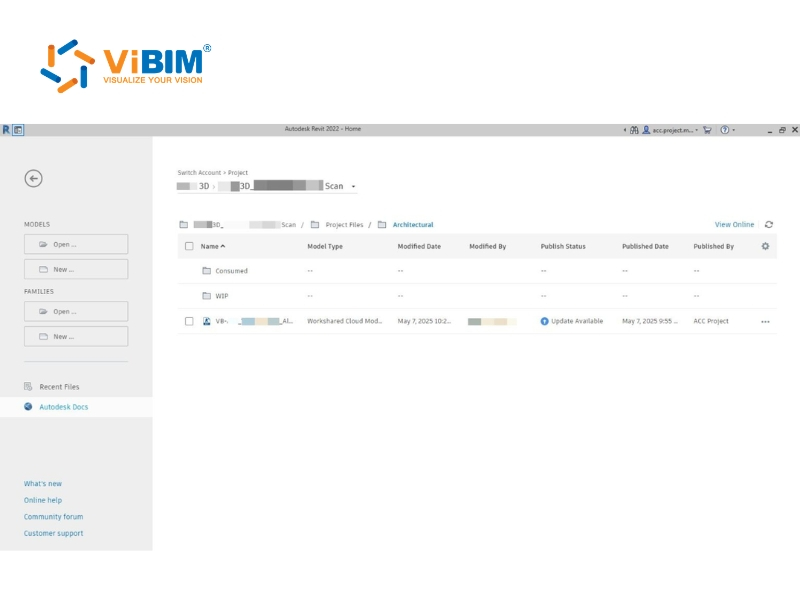
How to Implement a CDE on a Construction Project
Implementing a CDE requires technology selection, process definition, and organizational change management — not just purchasing software. A successful rollout follows 5 steps.
(Step 1) Define information requirements. Establish what information the project needs, in what format, at what level of detail, and at which milestones. For BIM projects, these requirements are captured in the Employer’s Information Requirements (EIR) and BIM Execution Plan (BEP). The EIR defines what the client expects. The BEP defines how the project team will deliver it. Both documents should specify CDE structure, naming conventions, and workflow rules before any platform is configured.
(Step 2) Select a CDE platform. Choose based on project size, BIM authoring tools, team technical maturity, and integration needs. Key evaluation criteria include ISO 19650 compliance, native BIM model support, mobile access for field teams, scalability across project phases, and API connectivity with tools like Revit, Navisworks, and AutoCAD. For Scan to BIM projects, point cloud viewing capability is an additional requirement.
(Step 3) Configure structure. Set up the folder hierarchy following the 4-state CDE workflow — WIP, Shared, Published, and Archived. Define naming conventions per BS EN ISO 19650-2, metadata standards, and role-based permissions for each stakeholder group. Create template projects to maintain consistency across future engagements.
(Step 4) Train and onboard teams. Training should match each user’s role. Field teams need mobile access workflows. BIM teams need model upload and review procedures. Project managers need dashboard and reporting capabilities. An intuitive CDE interface reduces onboarding time — but structured training sessions remain necessary for teams unfamiliar with gated workflows.
(Step 5) Pilot before scaling. Launch the CDE on one project or one discipline first. Collect feedback from users at every level, refine workflows based on actual usage patterns, and document lessons learned. Then scale across the organization with proven configurations.
CDE adoption fails without leadership commitment. Standardization requires organizational support — not just software licenses. The technology works only when the people and processes behind it are aligned.
Even with a solid implementation plan, teams encounter challenges during CDE adoption. Many of the most common mistakes in BIM implementation stem from poor data governance, but understanding these adoption challenges — and their solutions — accelerates the transition.
Common Challenges in CDE Adoption and How to Solve Them
CDE adoption faces 4 primary challenges: technology interoperability, data security management, workflow standardization, and organizational resistance to change. Each has proven solutions.
(a) Technology interoperability. Different disciplines use different software tools — and not all integrate with the chosen CDE platform. The fix: select a CDE that supports open data formats (IFC, BCF, PDF) and offers APIs for third-party tool connectivity. ISO 19650 recommends open formats specifically to prevent vendor lock-in and maintain data portability across the project lifecycle.
(b) Data security and permissions. Managing access across dozens of organizations and hundreds of users introduces complexity. Misconfigured permissions expose sensitive documents or restrict access to information teams need. The fix: align role-based access controls with contractual obligations from day one. Apply folder-level permissions that cascade to subfolders automatically. Require two-factor authentication and SSO for all users.
(c) Workflow standardization. Teams accustomed to their own file management processes resist standardized CDE workflows. The fix: define folder structures, naming conventions, and review workflows before the platform goes live — not after. Document everything in the BIM Execution Plan. Standardization decided after files start flowing creates chaos.
(d) Organizational resistance. People resist new technology, particularly when existing habits feel sufficient. The fix: secure leadership endorsement early. Run pilot projects that demonstrate measurable results — hours saved searching for files, errors prevented through version control, disputes resolved through audit trail. An intuitive CDE interface lowers the adoption barrier, but leadership commitment drives sustained use.
FAQs
These are the most common questions construction professionals ask about CDE implementation and usage.
Is a CDE Required for BIM Projects?
Yes. ISO 19650 mandates a CDE for information management on BIM-based projects. In the UK, CDE was a core component of the BIM Level 2 mandate, now governed by ISO 19650 and the UK BIM Framework. The standard requires the CDE process (gated workflow) and recommends enabling technology (CDE solution). For any project requiring ISO 19650 compliance, a CDE is foundational. For those asking what is bim iso 19650, it is essentially the international standard framework that dictates these very processes for managing information over the whole life cycle of a built asset.
What Is the Difference Between a CDE and a Project Management Tool?
A CDE manages project information — documents, models, and data. A project management tool manages project execution — tasks, schedules, resources, and budgets. They serve different functions and typically operate together. The differentiator: a CDE provides gated information workflow, BIM model management, and ISO 19650 compliance — capabilities PM tools do not offer. Platforms like Autodesk Construction Cloud combine elements of each.
Who Is Responsible for Managing the CDE?
The Information Manager governs the CDE — managing workflow execution, access permissions, and information quality. ISO 19650 and the CIC BIM Protocol define this role. The Information Manager is distinct from the BIM Coordinator: the BIM Coordinator handles design coordination and clash detection, while the Information Manager ensures the CDE process runs correctly and information progresses through gates on schedule. On smaller projects, one person fills both roles.
What Are the Most Common CDE Software Platforms?
The most widely used CDE platforms include Autodesk Construction Cloud (ACC), Oracle Aconex, Trimble Connect, Procore, Catenda Hub, and Bentley ProjectWise. ACC dominates the Autodesk/Revit ecosystem and is the standard for Scan to BIM coordination. Oracle Aconex targets large-scale infrastructure with strong audit capabilities. Trimble Connect integrates with surveying and field technology. Catenda Hub specializes in openBIM and IFC-based workflows. Bentley ProjectWise serves infrastructure and industrial projects. Platform choice depends on project size, BIM authoring tools, and ISO 19650 compliance needs.
A Common Data Environment exists to prevent these outcomes. By centralizing, structuring, and governing project information through a managed workflow, a CDE transforms construction data from a liability into a strategic asset — giving every stakeholder confidence that the information they access is current, authorized, and trustworthy.
Vietnam BIM Consultancy and Technology Application Company Limited (ViBIM)
- Address: 10th floor, CIT Building, No 6, Alley 15, Duy Tan street, Cau Giay ward, Hanoi, Vietnam
- Phone: +84 944 798 298
- Email: info@vibim.com.vn
Sources & Citations
- [1] FMI Corp, “Big Data = Big Questions for the Engineering and Construction Industry” whitepaper. Key findings: 95.5% of all data captured goes unused in the E&C industry; 13% of construction teams’ working hours are spent looking for project data and information. Source: https://www.forconstructionpros.com/business/press-release/21031884/fmi-corp-study-95-of-all-data-captured-goes-unused-in-the-ec-industry
- [2] Autodesk, “7 Steps to Successful Project Closeout” and “Right on Time: How to Unlock the Power of Construction Data”. Key finding: “Studies show up to 30% of initial data created during design and construction phases are lost by project closeout.” Source: https://www.autodesk.com/blogs/construction/construction-project-closeout/
- [3] PlanGrid & FMI Corp, “Construction Disconnected” (2018). Survey of nearly 600 construction leaders. Key findings: time spent on non-optimal activities accounts for $177.5 billion in labor costs per year in the U.S.; construction professionals spend 35% of their time on non-optimal activities (14+ hours per week); miscommunication and poor project data account for 48% of all rework on U.S. construction jobsites, costing $31.3 billion annually. Source: https://www.autodesk.com/blogs/construction/survey-plangrid-fmi/
- [4] ISO 19650-1:2018, “Organization and digitization of information about buildings and civil engineering works, including building information modelling (BIM) — Information management using building information modelling — Part 1: Concepts and principles.” Clause 3.3.15 defines CDE as “agreed source of information for any given project or asset, for collecting, managing and disseminating each information container through a managed process.” Source: https://www.iso.org/standard/68078.html
- [5] Navigant Construction Forum™ & PlanRadar, “Cost of Rework in Construction” (2025). Key finding: rework accounts for approximately 5% of direct project costs, with actual costs estimated closer to 9% when factoring in both direct and indirect expenses. Multiple academic studies from 1991–2024 confirm the 5–10% range. Source: https://www.planradar.com/us/cost-of-rework-construction/