
Point cloud to BIM converts raw 3D laser-scanned data into an intelligent, parametric Building Information Model. The scan on its own is only a point cloud, millions of raw 3D points; converting those point clouds to BIM is what makes the data designable, measurable, and ready for coordination.
What a project manager gets from a structured conversion is a budget that holds after handover, and what an MEP contractor gets is the existing systems handed over as a model of their own. BIM modeling from point cloud data sits between two production gates. ViBIM fixes scope and tolerance before modeling starts, then checks the finished model against the source scan before delivery. The software stack works as a chain of tools around Revit, which is where the model itself is built. Accuracy, LOD, and cost do not move together, so a model can carry high detail and still miss the tolerance, or sit at a low LOD and still match the scan.
The sections below also cover the six jobs the converted BIM model is delivered for, the four data problems that reach the modeler, the file formats the two sides exchange, ViBIM’s outsourced service, and the terms the conversion gets confused with.

What Is Point Cloud to BIM?
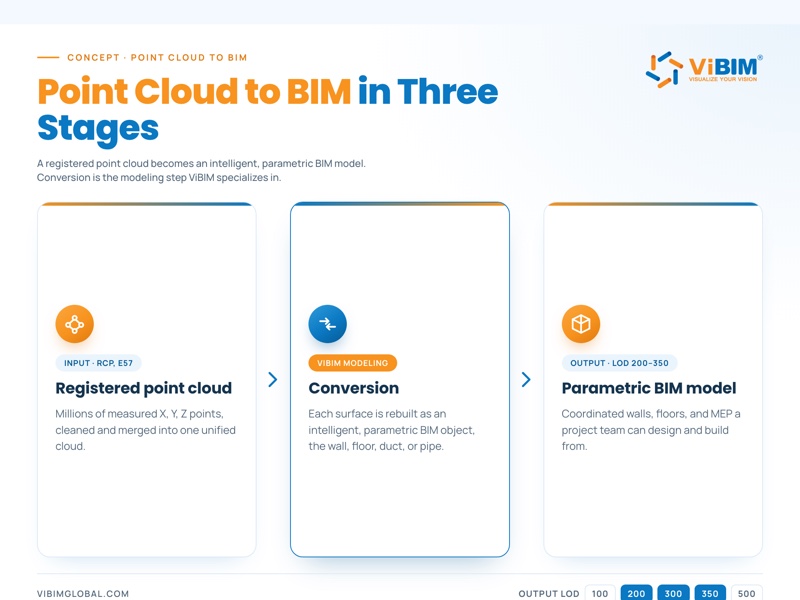
Point cloud to BIM, sometimes called scan to BIM, is the process of converting millions of 3D laser-scanned data points of an existing building or structure into a detailed, intelligent, parametric BIM model.
The point cloud itself is the raw output of a laser scan, a dense field of measured points, each with an X, Y, and Z coordinate and often an RGB color value, saved in formats such as RCP or E57. On its own, that point cloud is measured spatial data rather than a set of semantic BIM objects. You cannot select a wall or schedule a door because the cloud does not identify either as an object, although coordination software can still test model geometry against the point data.
Converting point cloud data to BIM adds the object types and data that a raw cloud lacks. Working in BIM authoring software, a modeler uses the point cloud as a reference and rebuilds it as parametric objects, the walls, floors, ducts, and pipes that carry data such as material, dimensions, and function. The result replaces manual measurement with an accurate as-built model, typically at LOD 200 to 350, that a project team can design, measure, and coordinate from.
How that model differs from a regular BIM model, and what project teams use it for, are explained below.
Point Cloud to BIM Model vs a Regular BIM Model
A point cloud to BIM model differs from a regular BIM model in where its geometry comes from, because it is rebuilt from measured scan data of an existing building, while a regular BIM model is authored from design intent and needs no scan at all.
The two models also differ in the projects they serve, what limits their detail, and how their accuracy is checked.
| Model from a point cloud | Regular BIM model | |
|---|---|---|
| Typical projects | Renovation, retrofit, as-built documentation, and facility management of existing buildings | New construction and design development |
| What limits detail | Scan density and the LOD agreed in the scope | The design stage the model supports |
| How accuracy is checked | Deviation check against the source scan | Design review and model checks against project requirements, with no deviation check because there is no existing building to measure |
A model drawn from design intent or old drawings cannot show how far the existing building has drifted from them, so for renovation work a model checked against measured data confirms the as-built condition.
What Is a Point Cloud to BIM Model Used For?
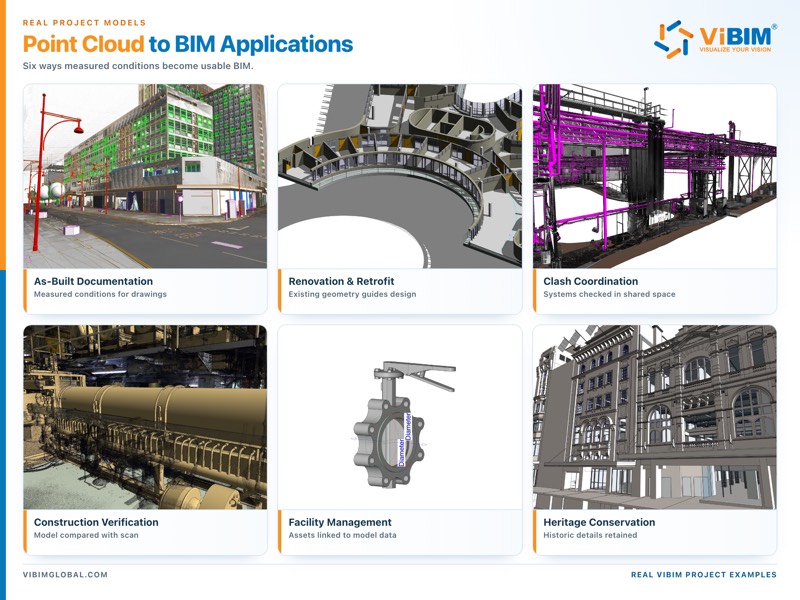
A point cloud to BIM model is used for as-built documentation, renovation and retrofit design, clash coordination, construction verification, facility management, and heritage and conservation. Each use changes what the model has to carry, from the detail held in the geometry to the data attached to it.
The six uses of a converted BIM model are:
- As-built documentation: The model records existing conditions as measured, and is often issued as 2D DWG sheets.
- Renovation and retrofit design: The model carries the real geometry of the structure and services that a new design has to meet.
- Clash coordination: The model holds every system that shares space with another, modeled down to the connections between elements.
- Construction verification: The model shows the built elements, ready to compare against the design.
- Facility management: The model carries asset and equipment data on geometry kept at the lowest useful detail.
- Heritage and conservation: The model includes decorative detail only where conservation decisions depend on it.
ViBIM’s production scope changes with the application. For an as-built marketing package, the output shifts from a general model to 2D plans and room data such as office area, warehouse area, deck height, clear height, ceiling height, sprinkler status, and mechanical area. That package serves commercial real estate and leasing rather than design coordination.
The examples below show how ViBIM models support six different uses, from documenting existing conditions to retaining historic detail.
How that model is produced decides what each AEC role gets from it.
Benefits of a Structured Point Cloud to BIM Process for AEC Teams
The benefits of a structured conversion process for AEC teams are predictable budgets for project managers, early warning on scan gaps for architects, a model set in project coordinates for BIM coordinators, verified geometry for engineers, and a separate model of existing systems for MEP contractors, each tied to a specific check or decision in the conversion.
Keeps Budgets and Scope Predictable for Project Managers
Agreeing scope, LOD, LOI, and tolerance at the start keeps budgets and scope predictable for project managers. Those four settings are among the inputs a conversion quote is priced on, which puts the cost drivers in the quote itself. A scope left open comes back after handover as re-scoped work, priced when the budget is already set.
Warns Architects About Scan Gaps Before Modeling Starts
A QC pass on the point cloud warns architects about scan gaps before modeling starts. Each gap is reported early, so architects know which parts of the building have no measured data before they design against the model. Without that warning, design work can rest on areas the scan never measured.
Gives BIM Coordinators a Model Set in Project Coordinates
Aligning the point cloud to the client’s coordinate system gives BIM coordinators a model set in project coordinates. The coordinate system fixed at alignment becomes the reference every discipline models against. A model left in the scanner’s local position has to be relocated before it can be overlaid with the other disciplines’ files.
On ViBIM projects, each modeler receives a separate Local file from the Revit Central model and works under a separate user account. This keeps permissions clear and prevents worksharing conflicts while the disciplines build against the same coordinated base.
Gives Engineers Verified Geometry to Design Against
Validating the model against the scan before handover gives engineers verified geometry to design against. Structural and MEP engineers can then size and place new work against geometry that has already passed a deviation check. Skipping that check lets any drift between model and scan pass straight into the new design.
Hands MEP Contractors a Separate Model of Existing Systems
Discipline-by-discipline modeling hands MEP contractors a separate model of existing systems. The contractor receives the existing ductwork, piping, and electrical runs on their own, ready to plan new work around. In a combined model, the contractor would first have to filter the existing systems out from the architecture and structure.
Discipline models are also what clash detection runs on, one of the wider benefits of Scan to BIM.
Each of those checks and decisions has a fixed place in the conversion workflow.
How Do You Convert a Point Cloud to BIM?
To convert a point cloud to BIM, define the scope, import and align the registered point cloud to the project coordinate system in a BIM authoring tool such as Revit, model the building elements discipline by discipline, and validate the model against the scan before delivery.
The work starts from a registered point cloud, the cleaned and unified scan that laser scanning and registration produce. We have run this modeling workflow in production since 2014, across more than 1,000 projects, and the stages apply in any authoring tool that can link a point cloud.
The six stages of converting a point cloud into a BIM model are listed below.
- Define scope, LOD, and tolerances.
- Prepare and QC the point cloud.
- Set up the project and align the cloud.
- Model the BIM elements, main runs first.
- Validate against the source scan.
- Deliver and resolve post-handover QC.
1. Define Scope, LOD, and Tolerances
Define the scope, LOD, and tolerances first, because they fix which systems get modeled, how much detail and data each one carries, and the deviation the final model is checked against. Building type shapes these choices, since a heritage façade, a hospital, and an industrial plant each carry different modeling standards.
The common LOD targets and the jobs they map to are listed below.
| LOD | Typical use |
|---|---|
| LOD 200 | Concept and early coordination |
| LOD 300 | Design and documentation |
| LOD 350 | Coordination and clash detection |
2. Prepare and QC the Point Cloud
Prepare and QC the point cloud before any modeling starts, so no hours are wasted building on top of bad data. A quick pass over the cloud catches the issues that would otherwise surface halfway through production.
The intake check covers three issues:
- Duplicate points: Overlapping points inflate the file and blur the geometry a modeler traces.
- Misaligned scan regions: Separate scans fail to line up where they overlap, so one surface appears twice.
- Coverage gaps: Some areas were never captured by the scanner, so those areas cannot be modeled from measured data.
Anything found is reported to the client early, so the scope and schedule can be adjusted.

3. Set Up the Project and Align the Cloud
Set up the project by importing the point cloud into a coordinated base file with the right units, version, and coordinate system, then align the cloud to its real-world position using origin-to-origin or shared coordinates, whichever the client’s project uses.
Getting the alignment right means every element modeled later lands in its correct place, both within the file and against the project’s survey control.
Once the cloud is imported, the team fixes the levels and grids that modeling will reference and cuts a standard set of working views, made up of two elevations, a plan, and a 3D view.
4. Model the BIM Elements, Main Runs First
Model the BIM elements discipline by discipline, main runs first, covering primary routes and dense zones before secondary branches and individual components. Starting with the busy areas, the main MEP risers, plant rooms, ceilings, and corridors, sets the spatial backbone everything else has to fit around.
From there the work moves outward to the secondary branches and the sparser zones, then to individual components built as reusable families. Each family is cleaned up, with its geometry and materials sorted, before it goes into the live model, which keeps the file consistent and quick to coordinate. Across all of it, the model is split by discipline, architecture, structure, and MEP, so each can be checked and delivered on its own.

5. Validate Against the Source Scan
Validate the finished model against the source scan in two independent layers, section checks and a clash and coverage review, confirming it matches reality within the agreed tolerance. Validation runs as its own stage at the end of production, because an unchecked model can drift from the data it was built on.
Validation covers two layers:
- Section checks: Longitudinal and cross sections are cut through the model and compared against the cloud to verify geometry line by line.
- Clash and coverage review: A pass in Navisworks finds missing or extra elements and runs a deviation check against the source cloud.

6. Deliver and Resolve Post-Handover QC
Deliver the validated model through an agreed channel, and resolve any post-handover QC feedback within the original scope before close-out. Delivery runs over a secure route such as FTP, Box, Google Drive, or ACC, in the formats the project calls for, most often RVT for Revit, IFC for open exchange, and DWG for 2D drawings.
In our experience most post-handover feedback is minor geometry tweaks; anything larger is re-scoped clearly, and recurring issues are logged to sharpen the next project.
From cloud QC to the final check against the scan, the work runs in dedicated BIM software.
What Point Cloud to BIM Software Do Teams Use?
The main point cloud to BIM software that teams use is Autodesk Revit, the most widely used BIM authoring tool, with ArchiCAD as an authoring alternative and ReCap Pro and Navisworks covering cloud preparation and model review. No single program does the whole job, so the work runs across a few connected tools, each covering one part of the conversion.
The main tools used to convert a point cloud into a BIM model are:
| Tool | Role |
|---|---|
| ReCap Pro | Point cloud processing, cleaning, and indexing to RCP/RCS |
| Revit | BIM authoring; links point clouds natively (.RCP) |
| ArchiCAD | BIM authoring alternative |
| EdgeWise and scan-to-BIM plugins | Semi-automatic extraction of pipes, conduit, and structural elements |
| Navisworks | Coordination, clash, and deviation review |
In ViBIM production, internally developed tools are used during the final QC pass. The checklist covers Model-in-Place elements; naming for views, families, types, materials, and files; level, workset, warning, and phase checks; purge status; and redundant views or objects.
Revit is the default for most teams, but it is one option among several. Ten more tools, including CloudCompare, Tekla Structures, and Solibri, are compared with these in our roundup of the best scan to BIM software. The scan-to-BIM plugins in that stack already automate parts of the modeling, and that automation is where AI enters the conversion.
Can AI Convert a Point Cloud to BIM Automatically?
No, AI cannot yet convert a point cloud to BIM fully automatically, because scan gaps and unusual geometry still defeat it. Scan-based modeling today is semi-automated, and on repetitive runs such as pipes and structural framing, automation can reduce modeling time.
An element hidden behind a ceiling or furniture leaves the algorithm no points to fit, and one-off shapes such as heritage details fall outside the standard building components AI models are trained on. Scan to BIM automation with the Revit API and Dynamo speeds up repetitive modeling and some checks, but interpreting the cloud, modeling by discipline, and QC still need an experienced modeler.
Software and automation decide how fast the model gets built, not how accurate or detailed it ends up.
What Determines the Accuracy, LOD, and Cost?
The accuracy of a model converted from a point cloud is determined by the scan data and the agreed tolerance, its LOD by the model’s intended use, and its cost by that LOD and LOI, what gets modeled versus carried as reference data, and the size of the building.
A clash coordination model, for example, needs its main MEP runs at LOD 350, while an asset-data model can keep LOD 200 geometry and carry its equipment data as LOI.
The scope decisions behind a converted model’s accuracy, LOD, and cost are explained below.
How LOD and LOI Shape Scope and Effort
LOD and LOI shape scope and effort because the higher they are, the more detail and embedded data each object carries, and the more hours the model takes to build. LOD covers how much geometric detail an element holds, graded on the tiers set out in our explainer on what LOD is.
LOI covers the non-geometric data attached to it, such as manufacturer, material, or maintenance information.
The LOD tiers and the modeling effort each one adds are:
| LOD | What it adds | Modeling effort |
|---|---|---|
| LOD 200 | Generic placeholders | Lowest, since each element is a placeholder sized from the cloud |
| LOD 300 | Accurate, specific geometry | Moderate, since every element is measured and placed to its real geometry |
| LOD 350 | Connections and interfaces | High, since each element also carries its connections to neighboring elements |
| LOD 400 | Fabrication and assembly detail | Highest, since each element is modeled to shop-level detail |
A model built for early coordination rarely needs LOD 400, and paying for it wastes budget.
What to Model vs Carry as Reference Data
What to model versus carry as reference data comes down to whether an element informs design or coordination, since those elements get modeled while complex or low-value geometry stays linked as point cloud reference. This decision moves cost and timeline directly, because modeling time scales with the number and intricacy of the objects built.
The elements to model and the geometry to keep as reference data are listed below.
- Modeled elements: Structure, the main MEP runs, and the building envelope are built as BIM objects.
- Point cloud reference: Ornate moldings and decorative detail stay in the linked cloud, where the design team can still see them without paying to model every curve.
What Drives Accuracy and Tolerance
Model accuracy is driven by scan quality, registration, and the tolerance band the project agrees, all three set upstream of modeling. A model can only ever be as accurate as the data it is built from. No amount of careful modeling recovers detail a sparse or noisy scan never captured.
Three inputs set model accuracy:
- Scan quality: The capture decides how finely and cleanly each surface was recorded.
- Registration: Alignment error left between the scans uses up part of the tolerance before any element is traced.
- Tolerance band: The scope sets the deviation allowed, based on the LOD and the accuracy the project requires.
In ViBIM’s experience, a mobile cloud from a device such as the BLK2GO has lower point density and can limit every element in the model to about LOD 300. Work requiring higher detail or tighter tolerance is therefore scoped around a registered terrestrial scan rather than assuming modeling can recover detail the mobile capture did not record.
A careful provider quotes that tolerance band instead of a fixed accuracy figure, and confirms it with the deviation check at validation.
Scan quality and registration come up again in the data problems a modeler has to handle.
What Are the Common Challenges in Point Cloud to BIM?
The common challenges in point cloud to BIM are noise and unwanted points, large file sizes, occlusion and missing data, and registration errors, all of which come from the scan data before any modeling starts.
Noise and Unwanted Points
Noise and unwanted points distort the surfaces a modeler snaps to, because they sit where no real surface exists. Noise comes from dust, rain, people walking through the scan, and reflective or glass surfaces that scatter the laser. Modeling over a noisy cloud leaves walls, slabs, and pipes with small offsets that later show up as clashes.
Statistical and smoothing filters in tools such as ReCap Pro or CloudCompare remove it, and the right filter for each noise type is explained in 3D point cloud noise filtering.
Large File Sizes
Large file sizes make point cloud data heavy to store and move, since a single building survey can produce hundreds of gigabytes of points. Display lag in Revit tracks the number of points each view renders, so modelers work inside section boxes, lower the displayed density, and split the cloud by floor or zone.
For transfer, ViBIM asks clients to send RCS files of 5 GB or less, or one ZIP per transfer. Teams move data at that scale through cloud platforms, file transfer, local servers, or a hybrid of them, and each option is weighed in managing and transferring massive point cloud datasets.
Occlusion and Missing Data
Occlusion and missing data leave parts of the building with nothing to model against, because a laser only measures the surfaces it can reach directly. Shafts, ceiling plenums, and spaces behind equipment are typical places for these holes. Gaps found at intake go back to the scanning provider, and that area stays unmodeled until the provider confirms it.
Coverage is settled during capture, alongside the scan density and quality that decide how much detail survives.
Registration Errors
Registration errors misplace whole regions of the cloud when neighboring scan positions share too little overlap to align on. Modeling software cannot correct a misaligned region, so it goes back for point cloud registration in ReCap Pro or Leica Cyclone first.
With the cloud clean and registered, the modeling can go to a specialist team.
Point Cloud to BIM Conversion Services from ViBIM
ViBIM converts registered point cloud data into coordinated BIM models for survey and reality-capture firms, with a 99% on-time delivery record and turnaround 30% faster than the market average. ViBIM’s clients are based across the US, UK, Canada, Australia, and the EU.
These outsourced modeling services are conversion work in which the client supplies a registered point cloud and the provider returns a BIM model built to the agreed LOD and checked against the scan.
The credentials behind ViBIM’s conversion services are:
- Track record: ViBIM has completed 250,000 hours of scan to BIM delivery in 11+ years.
- Qualified team: ViBIM’s team of 30+ people is mostly production staff, and every production member holds a degree in Architecture or Civil Engineering.
- Standards-aligned QC: Every model passes two independent QC layers that are compatible with ISO 19650, PAS 1192, and the BIM Forum LOD Specification.
- Industry contribution: Our founder helped build Vietnam’s first national BIM guidelines and has pioneered BIM in the country since 2011.
- Purpose-built tooling: The team develops its own Revit API and Dynamo automation for scan-based modeling.
Those production staff, shown below, work from ViBIM’s office in Hanoi, Vietnam.

If you have a point cloud ready or a project to scope, share it with our point cloud to BIM services team. ViBIM returns a quote with scope, timeline, and pricing within 12 to 24 hours, or you can start with a free trial to check the quality first.
Is Point Cloud to BIM the Same as Scan to BIM?
No, point cloud to BIM is not strictly the same as scan to BIM, because the term covers only the conversion step inside a scan to BIM workflow that starts with on-site laser scanning and registration. The terms are often used interchangeably, but the conversion itself covers only modeling and QC.
Point cloud modeling, point cloud to Revit, and LiDAR get mixed up with the conversion, which also runs on its own file formats.
How Is Point Cloud to BIM Different from Point Cloud Modeling?
Point cloud to BIM differs from point cloud modeling because the broader category covers any 3D model, 2D plan, or BIM deliverable made from a point cloud. 2D floor plans or a visualization mesh made from a scan count as point cloud modeling but not BIM conversion, since neither carries parametric objects.
How Do You Convert a Point Cloud to Revit?
To convert a point cloud to Revit, link the indexed scan file into a Revit project, align it to the project’s coordinates, and model the elements over it. Point cloud to Revit is the BIM conversion carried out in one specific authoring tool.
Revit LT cannot link point clouds, so the modeling needs a full Revit license before any point cloud to Revit conversion can start.
Is LiDAR the Same as a Point Cloud?
No, LiDAR is not the same as a point cloud, because LiDAR measures distance with laser light, while a point cloud is the dataset of measured points, whatever captured it. For BIM work, the capture method matters because it sets the density a modeler receives in a LiDAR point cloud.
What File Formats Are Used for Point Cloud to BIM?
The file formats used for point cloud to BIM are RCP and RCS for the indexed cloud, E57 for exchange between scanners and software, and RVT, IFC, or DWG for the delivered model. A cloud that arrives as E57 is indexed to RCP or RCS in ReCap Pro before Revit can link it.
RCP or RCS is the format to ask for when the scan provider can export it. For IFC, the schema version, IFC2x3 or IFC4, is agreed in the scope, because a model exported to the wrong schema opens incomplete on the client’s side.











