3D point cloud noise filtering is the systematic process of removing measurement errors, artifacts, and unwanted data points from raw laser scan data to enhance geometric precision and data reliability.
Without this critical step, raw scan noise significantly degrades point cloud quality, leading to inflated file sizes and critical errors in surface reconstruction, BIM modeling, and dimensional analysis. Therefore, effective filtering is non-negotiable for ensuring clean, reliable data for downstream applications—ranging from precise Scan to BIM architectural projects to autonomous vehicle mapping and inspection.
To achieve this level of precision, professionals employ various filtering approaches depending on the specific noise type. These range from statistical algorithms (such as SOR and radius outlier removal) to advanced surface smoothing methods like Gaussian, bilateral, and Moving Least Squares (MLS). These techniques are typically implemented using specialized software tools such as CloudCompare, the Leica Cyclone 3DR, and Autodesk ReCap Pro.
This comprehensive guide will walk you through the entire process, explaining what noise is and its sources, why filtering is necessary, and the key algorithms and software tools available. We will also provide a practical step-by-step filtering workflow, highlight common mistakes to avoid, and answer frequently asked questions to help you master point cloud cleaning.

What is “Noise” in a 3D Point Cloud?
In the context of 3D data acquisition, noise refers to unwanted deviations from true surface geometry that occur within point cloud data during the scanning process.
Noise manifests as points that do not represent actual physical surfaces or the intended scanned objects. These erroneous measurements result from equipment limitations, environmental interference, and challenging surface properties. Specifically, noise can appear as random scatter around true surfaces (Gaussian noise), isolated points located far from any real surface (outliers), or systematic patterns caused by scanner calibration issues. Correctly identifying these deviations is the essential first step in effective 3d point cloud noise filtering.
Typical laser scanners produce noise ranging from ±0.5mm to ±5mm depending on the scanning range, surface reflectivity, and specific scanner hardware. For example, at a distance of 10 meters (33 feet), you should expect ±1-3mm of noise for professional terrestrial laser scanners. This uncertainty accumulates during the data lifecycle; unfiltered noise in point clouds propagates directly into BIM models and dimensional measurements, compromising the precision of your digital twin.
The following sections classify noise by its spatial characteristics and identify the common sources encountered in professional laser scanning applications.
Types of Noise in 3D Point Clouds
Noise in point cloud data appears in seven forms, each caused by different scanning conditions or sensor behaviors:
- Gaussian noise: Small random shifts of point positions distort the true surface, usually caused by sensor precision limits or environmental interference during data capture.
- Outliers: Points that appear far from the main structure result from reflection errors, occlusion, or misreading, and they often create unwanted artifacts in the dataset.
- Systematic bias (registration and drift errors): Groups of deviated points form clusters due to surface reflectivity issues, systematic calibration errors during point cloud registration, or unstable scanning setups.
- Spatial jitter: Individual or small sets of points slightly offset from the surface arise from random sensor fluctuations or signal inconsistencies.
- Anisotropic noise: Direction-dependent deviations stretch or compress data along certain axes, often caused by alignment or calibration inaccuracy.
- Discrete perturbations: Regularly spaced or patterned errors appear due to consistent faults in sensor configuration or repetitive scanning interference.
- Surface-related artifacts (reflection noise): Surface distortions or loss of detail occur when resolution is low or reconstruction from depth maps is inaccurate.

Common Noise Sources in Laser Scanning
Noise originates from various technical and environmental factors during the data acquisition process. There are 4 common sources of noise in laser scanning:
- Sensor Limitations: Noise arises from the physical constraints of the hardware, internal electronic interference, or equipment calibration errors.
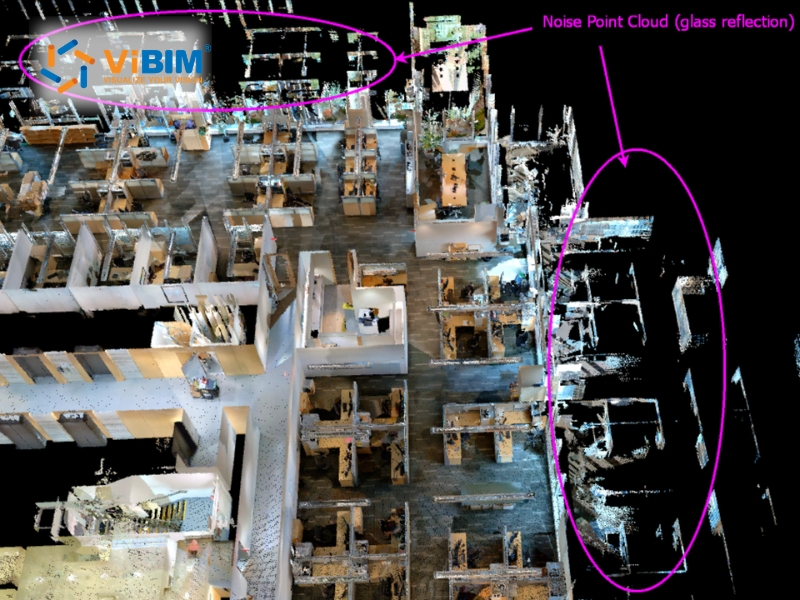
- Environmental Factors: External conditions such as airborne dust, steam, rain, or the presence of moving objects (pedestrians and vehicles) during a scan create “ghost points”—data artifacts that do not belong to any physical surface in the scene.
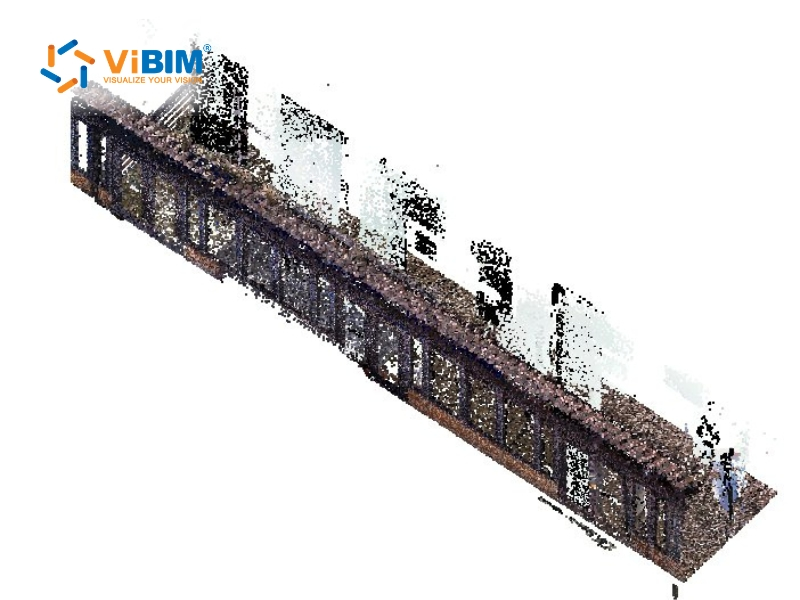
- Surface Characteristics: The physical properties of the target object significantly impact data quality. High-reflectivity surfaces (mirrors, polished stainless steel), transparent materials (glass partitions), or high-absorption surfaces (matte black finishes) cause laser beams to scatter or reflect multi-directionally, leading to severe outliers.
- Acquisition Parameters: Operational settings chosen during the scan can exacerbate noise. This includes scanning at distances exceeding the device’s optimal range, using a high angle of incidence where the laser hits the surface at an acute angle, or selecting resolution settings that are incompatible with the geometric complexity of the target.
Expert Perspective from ViBIM: We have observed a significant increase in noise-related challenges due to the rising popularity of mobile and handheld scanners (SLAM technology). While these devices offer superior speed and accessibility, they frequently introduce higher levels of “drift” and sensor noise compared to traditional stationary scanners.
Why Is Noise Filtering Necessary?
3D point cloud noise filtering is the critical technical process of identifying and removing erroneous data points, outliers, and measurement artifacts from a raw dataset. It serves as a foundational preprocessing step that refines geometric accuracy, acting as a “quality gate” in Scan to BIM quality control to ensure that all subsequent analysis or modeling is based on a high-fidelity representation of the physical site. Without effective filtering, errors from raw data accumulate, leading to significant structural inaccuracies in the later stages of a project.
The implementation of robust noise filtering provides 4 core benefits:
- Data Accuracy: Removing noise ensures that measurements for dimensions, distances, and coordinates achieve the highest possible reliability. This is particularly vital in 3D scanning to BIM projects, where millimeter-level precision is required to avoid costly construction clashes and coordination errors.
- File Size Optimization: Raw point clouds often contain billions of points, a significant portion of which are useless noise. Eliminating these redundant points drastically reduces file sizes, simplifying how to manage and transfer massive point cloud datasets, enabling smoother data storage, faster transfers, and improved software performance during manipulation.
- Downstream Processing: Automated algorithms for tasks such as meshing (surface reconstruction), feature extraction, and object recognition require clean input data to function correctly. Excessive noise can “confuse” these algorithms, resulting in distorted surface meshes or failed automated classifications.
- Visual Clarity: A clean point cloud allows engineers and BIM modelers to visualize the structure clearly without the distraction of “ghost points” or floating artifacts. This visual refinement simplifies manual inspection and reduces the likelihood of human error during the modeling process.
Software to filter point cloud noise
There are six noticeable software tools that offer various methods to clean and filter point cloud noise, enabling users to maintain precision and clarity across diverse project types and data volumes:
- CloudCompare: A free, open-source platform offers several filtering algorithms, including Statistical Outlier Removal and local plane fitting, enabling efficient cleaning of large and dense datasets.
- Leica Cyclone 3DR: A software built for LiDAR and drone data offers strong filtering, point cloud segmentation, and classification tools that support accurate processing in surveying and construction analysis.
- Polyga PointKit: A specialized program offers simplified tools for noise removal and surface correction, helping streamline point cloud post-processing and refinement.
- LP360: A LiDAR data software utilizes statistical filtering techniques to detect and remove noise points, particularly from near-horizontal surfaces captured in aerial scans.
- Zivid SDK: A development toolkit that includes built-in filters, reducing outliers and noise based on signal-to-noise ratios, to help achieve precise point data for high-resolution scans.
- Open3D: An open-source library provides functions for denoising and outlier removal, allowing users to customize filtering approaches for various point cloud processing tasks.
- Autodesk ReCap Pro: A commercial point cloud processing platform that provides scan cleanup, noise reduction, and region-based filtering tools. ReCap Pro serves as the primary preprocessing gateway for Revit and AutoCAD workflows, converting raw scan data (.e57, .rcp) into project-ready point clouds.
Choosing the right filtering tool is just the first step in a successful 3D modeling project. For a broader look at the technology stack required to transform raw data into intelligent models, explore our comprehensive guide on the best Scan to BIM software currently leading the industry.
How to filter 3D point cloud noise?
This guide demonstrates the professional workflow using Leica Cyclone 3DR, a tool preferred for its balance of automated power and manual control. In Cyclone 3DR, this process includes four key steps that gradually refine the dataset, making it cleaner and easier to work with, thereby preparing it for accurate 3D reconstruction and modeling from point cloud data.
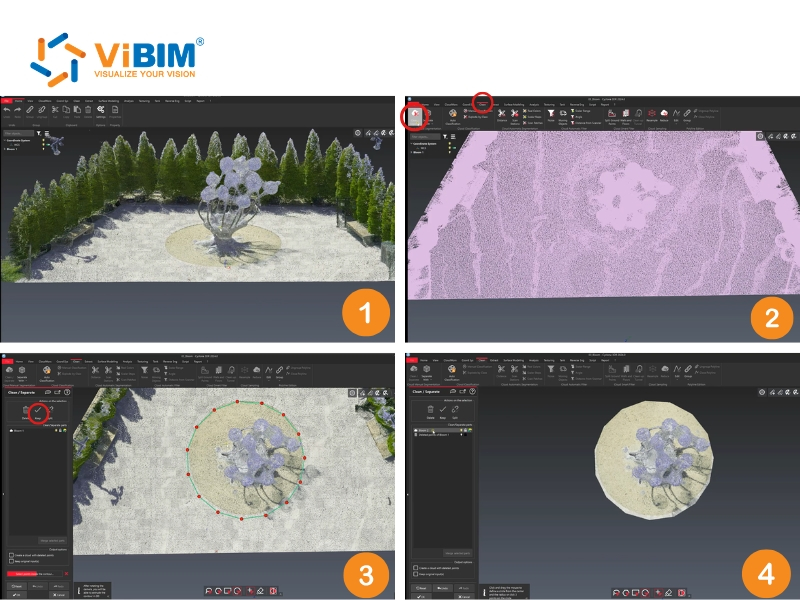
Step 1: Isolate the area you want to clean
Data isolation helps you focus on the object of interest and skip irrelevant surroundings. This step saves time and avoids unnecessary processing, especially when working with detailed scans like sculptures or building facades.
To begin, follow these four steps:
- Select your point cloud in Cyclone 3DR.
- Go to the Clean tab and choose Clean → Separate.
- Use a shape tool (like a circle) to highlight the specific area you want to keep.
- Choose Keep to move all unwanted background data such as trees or nearby structures to the recycle bin.
Step 2: Try the noise cleaning tool
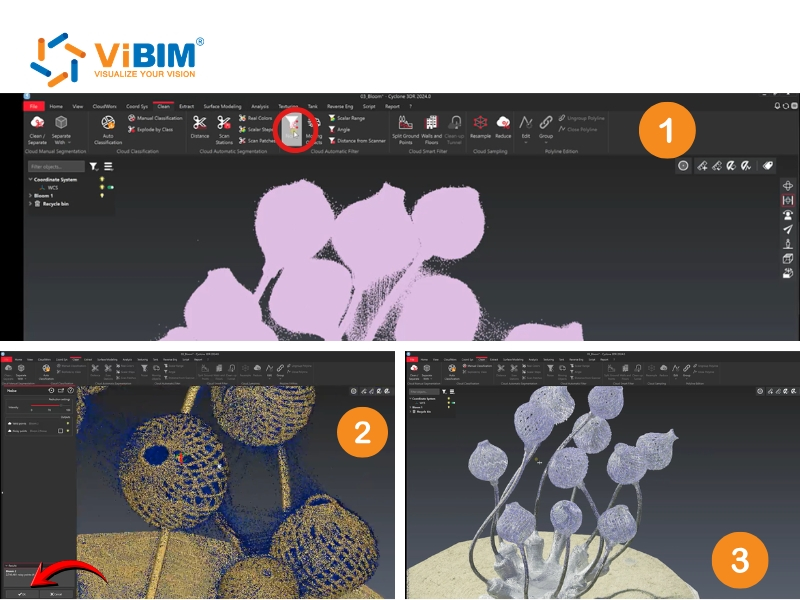
Stray points often appear throughout the scan as a result of sensor overspray or reflection, forming small clusters that do not belong to the actual surface. These floating points are common in complex scans and can interfere with the accuracy of 3D modeling. Cyclone 3DR provides several tools to remove them, and the easiest one to begin with is the Noise Cleaning Tool.
To run the cleaning process:
- Go to Clean → Noise.
- Run the filter to preview the detected noise highlighted in blue.
- Apply the cleaning to remove unwanted points.
Your point cloud will now appear cleaner; however, complex areas may still contain minor errors. When this happens, the Filter by Distance tool offers a more targeted approach to handling remaining noise.
Step 3: Use the filter by distance tool
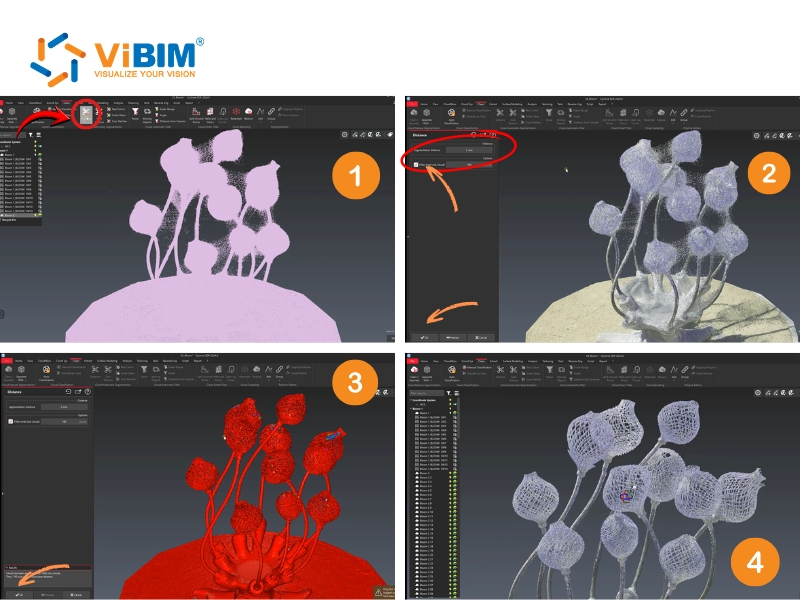
The Filter by Distance tool separates points into groups based on proximity and eliminates clusters that fall outside the defined range. This method provides better control and enables finer adjustments for dense or detailed scans.
To apply the filter, do the following:
- Select your point cloud again.
- Go to Clean → Separate → By Distance.
- Set your Segmentation Distance, for example, 2 mm, to define grouping limits.
- Check Filter Small Sub-Clouds.
- Set a Minimum Point Count, such as 100, to remove groups with fewer points.
- Click “Preview” to view the results before applying.
Cyclone 3DR will process and color-code sub-clouds for easy checking.
Step 4: Review and recombine your cleaned cloud
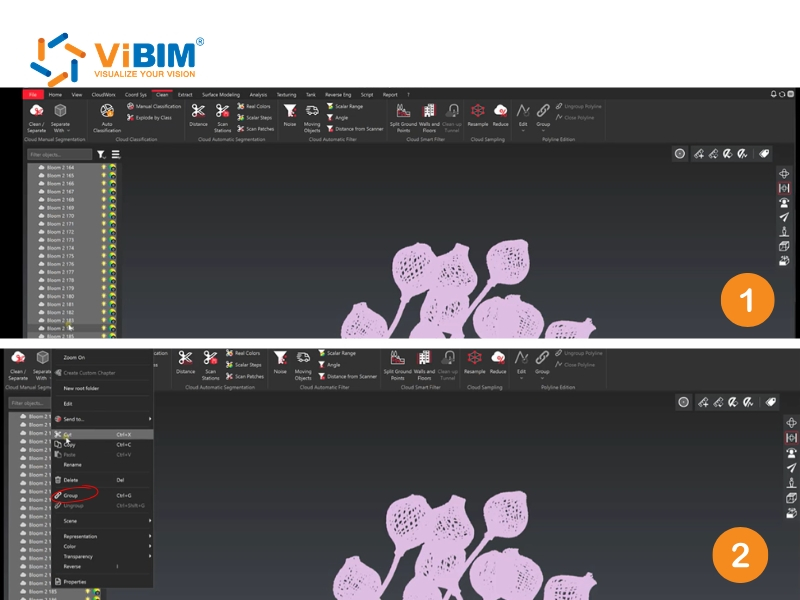
After filtering, Cyclone 3DR divides your dataset into several sub-clouds. Larger clusters usually represent your main object, while smaller ones tend to be leftover noise. Reviewing and merging these helps create a single, well-cleaned point cloud ready for modeling.
To finish the process:
- Select all sub-clouds you want to keep.
- Click ‘Group’ to merge them into a single point cloud.
The result is a precise, consistent dataset that can be used confidently for modeling or measurement tasks.
The Filter by Distance method is most effective when scans have good coverage. If your data contains missing parts or shaded zones, adjust the segmentation distance or the minimum point count to prevent losing valid points. Use Noise Cleaning for fast results and Filter by Distance for detailed refinements.
To clearly understand this process, watch the reference video:
Common mistakes in point cloud noise filtering
Mistakes in point cloud noise filtering often occur when users rush the cleaning process or rely too heavily on automation without verifying the details. The following six points highlight the most common errors and explain how they impact the quality of the final result.
- Over-smoothing: Excessive smoothing preserves surface geometry but removes delicate textures, which makes the final mesh lose definition and appear less realistic.
- Incorrect filtering parameters: Misjudged thresholds in outlier removal filters either delete useful points or leave unwanted noise behind, reducing the accuracy of both measurements and visual quality.
- Not addressing all noise sources: Single-method filtering targets only one type of disturbance while ignoring others, resulting in persistent artifacts caused by sensor errors, wind, or water reflections.
- Incomplete manual cleanup: Exclusive use of automatic filters often leaves unwanted residues, while manual correction becomes difficult for large datasets lacking efficient selection tools.
- Ignoring the data acquisition process: Poor scanning practices, such as unstable sensors or rapid drone movement, produce low-quality point clouds that no subsequent filter can fully correct.
- Not using backups: Directly editing the original file without saving a copy increases the risk of permanent data loss if the cleaning process inadvertently removes valid information.
FAQs
What is the difference between noise filtering and downsampling?
Noise filtering removes erroneous data points, whereas downsampling reduces the total number of points across the entire cloud to improve performance. While noise filtering targets quality, downsampling (such as Voxel Grid filtering) targets file size and density uniformity.
Can noise filtering algorithms recover missing data?
No, noise filtering algorithms cannot recover missing data; they only remove or reposition existing points. To address missing data (occlusions), you must generate new point sets using reconstruction-based denoising methods or perform additional scans of the area.
Which filtering method works best for architectural scans?
A combination of Statistical Outlier Removal (SOR) for cleaning and Bilateral filtering for smoothing works best for architectural scans. This pairing allows you to remove large floaters while preserving the sharp edges and corners typical of man-made structures.
How does filtering accuracy affect BIM model precision?
High filtering accuracy directly improves BIM model precision by providing a clearer “snap” point for modeling walls, slabs, and MEP components during point cloud to BIM conversion. If your point cloud is noisy, you risk modeling elements with significant offsets, which can lead to coordination issues and clashes during construction. Ensuring a clean and precise dataset is a critical prerequisite before you convert point cloud to 3D model Revit, as it directly determines the reliability and geometric integrity of the final digital twin.
Noise filtering in point clouds plays a key role in improving the accuracy and quality of scanned data. This article explains how 3D point cloud noise filtering works, from isolating areas and removing loose points to refining distances and combining the final cloud. Each step helps users create clean, detailed datasets that are ready for BIM or 3D modeling.
ViBIM specializes in turning point cloud data into precise BIM models using Revit and the Autodesk ecosystem. The company delivers reliable Scan to BIM services for building survey, existing and as-built documentation, as well as design and engineering phases. Contact ViBIM today to discuss your requirements and receive a complimentary quote.
ViBIM – Revit Modeling outsourcing services
- Address: 10th floor, CIT Building, No 6, Alley 15, Duy Tan street, Cau Giay ward, Hanoi, Vietnam
- Phone: +84 944 798 298
- Email: info@vibim.com.vn