
BIM for Facility Management is the application of Building Information Modeling to manage, operate, and maintain built assets during the post-construction phase. Unlike traditional approaches that rely on fragmented documents and outdated 2D drawings, BIM provides facility managers with a centralized, data-rich model serving as the single source of truth for equipment specifications, maintenance schedules, and spatial information.
Seven key benefits of BIM for FM include centralized data access, enhanced asset tracking, predictive maintenance capabilities, improved space utilization, energy efficiency, streamlined renovations, and better stakeholder collaboration. The implementation process follows five steps—from receiving the as-built model through ongoing updates—while integrating with existing CAFM, CMMS, and IWMS systems.
This guide explains what BIM for facility management is, details how it improves FM operations, outlines the implementation process, addresses common challenges, and identifies key industry standards for successful adoption.
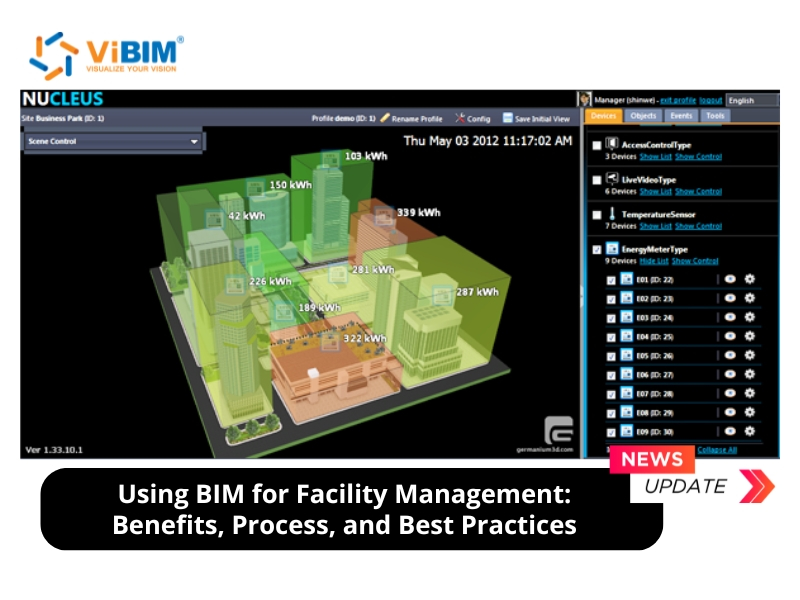
What Is BIM for Facility Management?
BIM for Facility Management (FM) is the application of Building Information Modeling to manage, operate, and maintain built assets during the post-construction phase. It provides facility managers with a data-rich digital representation that consolidates building geometry, equipment specifications, maintenance schedules, and warranty information into a single authoritative source.
BIM extends its value beyond design and construction by enabling owners to receive an as-built model that reflects actual field conditions. Facility managers integrate this model with real-time monitoring systems—often called a digital twin—to track asset performance, schedule preventive maintenance, and make data-driven operational decisions.
To understand when a static BIM model suffices versus when real-time monitoring justifies the investment, see our comparison of Digital Twin vs BIM.
How Does BIM Help in Facility Management?
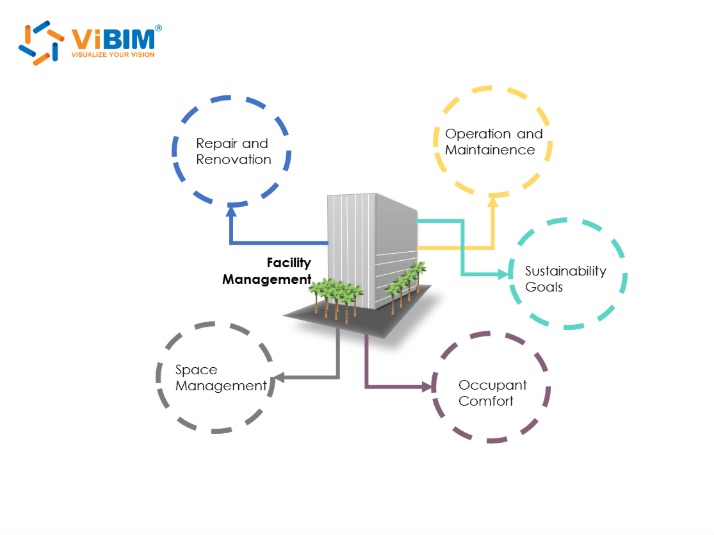
BIM helps facility management by providing a centralized, data-rich model that serves as a single source of truth for all building information. This enables facility managers to access accurate asset data instantly, implement predictive maintenance strategies, optimize space utilization, and make informed decisions that reduce operational costs throughout the building lifecycle.
The core mechanism works through data integration: BIM consolidates geometric information, equipment specifications, maintenance histories, and performance metrics into one intelligent model. Facility managers connect this model to Computerized Maintenance Management Systems (CMMS), Building Automation Systems (BAS), and IoT sensors to create a real-time operational view. This integration eliminates data silos, reduces manual data entry errors, and enables proactive rather than reactive facility management.
There are 7 key areas where BIM transforms facility management operations:
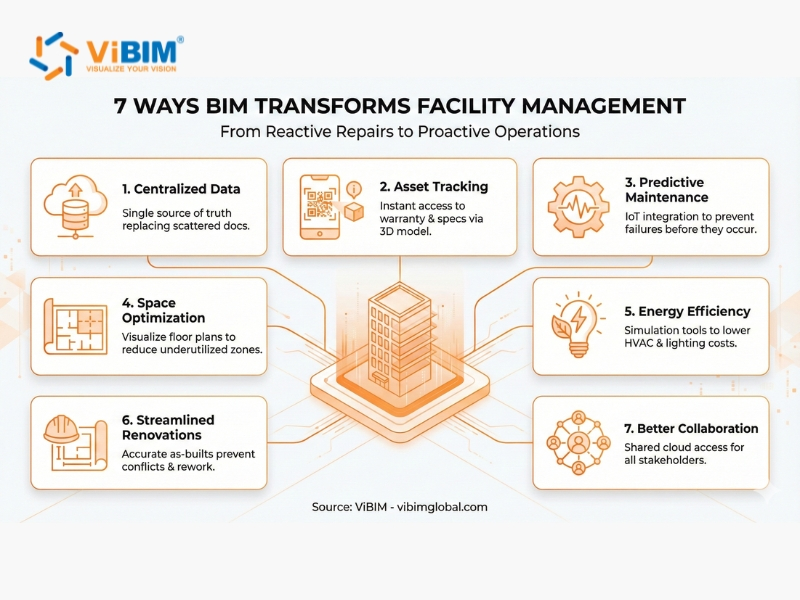
1. Centralized Data Access and Digital Twin Integration
BIM for facility management centralizes all building data—architectural drawings, MEP systems, equipment specifications, and maintenance records—into a single accessible model. Facility managers retrieve information instantly without searching through scattered paper documents, outdated CAD files, or multiple disconnected databases.
Digital twin integration extends this capability by connecting the BIM model to real-time sensor data. The digital twin mirrors the physical building’s current state, displaying live performance metrics such as temperature, humidity, energy consumption, and equipment status. This real-time visibility enables facility managers to identify anomalies immediately and respond before minor issues become major failures.
2. Enhance Asset Tracking and Management Accuracy
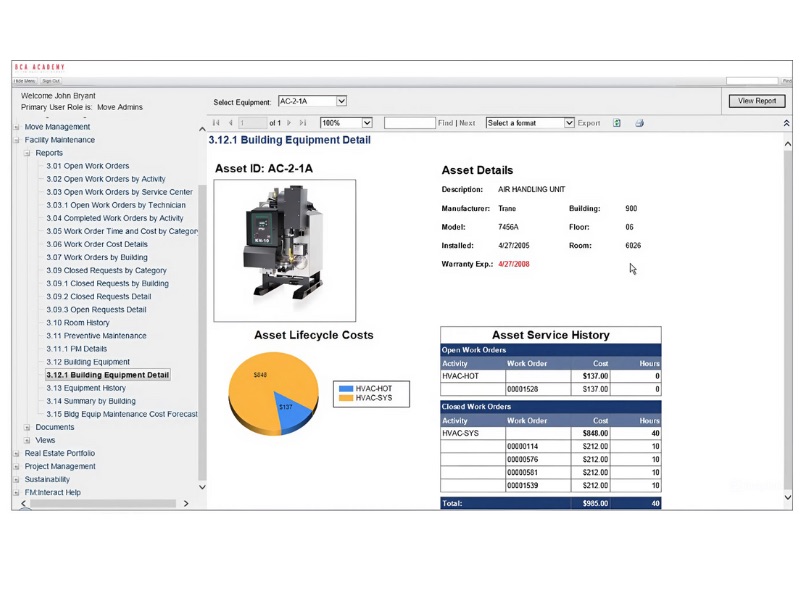
BIM enhances asset tracking by embedding detailed equipment data directly into the 3D model. Each asset contains linked information including manufacturer details, model numbers, serial numbers, installation dates, warranty periods, and replacement specifications. Facility managers click on any equipment in the model to access its complete history and documentation.
This visual asset management eliminates manual inventory processes and reduces errors from outdated spreadsheets. When equipment requires service or replacement, facility teams locate the exact asset, review its specifications, and order correct parts without site visits for verification. Large facilities with thousands of assets—hospitals, universities, and corporate campuses—benefit most from this visual asset management approach.

3. Enable Predictive and Proactive Maintenance Strategies
BIM enables predictive maintenance by integrating with IoT sensors and Computerized Maintenance Management Systems (CMMS). Sensors monitor real-time performance indicators—vibration levels, operating temperatures, pressure readings, and energy consumption patterns—while the BIM model visualizes which specific equipment generates these alerts.
This integration shifts maintenance from reactive to proactive. Instead of waiting for equipment failure, facility managers identify degradation patterns early and schedule repairs during planned downtime. Predictive maintenance reduces unplanned downtime by 35-50% and lowers overall maintenance costs by 18-25%, according to McKinsey & Company research. The BIM model stores maintenance histories, enabling teams to track recurring issues and optimize replacement schedules based on actual performance data rather than generic manufacturer guidelines.
4. Optimize Space Utilization through 3D Visualization
BIM improves space utilization by providing accurate 3D visualization of all building areas with precise measurements and occupancy data. Facility managers analyze floor plans, identify underutilized zones, and simulate reconfigurations before making physical changes.
Commercial office space underutilization reaches 42% globally, according to JLL research. BIM’s spatial analysis capabilities address this by providing accurate 3D visualization with precise measurements and occupancy data. Three building types benefit most from BIM spatial analysis: hospitals optimize patient flow between departments, corporate offices balance collaboration spaces with private meeting rooms, and universities schedule classrooms based on actual capacity and usage patterns. BIM links space data with occupancy sensors and booking systems to reveal which areas remain empty during peak hours, enabling data-driven decisions about consolidation, subleasing, or repurposing.
5. Reduce Energy Consumption and Operational Costs
BIM reduces energy costs by integrating energy analysis tools that simulate building performance under various conditions. Facility managers identify energy-intensive equipment, detect inefficient HVAC zones, and evaluate retrofit options before committing capital—all within the digital model.
Digitizing the building sector through BIM-based energy analysis can reduce energy costs by up to 20%, according to The Boston Consulting Group. The energy modeling capabilities support sustainability goals and regulatory compliance. BIM calculates daylighting potential, thermal performance, and HVAC system efficiency to pinpoint optimization opportunities. Facilities pursuing LEED certification or net-zero targets use BIM to document baseline consumption, model improvement scenarios, and verify actual savings post-implementation.
6. Streamline Renovations with Accurate As-Built Models
BIM streamlines renovations by providing accurate as-built documentation that eliminates guesswork during project planning. Architects and contractors access exact wall locations, structural elements, MEP routing, and clearance dimensions directly from the model instead of conducting extensive site surveys or discovering conflicts during construction.
This accuracy reduces change orders, rework, and project delays. When planning retrofits, facility managers use the BIM model to evaluate different design options, identify potential clashes with existing systems, and integrate cost estimating (5D) to predict expenses with greater precision. Buildings with up-to-date BIM models—whether maintained since construction or created through Scan to BIM capture—complete renovation projects more efficiently than those relying on outdated 2D drawings or incomplete records.
7. Facilitate Stakeholder Collaboration via Common Data Environments
BIM improves stakeholder collaboration by providing a shared visual platform that all parties—facility managers, maintenance teams, contractors, and building owners—can access and understand. The 3D model communicates spatial relationships and system interactions more effectively than 2D drawings or written reports.
A Common Data Environment (CDE) extends this collaboration by establishing version control, access permissions, and audit trails for all building information. Maintenance contractors view relevant equipment data without accessing sensitive financial information. External consultants review specific systems without downloading entire models. This structured approach ensures all stakeholders work from current, accurate information while maintaining appropriate data security. Cloud-based BIM platforms enable real-time collaboration regardless of team location. This capability proves essential for organizations managing distributed facility portfolios.
These facility management advantages represent just one phase of BIM’s value—to understand how the same technology reduces construction costs, minimizes rework, and improves project outcomes from design through handover, explore the complete benefits of Building Information Modeling.
How Does the Facility Management Process Work Using BIM?
The facility management process using BIM begins with receiving an accurate as-built model at project handover and continues through ongoing model maintenance throughout the building’s operational life. This workflow transforms static construction data into a dynamic operational tool that facility managers use for maintenance planning, space management, and capital decisions.
The facility management process using BIM follows five sequential steps:
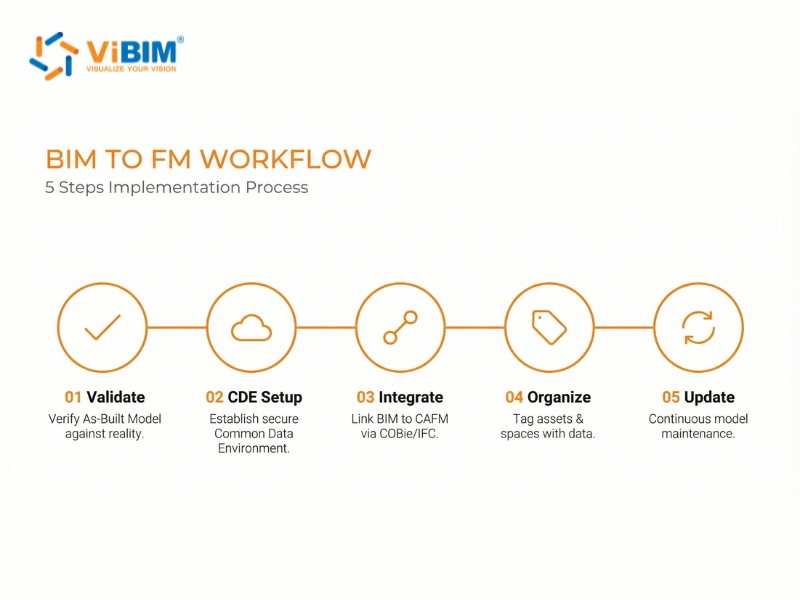
Step 1: Receiving and Validating the As-Built Model
Receive the as-built BIM model at project handover and validate it against physical conditions. This model reflects actual field conditions—all change orders, substitutions, and modifications made during construction.
Validation checks that the model contains required FM data: equipment specifications, room identifiers, system boundaries, and maintenance attributes. For existing buildings without BIM documentation, Scan to BIM services serve as the critical bridge to create accurate as-built models from 3D laser scan data (Point Cloud). This ensures the digital representation matches the physical reality with millimeter-level precision before FM integration. The validated model becomes the foundation for all FM operations.
Step 2: Setting Up the Common Data Environment
Establish a Common Data Environment (CDE) as the single source of truth for building information. The CDE manages BIM data through structured processes with defined access permissions, version control, and audit trails.
CDE setup involves selecting a cloud-based platform (such as Autodesk Construction Cloud), defining folder structures that mirror building organization, and establishing naming conventions. Access configuration determines who can view, edit, or approve changes—facility managers typically have broader permissions than external contractors.
Step 3: Integrating BIM with FM Systems
Integrate the BIM model with dedicated facility management systems that handle daily operations. BIM serves as the authoritative source for physical attributes; FM software manages workflows and schedules
Three primary system types integrate with BIM for facility management:
- CAFM (Computer-Aided Facility Management): Tracks space allocation, move management, and occupancy data by linking room information from the BIM model to organizational databases.
- CMMS (Computerized Maintenance Management System): Manages work orders, preventive maintenance schedules, and equipment histories by connecting asset data embedded in BIM to maintenance workflows.
- IWMS (Integrated Workplace Management System): Provides enterprise-level portfolio management by aggregating BIM data across multiple buildings for strategic planning and real estate decisions.
Integration typically uses COBie (Construction Operations Building information exchange) or IFC (Industry Foundation Classes) standards to transfer data between systems.
Step 4: Organizing Spaces and Assets
Organize building data around two foundational elements: spaces (rooms) and assets (equipment). This structure enables quick location of any component with its associated operational data.
Organizing Spaces: Establish a consistent room numbering system that matches physical building signage and uses unique identifiers. Each space in the BIM model links to attributes including area calculations (following standards such as BOMA for commercial buildings), department assignments, and occupancy limits. This spatial organization supports functions like lease management, move planning, and emergency response.
Organizing Assets: Classify equipment logically based on maintenance requirements and system relationships. Each asset in the BIM model contains type properties (data true for all instances, such as manufacturer and model number) and instance properties (data unique to each item, such as serial number, installation date, and service zone). Facility managers populate asset data from equipment nameplates, contractor submittals, and operations manuals to create a complete equipment registry within the model.
Step 5: Ongoing Model Updates
The BIM model requires updates whenever physical changes occur—renovations, equipment replacements, space reconfigurations, or system modifications. Without regular updates, the model loses reliability as an information source and fails to support informed facility management decisions.
Facility managers establish update protocols that define who can modify the model, what changes require documentation, and how updates are validated before publication. Minor changes (equipment replacements, furniture moves) may be handled internally, while major renovations typically require professional modeling services to maintain accuracy standards. Regular audits compare the digital model against physical conditions to identify discrepancies. This continuous maintenance transforms the BIM model from a static handover document into a living record that supports facility management decisions throughout the building lifecycle.
Now that we’ve covered how BIM transforms facility management through centralized data, predictive maintenance, and streamlined collaboration, let’s address the practical realities. The following sections examine implementation challenges and the industry standards that guide successful BIM for FM adoption.
What Challenges Should You Expect When Implementing BIM for FM?
Implementing BIM for facility management presents challenges in three areas: data management,organizational change, and technical integration. Construction teams often deliver incomplete as-built models requiring validation. Staff accustomed to traditional workflows may resist new processes. Connecting BIM with existing FM systems demands compatible data formats. Understanding these obstacles helps facility managers plan mitigation strategies before adoption.
Common challenges include:
- Data accuracy at handover: Incomplete or inconsistent as-built models require validation before operational use.
- Appropriate Level of Detail: Too much detail slows model performance; too little limits FM usefulness.
- Ongoing model maintenance: Keeping the model current after renovations or equipment changes demands dedicated resources.
- Resistance to change: Staff may resist adopting new BIM-based processes over familiar workflows.
- Skills gap: Few professionals possess expertise in both BIM technology and facility management practices.
- Unclear ownership: Organizations must define who maintains the model and ensures data quality.
- System integration: Connecting BIM with CAFM, CMMS, or IWMS platforms may require custom development.
- Software costs: Licensing fees across multiple users can strain budgets for large portfolios.
- File performance: Large BIM models may run slowly, requiring optimization for daily use.
- Cybersecurity: Integrating building systems data creates potential security vulnerabilities.
What Are the Key Standards for BIM in Facility Management?
Four key standards enable effective BIM implementation for facility management: IFC for
interoperability, COBie for data handover, OmniClass for classification, and ISO 19650
for information management processes.
- IFC (Industry Foundation Classes): A vendor-neutral, international standard (ISO 16739) that allows different BIM software to exchange data seamlessly. IFC ensures facility managers
can access building information regardless of which software created the original model. - COBie (Construction Operations Building information exchange): A spreadsheet-based data format specifically designed for transferring asset information from construction to operations. COBie extracts equipment data, space information, and maintenance requirements from the BIM model into a format compatible with most FM systems.
- OmniClass: A classification system that organizes building elements and products consistently. Using OmniClass tables ensures all project stakeholders categorize components the same way, which simplifies data management and system integration.
- ISO 19650: The international standard for managing information over the whole lifecycle
of a built asset using BIM. It defines processes for information delivery, collaborative
working, and security management.
Cloud-based BIM platforms increasingly support these standards while providing distributed
access, version control, and reduced IT infrastructure costs for facility management teams.
Integrating BIM data via standards like COBie and IFC ensures seamless information exchange between construction and operation phases.
How Can ViBIM Support Your BIM for FM Needs?
ViBIM provides Scan to BIM services that create accurate as-built models for facility management. For existing buildings without BIM documentation, our team converts point cloud data into
detailed Revit models containing the spatial and asset information facility managers need.
Our Scan to BIM for FM include:
- As-Built BIM Modeling: Architectural, structural, and MEP models at appropriate Level of Detail (LOD) for facility management operations.
- FM Data Integration: Models structured with room identifiers, equipment specifications, and attributes compatible with CAFM, CMMS, and IWMS platforms.
- COBie Deliverables: Asset data exported in COBie format for direct import into FM systems.
- Ongoing Model Updates: Support for maintaining model accuracy after renovations or equipment changes.
ViBIM delivers 99% of projects on time with turnaround up to 30% faster than industry average. Our team responds to inquiries within one hour during business hours.
Contact ViBIM to discuss your facility management BIM requirements or request a free trial project.

ViBIM – Revit Modeling Services
- Address: 10th floor, CIT Building, No 6, Alley 15, Duy Tan street, Cau Giay ward, Hanoi, Vietnam
- Phone: +84 944 798 298
- Email: info@vibim.com.vn











