
Building Information Modeling (BIM) acts as a powerful data repository for building projects, but this wealth of information presents a significant challenge for owners and facility management (FM) teams. Extracting structured, usable data for operations and maintenance directly from a native BIM model is often complex and inefficient, as critical information is typically buried within the model or scattered across various documents, leading to data loss and costly rework during project handover.
This is why the Construction Operations Building Information Exchange (COBie) emerges as a critical, standardized solution. COBie is a standard that focuses on the handover of asset information from the construction phase to the operations phase. The key purpose is to provide facility managers with a detailed and organized set of information about the building. It helps ensure that after a building is completed, facility managers and operators have all the necessary data to maintain and manage the building effectively.
This article will explain what COBie is, explore its powerful relationship with BIM, detail its benefits and core components, and clarify why it has become an indispensable standard for modern, data-driven construction and facility management.

What is COBie?
COBie, which stands for Construction Operations Building Information Exchange, is a non-proprietary data format for publishing and exchanging a subset of building information focused on assets rather than geometry. Its core purpose is to standardize and streamline the handover of crucial operational data from the construction team to the building owner and facility management (FM) team.
The key distinction of COBie is its focus on delivering a manageable subset of BIM data that is specifically relevant to asset management. While a full BIM model contains exhaustive geometric and engineering data, COBie extracts only the information required for the building’s operational lifecycle. This includes details about the building’s spaces, the equipment and components within those spaces, and all associated information such as product data sheets, warranties, spare parts lists, and preventive maintenance schedules.
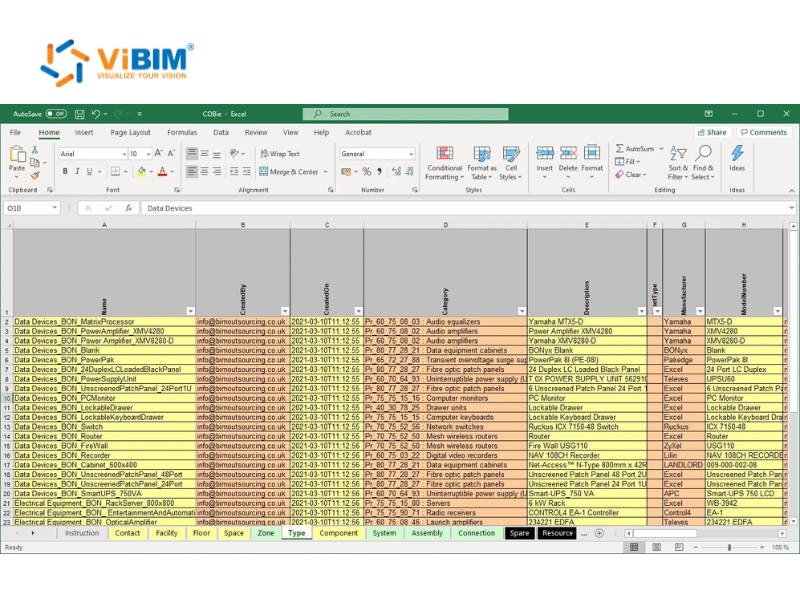
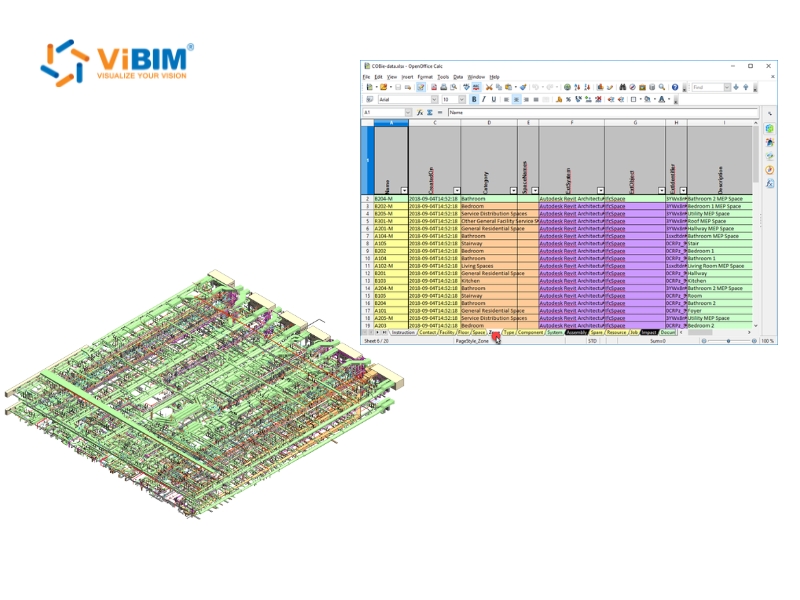
Typically, COBie data is delivered in a simple spreadsheet format (.xlsx). This makes it universally accessible, as it doesn’t require specialized or expensive software to open and view the information. Each tab within the spreadsheet corresponds to a different category of asset data (e.g., Floors, Spaces, Components, Systems), creating a clear, organized, and relational database that can be easily imported into Computerized Maintenance Management Systems (CMMS) and other facility management software.
History of COBie
The development of COBie was driven by the need to solve the long-standing problem of inefficient and data-poor project handovers. Its history can be traced back to the early 2000s in the United States, with key milestones including:
- Origins in the US Army (2007): COBie was initiated by the U.S. Army Corps of Engineers (USACE) to improve the lifecycle management of their extensive portfolio of facilities. The first version was developed and published in 2007 with support from the National Aeronautics and Space Administration (NASA) and the White House Office of Science and Technology Policy.
- Formal Standardization in the US (2011): The National Institute of Building Sciences (NIBS) officially adopted COBie as a key part of the National BIM Standard-United States® (NBIMS-US™) with the release of NBIMS-US™ Version 2 in 2011. This was a critical step that formalized COBie as a national standard, promoting its adoption across both public and private sectors in the United States.
- International Adoption (UK Mandate) (2016): The UK Government, in its Government Construction Strategy published in 2011, announced its intention to require collaborative 3D BIM on its projects. This led to the landmark BIM Level 2 mandate, which came into full effect in April 2016. A core requirement of this mandate was the delivery of COBie data for all centrally procured public sector projects. This pivotal move by the UK significantly accelerated COBie’s international adoption and cemented its status as an essential standard of BIM for information management in the global construction industry.
COBie and BIM: A Powerful Partnership
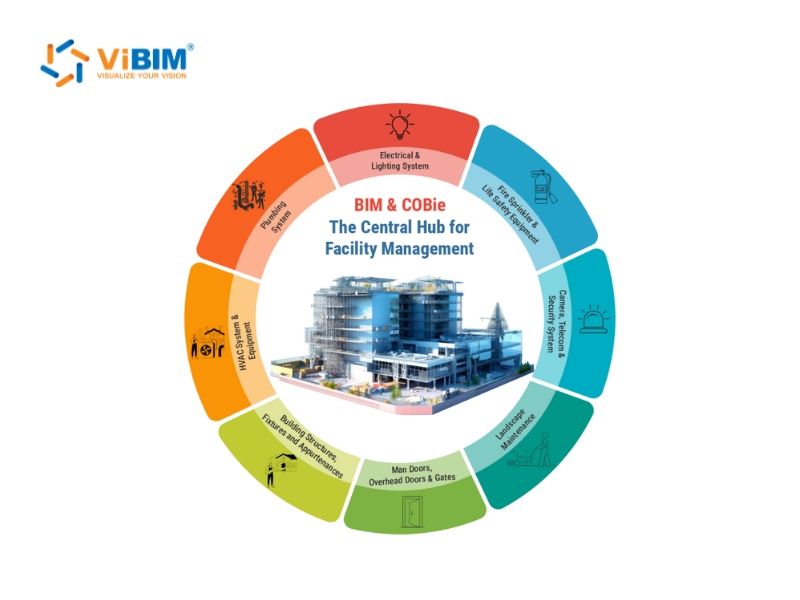
COBie and BIM are not competing standards; they are complementary technologies that form a powerful partnership to bridge the critical gap between construction and operations. A Revit BIM modeling service provider structures the rich, object-oriented 3D model—the source of the data—while COBie provides the standardized format for extracting, organizing, and delivering its essential operational information.
This relationship can be understood as follows:
- COBie as a Data Subset of BIM: A BIM model is a vast database containing everything from detailed geometric representations to complex engineering analysis data. COBie acts as a filter, specifying which data points are required for facility management and providing a structured schema for their delivery. It doesn’t replace the BIM model; it makes the data within it accessible and usable for the owner.
- A Framework for Information Exchange: COBie defines the “what” and “how” for data delivery. It establishes clear requirements for the information that needs to be captured at each stage of the project lifecycle from design and construction to commissioning and handover. This ensures that the right data is collected by the right people at the right time.
- Creating a Common Data Environment (CDE): The integration of BIM and COBie is a cornerstone of a functional Common Data Environment. It ensures that data flows seamlessly from designers to contractors and finally to the owner in a consistent, open, and non-proprietary format. This breaks down data silos and prevents the loss of valuable information between project phases. By embedding COBie requirements into the BIM execution plan, project teams can work collaboratively toward a common data deliverable, ensuring the final as-built model contains not just geometry, but a rich and structured operational database ready for immediate use.
Basic Principles of COBie
COBie principles revolve around three key areas: a classification system, a data model, and a delivery format. These principles ensure efficient data exchange for facility management throughout the building lifecycle, especially during handover. The core principles include:
- Classification System: COBie data is organized according to a pre-defined classification system (such as OmniClass™, UniFormat™, or MasterFormat™). This provides a consistent structure for naming and categorizing assets, making the information easy to navigate, search, and understand across different projects and systems.
- Data Model: COBie uses a clear, relational data model that is aligned with the buildingSMART Data Model (IFC). This structure defines the relationships between different data elements (e.g., a specific pump is located in a specific room, which is on a specific floor, and is part of a specific system). This logical organization is what makes the data intelligent and actionable.
- Format: The primary delivery format for COBie is a simple spreadsheet file (.xlsx). This principle ensures that the data is not locked into a proprietary software ecosystem. Anyone with access to common spreadsheet software can open, read, and use the information, democratizing access to crucial building data.
Components of COBie
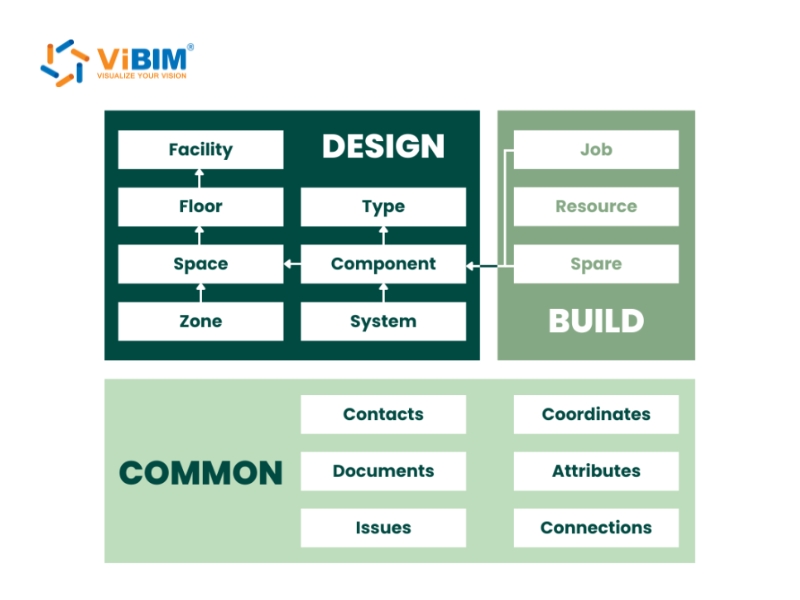
The structure of a COBie spreadsheet is organized into multiple worksheets (or tabs), each dedicated to a specific category of information. This segmented structure makes the data easy to manage and understand. The key components of a COBie deliverable include:
- Instruction: The first tab, providing basic instructions, project details, and definitions for the data fields used throughout the workbook.
- Contact: A directory of all individuals, roles, and organizations involved in the project, from the architect to the commissioning agent.
- Facility: Contains high-level information about the project itself, such as the building name, site address, and project number.
- Floor: A list of all building levels or floors, establishing the vertical organization of the facility.
- Zone: An organizational layer that groups multiple spaces together based on a shared function or system (e.g., HVAC zones, security zones, or fire regulation areas).
- Type: A catalogue of all the specific product types used in the project (e.g., a certain model of air handling unit or light fixture). This sheet contains manufacturer details, model numbers, warranty information, and other generic product data.
- Component: An instance-based list of every individual asset installed in the facility. Each component is an instance of a “Type” and includes its unique serial number, installation date, and location (by Space). This is the most critical worksheet for facility management.
- System: Defines the building’s operational systems (e.g., “Domestic Hot Water,” “Primary HVAC”) and lists which components are part of each system.
- Assembly: Describes how different components are grouped together to form larger, more complex assets or assemblies.
- Connection: Details the physical connections between components, such as pipe connections or data/power cables, which is essential for maintenance and troubleshooting.
- Spare: Lists the spare parts required for the maintenance of assets listed in the Component sheet, including supplier information and part numbers.
- Resource: Details the resources, such as specific tools or materials, needed to perform maintenance tasks.
- Job: Outlines the specific maintenance tasks and schedules (e.g., preventive maintenance, inspections) required for assets, providing a ready-to-use maintenance plan.
- Impact: Documents the potential environmental, social, and economic impacts associated with maintenance tasks or asset failures.
- Document: A list of all associated documents—such as warranties, manuals, images, and technical specifications—with links to the corresponding contacts, assets, or systems.
- Attribute: Contains specific, non-standard properties and characteristics for each asset type or component that are not covered in the other worksheets (e.g., performance ratings, color codes, or custom data points required by the owner).
- Coordinate: Specifies the exact geometric location (X, Y, Z coordinates) and orientation of components within the building model.
- Issue: A log used during the design and construction phases to track and resolve project issues, such as clashes or coordination problems.
Key Benefits of Implementing COBie in BIM
Integrating COBie into a BIM workflow delivers substantial, measurable benefits that extend across the entire project lifecycle and well into the operational phase of a building.
- Streamlined Digital Handover: COBie replaces the traditional, cumbersome process of handing over paper-based manuals, binders, and unorganized digital files with a single, structured, and easy-to-use digital dataset.
- Efficient Data Organization: By enforcing a standardized data structure, COBie ensures that asset information is captured consistently and completely, eliminating ambiguity and making the data reliable.
- Enhanced Facility Management: Modern facilities management using BIM relies on COBie to provide FM teams with immediate, day-one access to crucial asset data for maintenance and warranty tracking.
- Time and Cost Savings: COBie significantly reduces the time and expense associated with manually collecting, verifying, and re-entering asset data into FM systems post-construction. This leads to lower operational costs through more efficient and proactive maintenance.
- Improved Data Accuracy and Reduced Loss: By capturing data progressively throughout the project lifecycle and using a standardized format, COBie mitigates the risks of data loss, transcription errors, and incompatible formats that are common in traditional handovers.
- Enhanced Interoperability: As a non-proprietary format, COBie facilitates seamless data exchange between different software applications used by various stakeholders (e.g., BIM authoring tools, CMMS, CAFM systems).
- Increased Transparency and Decision Making: Having access to organized, reliable, and comprehensive data provides a robust foundation for informed decision-making related to asset maintenance, replacement, and long-term capital planning.
- Compliance with Mandates: The use of COBie is increasingly mandated by government agencies and large-scale clients (such as in the UK and parts of the US) as a standard project deliverable, making its adoption essential for securing such projects.
- Extensibility: While COBie provides a standardized structure, it is also flexible. Project teams can add customized fields and attributes to capture specific information required by the client, making it adaptable to unique project needs.
Who Benefits from COBie? Key Stakeholders
The adoption of COBie provides value to a wide range of stakeholders involved in a building’s lifecycle, creating a more collaborative and efficient ecosystem.
- Owners: Building owners are the primary beneficiaries. They receive a structured, complete, and immediately usable digital asset register, reducing the cost and time needed to populate their facility management systems and enabling better long-term operational and financial planning.
- Facility Managers: As the direct end-users, facility managers gain immediate access to all the information they need to do their jobs effectively from locating equipment and accessing maintenance manuals to tracking warranties and scheduling preventive maintenance.
- Contractors: COBie standardizes and streamlines the handover documentation process, automating data compilation and reducing the administrative burden at project closeout. This leads to a more efficient and professional handover.
- Designers (Architects & Engineers): By defining the data requirements from the outset, COBie helps designers organize their models with the end in mind. This ensures consistency and facilitates better coordination, as they know exactly what information needs to be included for the owner.
- Subcontractors & Suppliers: COBie provides a clear and standardized format for subcontractors and suppliers to contribute their specific asset information (e.g., manufacturer, model number, serial number), ensuring their data is accurately integrated into the final project deliverable.
Partner with Experts to Maximize Your COBie Implementation
The quality of your COBie deliverable depends entirely on the accuracy and completeness of your source BIM model. Working with an experienced Revit BIM modeling service provider ensures your architectural, structural, and MEP models contain the required asset attributes, proper classifications, and data structures needed to generate reliable COBie spreadsheets that support efficient facility operations throughout the building lifecycle.
FAQs
Is COBie mandatory in BIM projects?
No, COBie is not automatically mandatory for all BIM projects. However, it is frequently required for public sector projects. For example, the UK government requires COBie deliverables for all its centrally funded projects under the BIM Level 2 framework. Similarly, in the United States, government agencies like the U.S. Army Corps of Engineers (USACE) and the General Services Administration (GSA) mandate its use. For private projects, while not always a default requirement, its adoption is often client-driven, as it is widely recognized as a best practice for ensuring a high-quality, data-rich handover.
See more: BIM Maturity Levels Explained: Level 0, 1, 2, 3
Is COBie only suitable or mandated for very large construction projects?
No, COBie is highly beneficial for projects of all sizes, not just large ones. While it is true that COBie is most frequently mandated on large, complex projects due to the significant value in managing extensive asset portfolios, its core principles are universally applicable. The fundamental goal of COBie—to deliver structured, organized data for efficient facility management—is a need for every building, regardless of its scale. The level of detail within a COBie deliverable is scalable and can be tailored to fit the complexity of the project and the specific needs of the client. For smaller projects, a simplified COBie dataset can still provide immense value by ensuring a clean, professional, and efficient handover, preventing data loss and saving the owner operational costs down the line.
Can the information in a COBie deliverable be updated after the project handover?
Yes, absolutely. The COBie deliverable provided at project completion is a snapshot in time, representing the “as-built” condition of the facility. Once this data is imported into a Computer-Aided Facility Management (CAFM) or Computerized Maintenance Management System (CMMS), it is intended to become a dynamic, “living” database. Facility teams should continuously maintain and update the information throughout the building’s operational lifecycle with new maintenance records, component replacements, refurbishments, and other changes, ensuring it remains an accurate and valuable asset register.
What is the difference between COBie and IFC?
COBie and IFC (Industry Foundation Classes) are both open, non-proprietary standards developed by buildingSMART, but they serve different purposes.
- IFC (Industry Foundation Classes) is a complete data model and BIM file format designed to describe all the information in a building, including both the detailed 3D geometry and the associated data. It is a comprehensive schema for achieving interoperability between different BIM software applications.
- COBie (Construction Operations Building Information Exchange) is a data specification that defines a subset of the information contained within an IFC or BIM model. Its focus is exclusively on the asset data required for building operations and maintenance, and it is typically delivered in a simple spreadsheet format. In essence, you can think of COBie as a specific, simplified view of the broader data model defined by IFC, tailored for the needs of the building owner and operator.
In essence, COBie bridges the critical gap between a data-rich BIM model and the practical needs of facility managers by standardizing the handover of operational asset data. It transforms project closeout from a chaotic exchange of documents into a seamless delivery of structured, actionable information. This leads to immediate operational readiness, significant cost savings, and more efficient long-term maintenance.
See more: What is a BIM Execution Plan (BEP)? Learn how to create a BEP for your project
As the AEC industry continues its digital transformation, adopting COBie is no longer just a best practice but a strategic investment in a building’s entire lifecycle. For any stakeholder committed to quality and long-term value, implementing this standard ensures a building can be managed as intelligently as it was designed.











