
3D Scan to Revit is the process of converting point cloud data captured by 3D laser scanning into intelligent, parametric Revit models.
As-Built modeling plays a significant role in construction and renovation by providing precise and information-rich documentation of existing buildings. Accurate As-Built models help architects, contractors, engineers, facilities managers, surveyors, and laser scanning companies plan effectively and reduce costly errors during construction and renovation.
However, traditional surveying methods often result in data gaps, measurement errors, and inefficient manual workflows. Integrating 3D scanning technology with Autodesk Revit overcomes these limitations. By adopting a Point Cloud to BIM workflow, project teams secure a robust solution that guarantees accuracy and streamlines coordination across all disciplines.
This article breaks down the specific challenges that 3D Scan to Revit resolves for as-built documentation — from measurement accuracy and data gaps to coordination failures across disciplines. It covers the measurable benefits, the step-by-step integration workflow, real project outcomes, and the criteria for selecting the right Scan to BIM partner for your next project.
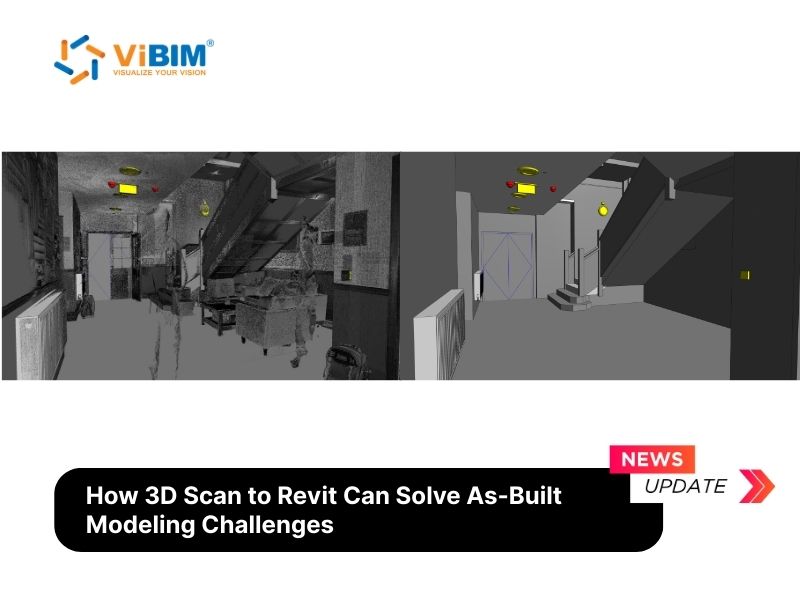
The Importance of Accurate As-Built Modeling
Accurate as-built models serve as the single source of truth for every renovation, retrofit, and facility management decision throughout a building’s operational life. When this documentation contains errors or gaps, the consequences cascade across every downstream activity — from design coordination to construction execution to long-term maintenance.
The four critical areas where as-built accuracy directly determines project outcomes:
- Project Cost and Schedule: Inaccurate as-built data forces design teams to work from a flawed baseline. Structural engineers size members based on incorrect loads. MEP coordinators route systems through spaces that do not exist as drawn. Every discipline inherits these errors, producing a chain of change orders and field conflicts during construction. A joint study by PlanGrid and FMI Corporation, surveying nearly 600 construction leaders, found that poor project data and miscommunication account for 48% of all rework on U.S. construction jobsites — costing the industry over $31 billion annually. Within that figure, 22% of all rework traces directly to erroneous or inaccessible project information. Across multiple industry analyses, rework adds 5% to 20% of total project cost depending on building complexity.
- Compliance and Safety: As-built documentation serves as the legal record of actual installed conditions — structural members, fire protection systems, electrical routing, plumbing layouts. Building inspectors, code officials, and insurance assessors reference these records during audits and permit reviews. Discrepancies between documented conditions and physical reality can trigger failed inspections, code violations, and liability exposure during disputes. These problems grow more expensive the longer they remain undetected.
- Renovation and Retrofit Planning: Every renovation decision — where to place new openings, how to reroute ductwork, whether existing structure can support additional loads — depends on verified existing conditions. Without that verification, design teams fill gaps with assumptions that compound into field conflicts. Research by the UK’s Get It Right Initiative (GIRI), involving 17 major construction organizations, found that the total cost of avoidable errors can reach 10% to 25% of project value when unrecorded process waste, latent defects, and indirect costs are included. For renovation work, where existing condition unknowns multiply these risks, the margin for error narrows further.
- Facility Management and Building Lifecycle: Facility managers who inherit accurate as-built BIM models gain a reliable operational baseline for maintenance scheduling, asset tracking, space planning, and energy management. These models integrate directly with CMMS (Computerized Maintenance Management Systems) and CAFM (Computer-Aided Facility Management) platforms, giving operations teams instant access to system layouts, equipment specifications, and component locations. Incomplete or outdated documentation forces reactive troubleshooting, longer downtime, and higher operational costs across the building lifecycle.
Traditional surveying methods that rely on manual tape measurements and hand-drawn sketches cannot deliver the precision and completeness these applications demand. This gap between required accuracy and legacy capability is precisely what is 3D laser scanning technology addresses.
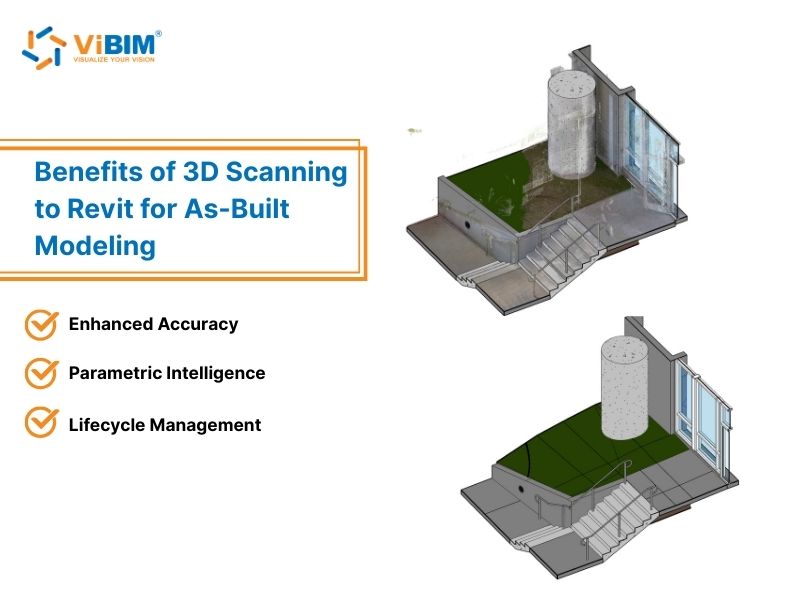
Key Challenges in As-built Modeling Solved by 3D Scan to Revit
3D scanning technology captures hundreds of thousands to millions of measurement points per second using LiDAR-based devices, creating a dense point cloud that represents the exact physical conditions of a structure. When this data feeds into Revit, teams gain a parametric, information-rich BIM — not a static drawing, but an intelligent model where every wall, pipe, and beam carries data that supports decisions across the entire project lifecycle.
Adopting Scan to Revit methodologies resolves several persistent issues in the construction and renovation sectors. Each challenge below represents a real obstacle that project teams face — with a documented solution and measurable outcome that 3D scanning technology delivers.
Challenge 1: Inaccurate Measurements and Data Gaps
The Problem: A renovation team begins design work on a 50,000 sq ft (4,645 m²) commercial facility using manually surveyed as-built drawings. Midway through construction, they discover a 4-inch (100mm) deviation in a floor slab and mislocated mechanical shafts that manual surveys failed to record. These gaps force redesign, material reorders, and schedule delays. This scenario is common — manual tape measurements in complex environments accumulate tolerances of ±1 inch (25mm) per reading, and those errors compound across hundreds of data points in a single building. Research confirms that bad data or inaccurate information causes 14–22% of all construction rework.
How 3D Scan to Revit Solves This: A terrestrial laser scanner records hundreds of thousands to points per second, capturing every surface within line of sight at ±2mm accuracy. The resulting point cloud leaves no pipe, conduit, beam, or wall deviation undocumented. When modelers build the Revit model over this dataset, the digital representation matches physical reality within millimeters — not inches.
The Result: The complete spatial record eliminates the data gaps that force costly assumptions during design. The final Revit model captures site conditions with an accuracy of ±2mm to ±6mm — replacing the ±25 to 50mm tolerance range of manual tape measurements with verified geometry that design teams can trust for critical decisions on structural loads, MEP routing, and renovation planning.
Challenge 2: Time-Consuming Manual Processes
The Problem: Measuring a complex facility by hand — recording wall dimensions, ceiling heights, pipe runs, duct routing, and structural member locations — can consume 3 to 5 separate site visits spread across several weeks. Each visit requires coordinating access, deploying field crews, and manually transferring handwritten notes into CAD software. The transcription step alone introduces a second layer of human error. For scanning companies managing multiple projects simultaneously, this manual cycle strains capacity and delays deliverables for downstream clients.
How 3D Scan to Revit Solves This: A laser scanner documents the same facility in a single mobilization — often completing full data capture in hours rather than days. Because scan data flows directly into processing software and then into Revit, the manual transcription step disappears entirely.
The Result: One documented case showed that combining scanning with BIM modeling cut measuring time by 60% and made Revit modeling 40% faster, ultimately slashing the field-to-finish timeline by half. Outsourcing the modeling phase to specialized firms compresses delivery further — ViBIM consistently delivers turnaround times up to 30% faster than industry standards, enabling scanning companies to move through their project pipeline without bottlenecks.
Challenge 3: Complex Geometries and Hard-to-Reach Areas
The Problem: Heritage buildings with ornate facades, vaulted ceilings, and decorative columns present geometry that tape measures cannot document reliably. Industrial facilities with overhead piping at 30 feet (9 meters), confined mechanical rooms, and dense MEP routing create access challenges that are both difficult and dangerous for manual survey crews. Research confirms that heritage structures exhibit geometric complexity that makes digitization through conventional methods inaccurate and time-consuming. Missing a single structural offset or pipe routing path in these environments can cascade into field conflicts during construction.
How 3D Scan to Revit Solves This: Laser scanners capture data from a safe distance — documenting high ceilings, tight spaces, and intricate architectural details without requiring scaffolding, lifts, or physical contact with fragile structures. High-accuracy scanners create dense point clouds essential to accurately representing complex geometries and intricate details, reducing data gaps and improving the quality of the Scan-to-BIM process.
The Result: Revit’s modeling tools translate this data into custom parametric families — arches, irregular columns, non-standard MEP components — that accurately represent what exists. For heritage projects, this non-invasive approach preserves the structure while creating a permanent digital archive that supports future conservation, restoration planning, and regulatory compliance without requiring repeated physical surveys.
Challenge 4: Coordination Failures and Fragmented Lifecycle Data
The Problem: In fragmented workflows, each discipline — Architecture, Structure, MEP — works from separate sets of 2D as-built drawings. These drawings often reflect different survey dates, different measurement conventions, and different levels of completeness. When a mechanical contractor routes ductwork based on one drawing set while a structural engineer checks load paths from another, clashes go undetected until field installation. Poor communication and fragmented project data account for 48% of all rework on U.S. construction jobsites, driven largely by teams operating from inconsistent information. FMI Corporation research found that erroneous or inaccessible project data alone contributes to $14.3 billion in annual rework costs across the U.S. construction industry.
How 3D Scan to Revit Solves This: A unified Revit model built from a single scan dataset gives every discipline — architectural, structural, and MEP — the same verified baseline. Project teams run clash detection before construction begins, identifying conflicts between ductwork and structural members, piping and electrical conduit, or new systems and existing infrastructure. Industry reports indicate that BIM-based clash detection — enabled by accurate scan data — reduces rework costs by up to [5]. The Autodesk ecosystem extends this further: Revit integrates with Navisworks for advanced clash analysis and the Autodesk Construction Cloud (ACC) for real-time stakeholder access.
The Result: Digital coordination replaces the costly cycle of field discovery, RFI, and change order. But the value extends beyond construction completion. Unlike static CAD files, every Revit element carries embedded parametric data — a wall knows its material, fire rating, and thickness; a pipe carries diameter, material type, and system classification. This parametric intelligence transforms the as-built model from a coordination tool into an operational asset. Facility managers use it for maintenance scheduling, asset tracking, and space management across the building’s operational life. These models integrate directly with CMMS and CAFM platforms, giving operations teams instant access to verified building data — or serve as the foundation for a full Digital Twin.
For a comprehensive look at how this technology maximizes project value and ROI, read our detailed guide on the benefits of Scan to BIM.
How 3D Scanning Integrates with Revit for As-built Modeling
The integration of 3D scanning with Revit creates a seamless workflow from physical reality to digital twin.
Overview of the 3D Scan to Revit Process
The initial phase of the Scan to BIM workflow involves capturing physical reality and preparing the digital data for modeling:
- Data Capture: Surveyors utilize terrestrial or mobile laser scanners to document the site’s physical attributes, generating a raw dataset of millions of measurements known as a point cloud.
- Data Processing: The raw scan data is imported into processing software, such as Autodesk ReCap, to clean noise and register multiple scans together. This step indexes the data into unified formats, with a preference for RCP/RCS files to ensure the quality and integrity of the original input.
- Import to Revit: The processed and indexed point cloud files (RCP/RCS) are linked directly into Autodesk Revit. This establishes a precise 3D reference trace within the software, ready for the modeling team to begin their work.
Working with Point Clouds in Revit
Once the point cloud is linked into the software, it transforms into an interactive 3D reference environment. The modeling process typically follows these key steps:
- View Management and Sectioning: Modelers use section boxes and view ranges to slice the dense point cloud into manageable layers, isolating specific floors or areas to gain a clear view of the structure’s cross-sections.
- Precise Geometry Creation: Using Revit’s architectural and structural tools, modelers snap new geometry directly to the point cloud data points . This ensures that walls, floors, and beams align perfectly with the actual physical measurements rather than theoretical design values.
- Component Standardization: Instead of generic shapes, specific Revit families are selected or created to represent building components (such as windows, doors, and MEP equipment) that accurately fit the scanned dimensions.
- Visual Validation: Throughout the process, the new model elements are visually checked against the underlying point cloud to identify deviations instantly, ensuring the digital twin faithfully represents the as-built conditions.
To master the technical steps involved in transforming raw scan data into a polished BIM model, check out our in-depth guide on how to convert point cloud to Revit model.
Advantages of Using Revit with 3D Scans
Autodesk Revit stands out as the premier choice for Scan to BIM due to specific features that transform raw data into intelligent, actionable information:
- Intelligent Parametric Families: Revit utilizes “smart” parametric families that allow modeled elements to become data-rich objects. Modeled components retain specific attributes, ensuring the model serves as a functional asset for future facility management.
- Unified Multi-Disciplinary Platform: Revit hosts Architecture, Structure, and MEP disciplines within a single, coordinated environment. This unified approach facilitates real-time coordination across trades, ensuring all systems are integrated and checked against the scan data simultaneously.
- Seamless Ecosystem Integration: Revit integrates natively with tools like Autodesk ReCap for processing point clouds and Navisworks for clash detection. This robust ecosystem ensures that massive scan datasets are handled efficiently, maintaining absolute precision throughout the workflow.
- Advanced Cloud Collaboration: Utilizing the Autodesk Construction Cloud (ACC), Revit facilitates superior project collaboration . This cloud-based feature enables stakeholders to access, review, and update the latest project data instantly, fostering efficient communication and teamwork.
Success Stories of 3D Scan to Revit in As-built Modeling
ViBIM has successfully implemented Scan to Revit solutions for various complex projects, overcoming significant challenges to deliver high-quality digital twins.
Scan to BIM modeling for Residential Renovation in the EU
Project Overview: This project involved the digitalization of a residential apartment complex in the EU, consisting of five above-ground floors and one basement level, with a total area of approximately 8,600 m². The scope required a comprehensive 3D model covering Architecture, Structure, and MEP systems—both inside and outside the building—to serve as the foundation for future renovation design and facility management.
Results and Benefits:
- High-Precision Digital Twin: ViBIM successfully constructed a precise 3D model for all disciplines (Architecture, Structure, and MEP) at LOD 300, ensuring a deviation of less than ±15 mm compared to the existing conditions.
- Unified Information Source: We delivered a model that bridges the gap between technical drawings and physical reality, providing a consistent and reliable dataset for the building’s operational lifecycle.
- Future-Proofing: The accurate As-Built model now serves as a critical asset for the client, streamlining the design process for renovations and simplifying long-term facility management tasks.
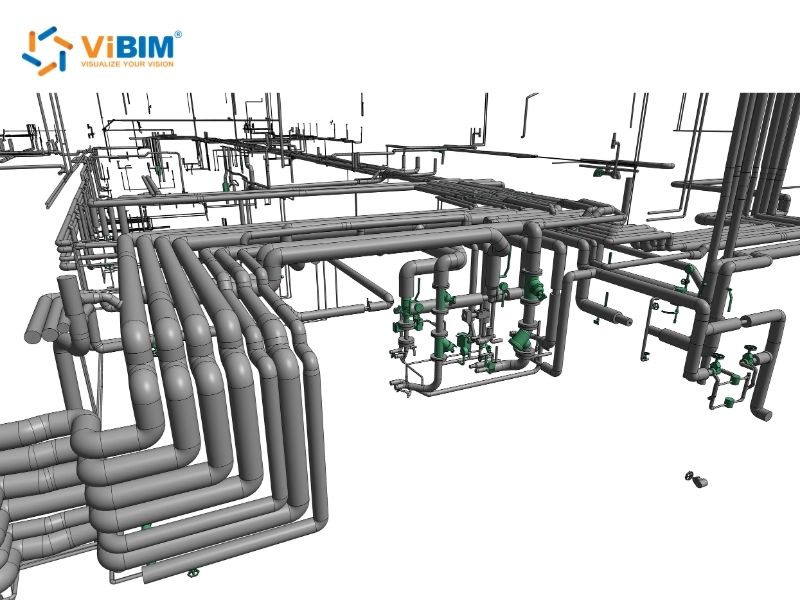
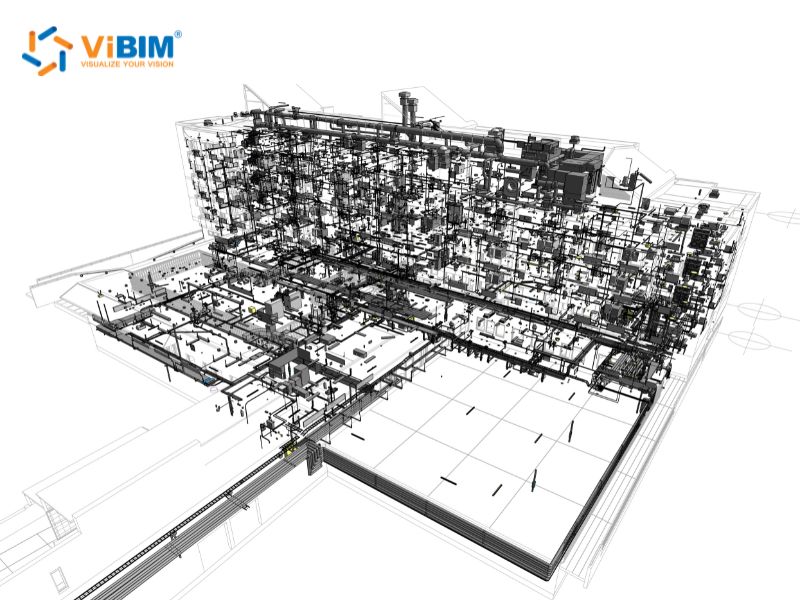
Point cloud to BIM modeling for Commercial Supermarket in the UK
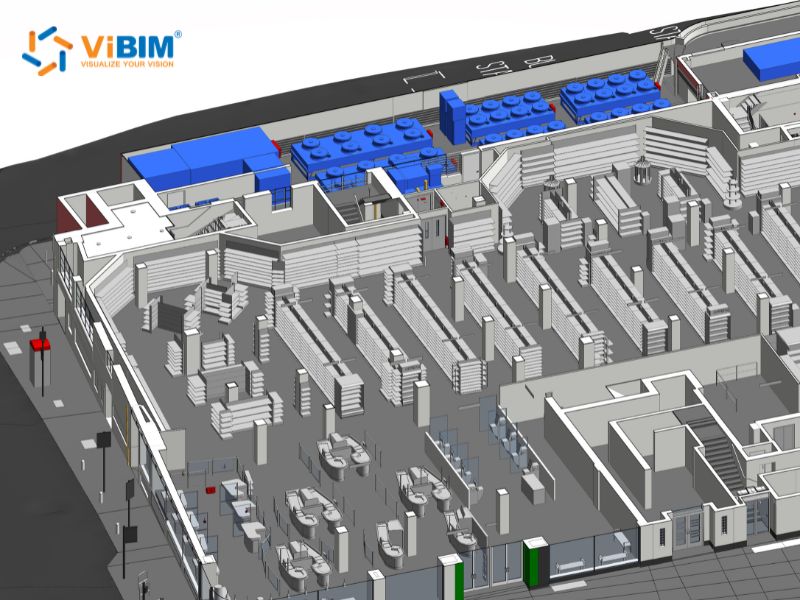
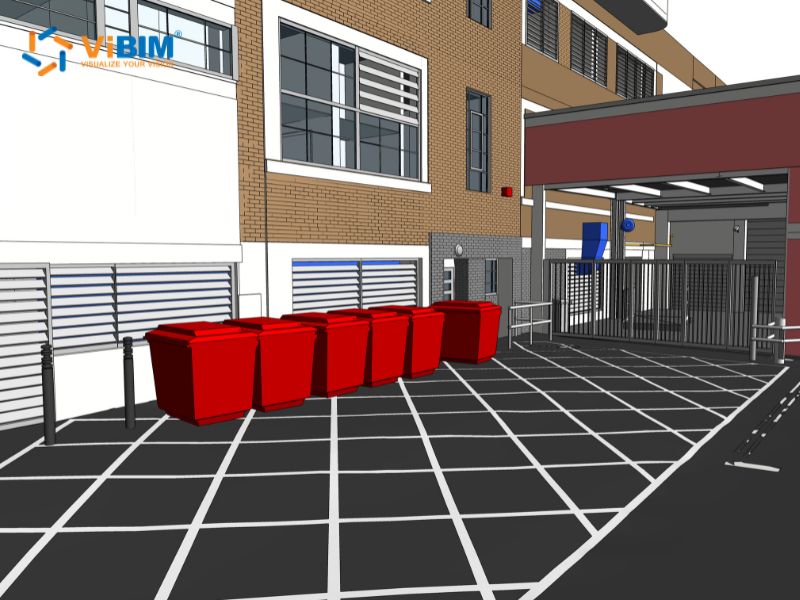
Project Overview: Located in the UK, this 7,380 m² supermarket project required the creation of an exact 3D BIM model from Point Cloud data. The objective was to reflect the true current state of the facility, including complex MEP systems and specific operational equipment, to support upcoming renovation works.
Results and Benefits:
- Completed in 2 Weeks: ViBIM modeled the entire supermarket space in detail, capturing not just the building shell but also intricate MEP systems and operational assets like shelving, refrigeration units, and checkout counters. The modeling phase was completed within approximately 2 weeks, delivering an accurate as-built baseline that the client’s design team could begin renovation planning against immediately.
- Long-Term As-Built Reliability. The resulting model was built to serve as a verified as-built record for years — eliminating the need for re-surveying or re-modeling when future renovations, tenant fit-outs, or equipment upgrades arise. This one-time investment in accurate documentation protects the client from repeated data collection costs across the building’s operational lifecycle.
- Direct Integration with FM and Digital Twin Systems. The as-built model meets the data requirements for integration with facility management platforms, including CMMS and CAFM systems. The client can connect this model directly to FM workflows for asset tracking, maintenance scheduling, and space management — or extend it into a full Digital Twin for ongoing operational optimization. This FM-ready deliverable transforms the model from a construction tool into a long-term operational asset.
When Should You Use 3D Laser Scan to Revit?
You should consider Scan to Revit services for the following scenarios:
- Renovation and Retrofit Projects: When existing drawings are missing or inaccurate.
- Historical Preservation: When capturing intricate details and irregular geometry is essential.
- Facility Management: When creating a digital twin for asset tracking and maintenance.
- Clash Detection: When installing new MEP systems into complex existing environments.
How to Choose a Professional 3D Scan to Revit Service
Selecting the right partner is critical for project success. Consider these factors:
- Software Expertise: Ensure the provider specializes in the Autodesk platform (Revit, ReCap, Navisworks).
- Quality Control: Look for firms with rigorous QC processes. A two-layer independent check covering technical accuracy and adherence to standards is ideal.
- Data Security: Verify that the provider has strict data security policies, using secure FTP servers or platforms like Autodesk Construction Cloud.
- Capacity: Choose a firm with a large enough team to handle your project scale and deadline.
Once you’ve identified these selection criteria, the next step is executing the partnership effectively—our guide on how to outsource Revit modeling walks you through vetting providers, establishing clear deliverable specifications, and managing remote teams to ensure your 3D scan to Revit project stays on schedule and within budget.
Why Choose ViBIM for Your Scan to BIM Needs
ViBIM positions itself as a premium Scan to BIM service provider, focusing on high accuracy and reliability.
- Expertise: We specialize in using Revit as our primary authoring tool for Scan to BIM.
- Speed: We deliver turnaround times up to 30% faster than the market average.
- Reliability: We maintain a 99% on-time delivery record.
- Flexibility: We accept various input formats, including RCP/RCS and E57, and can deliver LODs ranging from 100 to 500.
Contact ViBIM today to discuss how our 3D Revit BIM Modeling services can streamline your next project. We offer a complimentary trial project to demonstrate our capabilities and ensure we meet your specific quality standards.
Contact information:
- Address: 10th floor, CIT Building, No 6, Alley 15, Duy Tan street, Cau Giay ward, Hanoi, Vietnam
- Phone: +84 944 798 298
- Email: info@vibim.com.vn
- Website: https://vibimglobal.com/
References
- PlanGrid and FMI Corporation. (2018). Construction Disconnected: The High Cost of Poor Data and Miscommunication. Survey of 599 construction industry leaders across U.S., UK, Australia, NZ, and Canada. https://www.prnewswire.com/news-releases/new-research-from-plangrid-and-fmi-identifies-factors-costing-the-construction-industry-more-than-177-billion-annually-300689826.html
Data used: 48% of rework from poor data/miscommunication; $31.3B annual rework cost; 22% from erroneous project information; $14.3B from poor project data.
- Get It Right Initiative (GIRI). (2016). A Call to Action: Reducing Avoidable Error in UK Construction. Research involving 17 major UK construction organizations, funded by CITB. https://getitright.uk.com/reports/call-to-action
Data used: Total cost of avoidable errors ranges from 10–25% of project value.
- Existing Conditions. (n.d.). What Is the Precision of 3D Laser Scanning? https://www.existingconditions.com/insights/what-is-the-precision-of-3d-laser-scanning-with-existing-conditions
Data used: ±2mm scanner accuracy for professional terrestrial laser scanners.
- Matterport. (n.d.). Point Cloud to BIM: How It Helps Surveyors Save Time and Cut Costs. Case study: Bergman Associates. https://matterport.com/blog/point-cloud-to-BIM
Data used: 60% reduction in measuring time; 40% faster Revit modeling; 50% field-to-finish time reduction.
- NxtSyg. (2026). Scan to BIM Services: Cut Construction Costs & Rework by 40%. Citing Arkance and Dodge Construction Network reports. https://www.nxtsyg.com/blog/scan-to-bim-services-cut-construction-costs-rework/
Data used: BIM-based clash detection reduces rework costs by up to 40%.
- PlanRadar. (n.d.). The Cost of Rework in Construction. https://www.planradar.com/us/cost-of-rework-construction/
Data used: 14–22% of construction rework caused by bad data (corroborated by PlanGrid/FMI).
- Pereira, A., et al. (2024). Historical Heritage Maintenance via Scan-to-BIM Approaches: A Case Study of the Lisbon Agricultural Exhibition Pavilion. ISPRS International Journal of Geo-Information, 13(2), 54. https://www.mdpi.com/2220-9964/13/2/54
Data used: Heritage structures exhibit geometric complexity that makes conventional digitization inaccurate and time-consuming.
- Scientific Reports. (2026). Predictive hybrid scan-to-BIM method improves heritage building documentation completeness and accuracy. Nature. https://www.nature.com/articles/s41598-026-38200-8
Supporting evidence: Incomplete survey data undermines BIM reliability for structures with restricted access and complex geometries.











