
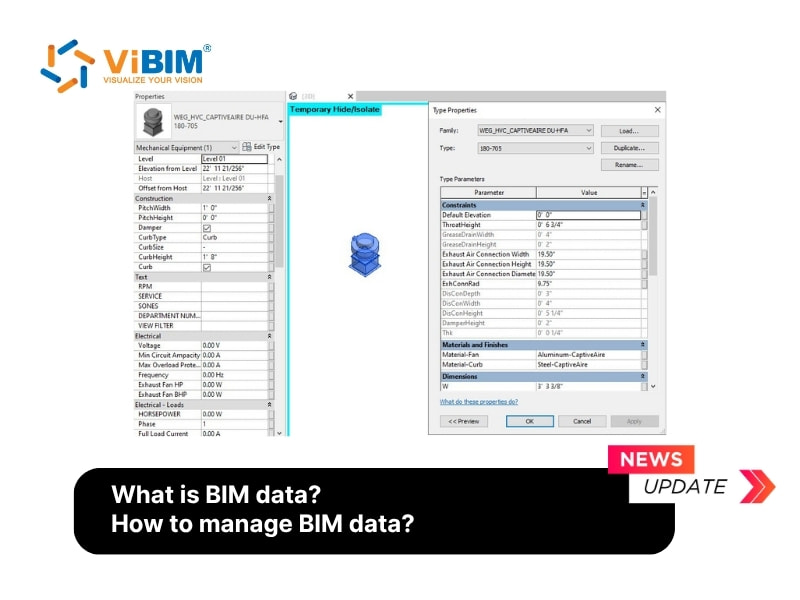
BIM data represents structured and intelligent information that defines every detail of a building project beyond its 3D geometry. It includes both visual and non-visual elements that describe materials, quantities, performance, and maintenance requirements across the entire asset lifecycle. Each component in a model carries data such as dimensions, materials, and technical properties, which together form a complete digital description of the built environment. BIM data can exist in six types: String, Number, Boolean, Date, Enumerated, and Array and can be grouped by content type, structure, or use to support analysis and coordination across disciplines.
BIM data management begins with establishing clear standards and consistent workflows that guide the creation, storage, and sharing of information. Teams apply structured naming conventions, version control, and quality checks to maintain data reliability. Secure storage and regular backups safeguard valuable project data, while collaboration platforms facilitate real-time coordination among architects, engineers, and contractors. Through these methods, BIM data management helps maintain accuracy, reduces rework, and supports informed decision-making throughout the design, construction, and facility operation phases.
This article will explain what BIM data is, its types and formats, how to manage it effectively, why data management is important, and the challenges teams often face in maintaining consistent and reliable information.
What is BIM data?
BIM data is a collection of intelligent, object-based information that extends beyond simple 3D geometry to form a digital representation of a built asset throughout its entire lifecycle. Each piece of information describes the physical and functional characteristics of elements within the model, supporting accurate design, construction, and operation.
The definition of BIM data originates from the general concept of data, which defines data as individual facts, statistics, or items of information, often numeric in nature. In technical terms, data are values of qualitative or quantitative variables about one or more persons or objects, and BIM applies this same logic to describe every component within a building model.
What are the BIM data types?
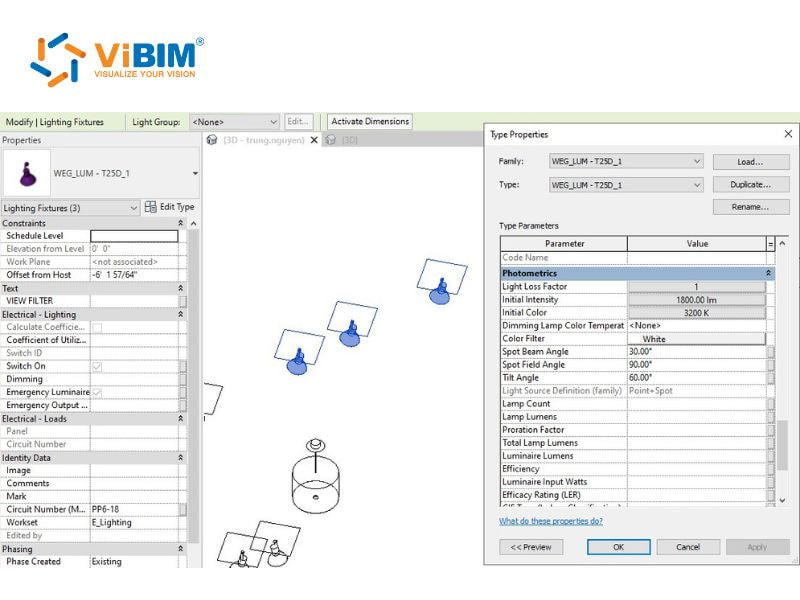
There are 6 BIM data types: String (text), Number, Boolean, Date, Enumerated, and Array (list). These data types define how information is stored, displayed, and processed. In BIM software, every element property is recorded in a structured, machine-readable format, where each attribute has a label and a value tied to a specific data type.
- String (text): A text data type represents an unrestricted sequence of characters that can include letters, numbers, or symbols. It is always interpreted as text, meaning it cannot be used in calculations, such as the “D-01” value shown in the table above.
- Number: This data type accepts only numeric values and can represent whole numbers (integer) or decimal numbers (float). It allows calculations, such as Fire Rating = 30 or Width = 0.9 m, in the example table.
- Boolean: This type expresses two logical states, true or false, often shown as 1 and 0 or yes and no. For instance, Fire Door = True represents that the door meets fire safety standards.
- Date: A date type stores time-related information and is typically used for scheduling and progress tracking. In the table example, it appears in fields such as “Start Date” and “End Date” to define installation timelines.
- Enumerated: This data type provides a predefined list of possible values from which users can choose only one option. For example, a “Material” label could have a dropdown with values like Aluminium, Steel, and Glass.
- Array (list): This data type allows storing multiple values of the same type, functioning as a list. In the “Material” example, if a door combines Aluminium and Glass, an array could store both values, giving the array a length of 2.
These six data types can be organized in three different ways: by content type, by structure, and by use. Continue reading to discover how each method facilitates the efficient organization of BIM data.
By content type
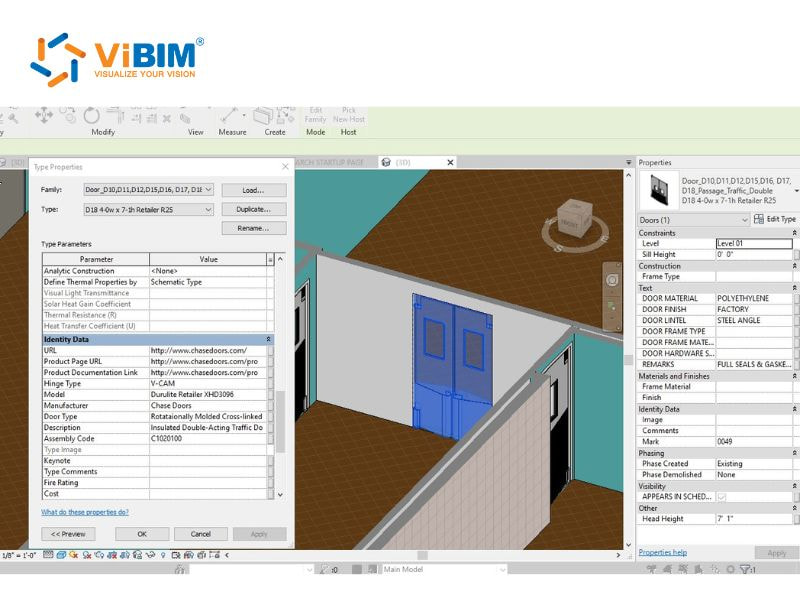
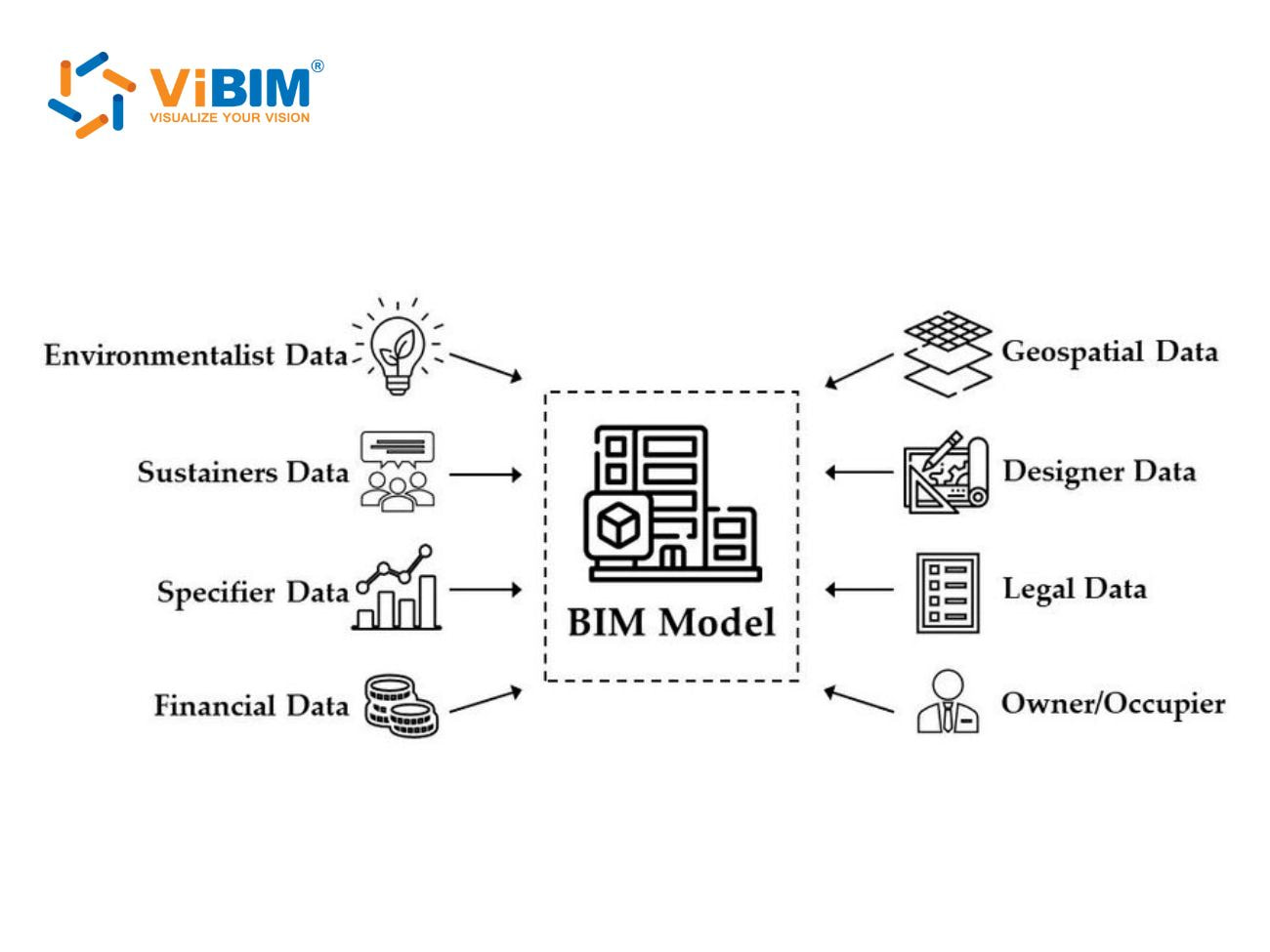
BIM data can be categorized by its content type, which defines the type of information stored and how it supports design and construction activities throughout the project lifecycle. Each type contributes a unique role in describing both the physical and functional characteristics of the model.
- Geometric data: This data type contains measurements, shapes, and spatial relationships of building elements. It also includes information about object positions, orientations, and visual appearances in the model.
- Documentation data: This data type includes project specifications, design intent, and construction methodologies. It also stores regulatory details, compliance requirements, and other documentation that guide project execution.
- Non-geometric data: This data type covers costs, material specifications, and maintenance instructions. It also stores performance parameters and operational details that define how each building component should function and be maintained.
By structure
BIM data can also be categorized based on its structure, which defines how information is organized and stored within the model. There are two data structures that affect how easily the data can be searched, shared, and updated across different project stages.
- Structured information: Structured information refers to data organized in predefined formats such as databases, parameters, or spreadsheets. It allows users to quickly retrieve, compare, and modify details for precise coordination and analysis across the model.
- Unstructured information: Unstructured information encompasses text-based content, such as notes, reports, or supporting documents, that do not adhere to a fixed format. It helps capture design intent, communication records, and contextual details that enrich project understanding.
By use
BIM data can also be classified by its use throughout the project, as each category supports a specific phase and function in the building lifecycle. These three data types help maintain continuity from design to construction and later to operation.
- Design data: Design data defines the shape, size, and performance of building elements. It guides architects and engineers in analyzing options, refining models, and creating coordinated layouts for accurate visualization.
- Construction data: Construction data includes schedules, material details, and assembly methods that guide on-site execution. It supports project coordination, cost control, and progress tracking to maintain accuracy during construction.
- Operations data: Operations data includes maintenance schedules, asset details, and performance history, which are used after project completion. It assists facility managers in planning repairs, tracking energy use, and optimizing building performance.
What is the BIM data format?
BIM data can be stored and shared in three standardized formats, allowing multiple platforms and disciplines to collaborate effectively. Each format serves a specific purpose depending on the level of detail and data type required for project coordination.
- IFC (Industry Foundation Classes): IFC acts as the main open-source standard for exchanging BIM data between software platforms. It can handle both geometric and non-geometric information, manage attribute data, and maintain relationships between building components to support accurate collaboration.
- COBie (Construction Operations Building Information Exchange): COBie focuses on non-geometric data useful for facility management. It records equipment specifications, maintenance schedules, and warranty information, typically stored in structured spreadsheets for easier review and handover to asset managers.
- XML-based schemes: XML-based schemes offer flexibility for specialized data exchange that supports custom data structures. They are often applied in systems relying on sensor information, automation processes, or integrations with monitoring and control environments.
Uniclass, Omniclass, and Uniformat are classification systems that organize BIM data efficiently beyond file formats. They create a unified structure for project elements, helping teams maintain consistency, while metadata management supports accurate tracking and organization across complex BIM environments.
To better understand how these formats function as containers for your project data, read our foundational explanation of what is a BIM file.
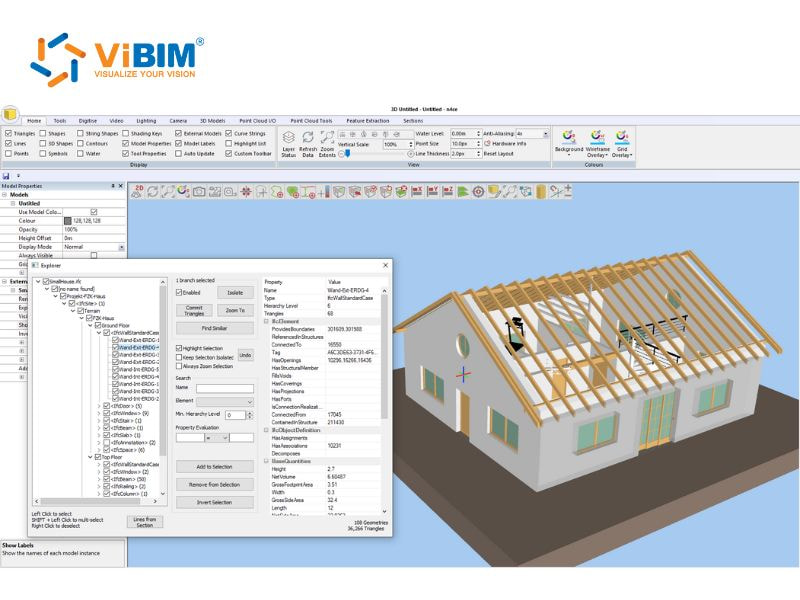
Best practices for BIM data management
BIM data management is most effective when guided by a clear and consistent strategy. There are five practices that form the foundation for maintaining accurate, secure, and easily coordinated information across different project stages.
- Develop a clear data management plan: A comprehensive BIM plan outlines how project information is collected, stored, and disseminated. Clear roles, responsibilities, and update procedures help prevent confusion and maintain control over how data flows across teams.
- Establish naming conventions and standards: Consistent naming rules and BIM standards reduce errors and miscommunication. When every file follows a consistent structure, searching and interpreting information become faster, supporting smoother collaboration between disciplines.
- Implement regular backups and recovery plans: Frequent backups protect against hardware failure, accidental deletion, or software issues. A well-planned recovery system minimizes project downtime and helps teams restore work efficiently without losing progress.
- Use BIM-specific collaboration tools: Collaboration platforms like BIMcollab Zoom or BIMcollab Twin function alongside the best BIM software to organize communication and data exchange in one place. They centralize updates, track changes, and help coordinate tasks between all project participants.
- Run regular data audits and quality checks: Scheduled audits maintain data accuracy and consistency. Continuous checking of models and documents prevents outdated or incorrect information from impacting project performance or necessitating costly revisions.
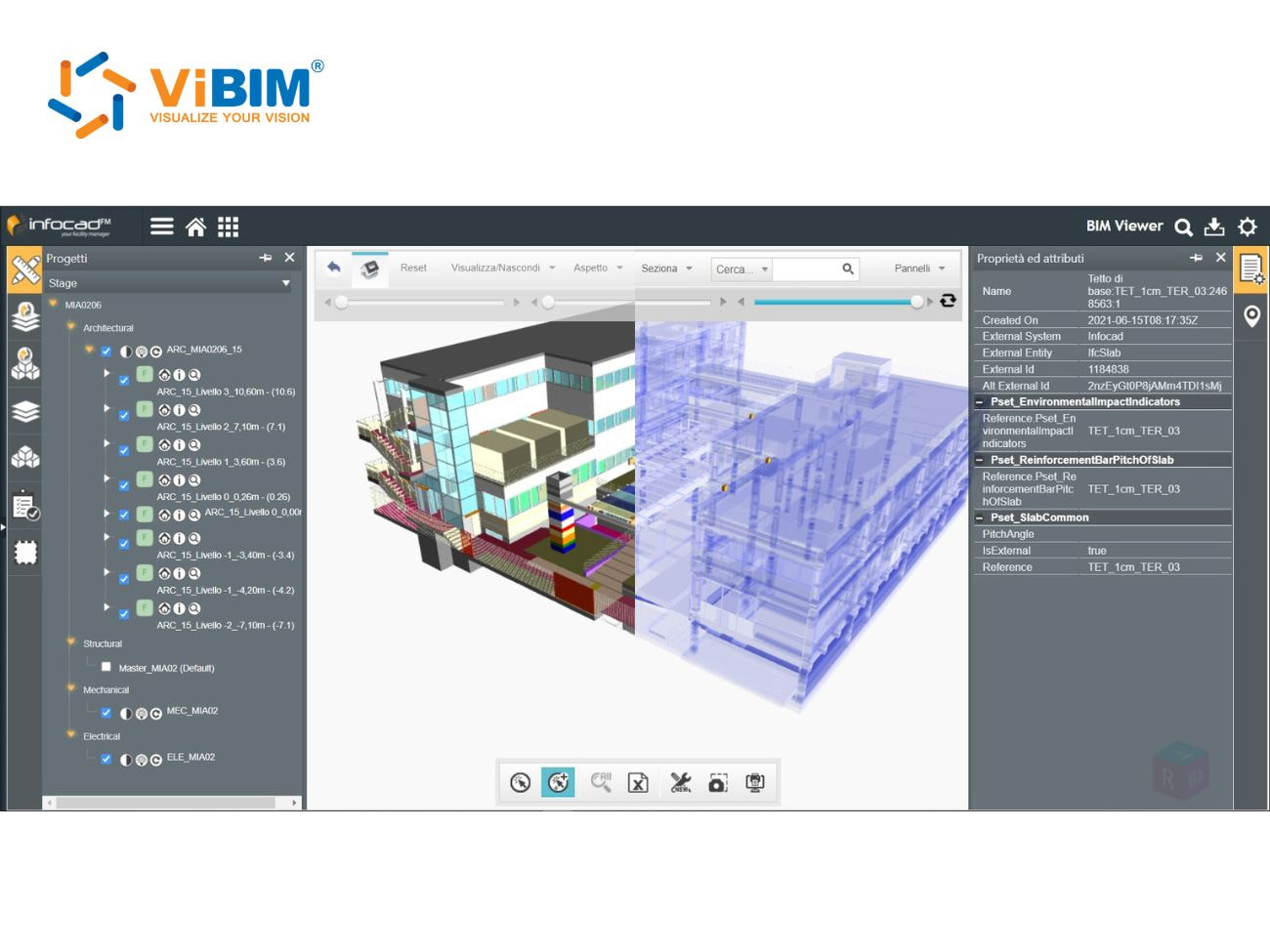
Why BIM data management is important?
BIM data management plays a major role in keeping construction projects organised, efficient, and transparent. Four main advantages clearly show how structured data can make every stage of a project run smoothly.
- Enhanced project control: Centralized data management provides project teams with clearer control over costs, schedules, and resources. Accurate information enables them to track material usage, forecast delays, and prevent unnecessary rework, thereby maintaining steady and predictable progress.
- Better collaboration across teams: Shared BIM platforms help bridge gaps between architects, engineers, and contractors who work from different locations. Real-time updates ensure everyone works from the same data, reducing miscommunication and streamlining key project decisions.
- Data-driven decisions: Reliable data allows design and construction teams to make confident choices based on current project information. Updated records help prevent design conflicts, reduce rework, and improve both efficiency and project quality over time.
- Quicker detection and resolution of clashes: Coordinated BIM models make it easier to find conflicts between systems like plumbing, electrical, or HVAC. Detecting these issues early in the design stage saves both time and cost before work begins on-site.
The challenges of managing BIM data
Managing BIM data often presents three key challenges, especially as projects become more complex and involve multiple disciplines:
- Maintaining data consistency and accuracy: Data consistency becomes a significant challenge as teams utilize various software tools. Disconnected systems can lead to misaligned updates and design errors. A unified data environment and shared standards help keep all project information accurate and synchronised.
- Managing large data volumes: BIM models generate vast datasets that expand as designs evolve. Unorganised data can slow down access and make collaboration difficult. A structured file system with reliable storage and retrieval methods keeps the project flowing efficiently and avoids wasted effort.
- Protecting data security and access rights: Sensitive design information requires strong protection from unauthorised use. Unsecured sharing or storage can expose valuable assets to risks. Using encryption, role-based permissions, and secure servers builds confidence among project teams and clients alike.
What is BIM data quality?
BIM data quality refers to the consistency, accuracy, completeness, format, and uniqueness of the information stored within a BIM model, ensuring it is fit for its intended use. Data quality reflects the dependability and trustworthiness of the collected information, indicating how well the model represents real-world conditions and supports informed decision-making. Let us describe each of them and give examples for better understanding.
Consistency
Consistency measures whether each occurrence of a data point in all sources exists and matches correctly. Consistent data for a room number means the same number must appear in every source: the model, the room program spreadsheet, and the Facility Management software. The metric used to evaluate this attribute is the number of inconsistencies.
For every data point, the project must establish which storage acts as the source of truth and communicate this decision to all teams. In simple terms, the source of truth is the master data reference, and if any discrepancies occur, its value should overwrite all others.
A clear example of data consistency can be seen in the table below:
| Source | Consistent data | Inconsistent data |
| Room program database | BB.2045 | BB.2045 |
| Architectural model | BB.2045 | BB 2045 |
| Structural model | BB.2045 | 2045 |
| Facility Management (FM) database | BB.2045 | BB.245 |
| Source | Consistent data | Inconsistent data |
| Room program database | AA.1023 | AA.1023 |
| Arch. Model | AA.1023 | AA 1023 |
| MEP Model | AA.1023 | 1023 |
| FM database | AA.1023 | AA.1023 |
Accuracy
Accuracy checks whether the data entered into the model truly reflects real-world conditions. These checks identify whether each value is correct or incorrect. For instance, when an object marked as “Load-bearing” is actually a 10 cm plasterboard wall, that data is inaccurate. The metric for this attribute is the ratio between the number of objects with data issues and the total number of correct ones.
Comprehensiveness
The comprehensiveness factor indicates how complete the data within the model is. It verifies whether all required information has been filled in and recorded properly. Each BIM element, such as a door, pipe, or wall, must contain specific data fields like material, location, and system code. Missing properties mean the data is incomplete.
This factor connects closely to the LOIN (Level of Information Need) and project requirements, which vary by project stage. For example, during the design phase, a model may only require basic shape and material information. During construction or operation, additional properties, such as installation dates or maintenance details, must also be included. To measure completeness, teams can count the number of required property fields that are empty. Fewer missing entries indicate higher completeness.
Format
Data entries must follow the required format for each property to maintain uniformity. For instance, the fire resistance property follows the “EIXX” format where XX are standard values (e.g., EI30, EI60, EI90). Similarly, concrete classes in Eurocode use the format “C30/37”. Even date formats can cause confusion for international teams, as they vary by region (e.g., DD.MM.YYYY or MM/DD/YYYY). The metric here is the ratio of data that does not meet the required format.
Below are examples of correct data formats:
| Data label | Correct format | Incorrect format |
| Concrete class in Eurocode | C30/37 | B30, C30-35, C30 |
| Fire resistance | EI60, REI60 | EI45, EI50, 100 |
| Model Maturity Index | MMI350 | Mmi 350, 200, m.m.i. 300 |
Uniqueness
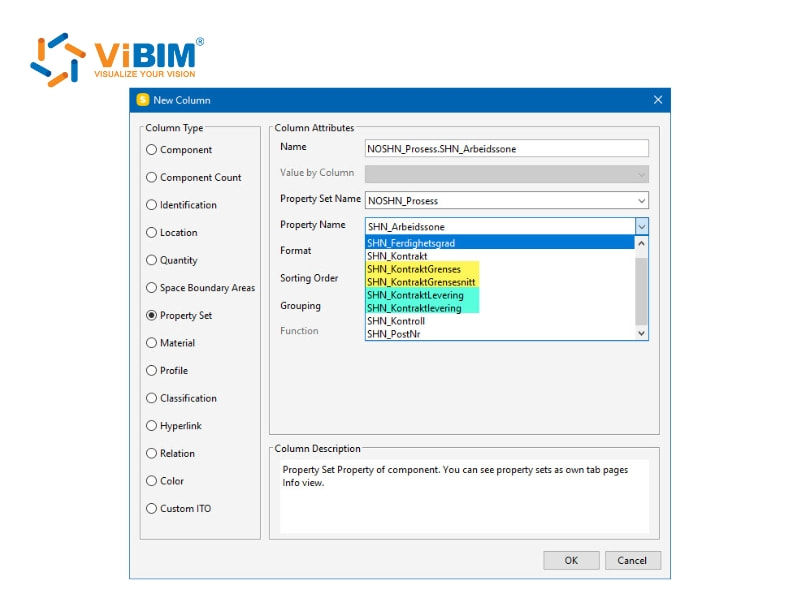
Uniqueness identifies whether duplicate data entries exist in the dataset. This measurement is especially important when the project requires unique element codes for tracking or integration in later stages. The metric used to evaluate this attribute is the total number of duplicated records detected.
Solibri offers unique BIM data validation features that directly relate to the concept of uniqueness as a metric in BIM datasets. Specifically, Solibri provides rule-based checking capabilities that include verifying the uniqueness of element codes or identifiers within the BIM model. It helps you enforce a strict “one element, one ID” rule through specific validation capabilities:
- GUID Validation: Solibri scans for unique Global Unique Identifiers (IFC GUIDs) to verify that every object is distinct. This applies whether you are looking at a single file or coordinating across multiple federated models.
- Beyond Geometry: The process goes past standard clash detection. It validates the data itself by using the Information Delivery Specification (IDS) to hunt for duplicate element codes or faulty classifications.
- Automated QA: By automating these checks early in the design phase, you prevent the chaos of managing duplicate codes during construction or facility management.
The metric here is the total count of duplicated records, but the real value is knowing your model allows for reliable tracking and integration downstream.
Timeliness
Timeliness ensures that the data remains current and accurately reflects real conditions at the time it is used. As design and construction progress, data can quickly become outdated. Updates can happen manually or automatically, depending on the workflow. The metric for this attribute is the number of records that have not been refreshed within the defined time frame.
How is BIM data integrated into the workflows?
BIM data integration supports project coordination and decision-making throughout different stages. Project lifecycle integration connects data from planning to maintenance, while data exchange and collaboration in BIM allow multiple teams to work seamlessly. These two methods create a structured workflow that readers can further explore for deeper understanding.
Project lifecycle integration
Project lifecycle integration is the backbone of BIM implementation, as it maintains data consistency across every project stage, from design to construction and maintenance. When data flows smoothly between these phases, teams can minimize errors, reduce rework, and achieve better project outcomes.
1. Design Phase
The Design Phase lays the foundation for all later stages. This is where the BIM model is built with intelligent, parametric components that describe the behavior and relationships of each element. Data management at this stage becomes the base for accurate decisions in design, construction, and operation. Real-time collaboration tools replace isolated workflows, making the model a shared and reliable reference for all participants.
Key data processes in this phase include:
- Performance analysis and design validation
- Generation of project documentation
- Clash detection and coordination
- Simulation data integration
- Version control and data updates
2. Construction Phase
The Construction Phase converts digital designs into actual structures. The model data now guides on-site coordination, resource allocation, and scheduling. By linking the model to time (4D BIM), teams can visualize sequences and manage progress more effectively. Cost and quantity information (5D BIM) supports accurate budgeting and minimizes waste through better material control.
Key data processes in this phase include:
- As-built documentation and change tracking
- Quality control and inspection data integration
- Site coordination and logistics management
- Progress and deviation tracking
3. Maintenance Phase
The Maintenance Phase converts the completed model into a detailed Asset Information Model (AIM) for long-term facility management. BIM data at this stage provides access to specifications, maintenance plans, and warranty records for each component. This information enables facility teams to schedule predictive maintenance, enhance energy efficiency, and prolong the building’s lifespan through effective BIM for facility management.
Key data processes in this phase include:
- Asset and equipment tracking
- Maintenance scheduling and performance monitoring
- Energy analysis and system optimization
- Updating digital records for future renovations
Data exchange and collaboration in BIM
One of the most significant factors behind successful BIM implementation is the effectiveness of team collaboration and data exchange. Construction projects involve architects, engineers, contractors, and owners, so data must move smoothly between them to keep designs accurate and workflows efficient.
Interoperability: The Foundation of Collaboration
In BIM, interoperability goes beyond simple file transfers. It represents the capability of different software tools and disciplines to communicate effectively while maintaining data accuracy and meaning. Because each stakeholder may use a different BIM platform, achieving interoperability often becomes a challenge.
According to ISO 19650-1, Clause 6.1 (Principles of the information delivery cycle), “Information exchanges should be done using open standards whenever possible.” This principle reinforces the importance of neutral data formats that allow smooth communication between diverse BIM environments, adhering to the principles of openBIM.
Open standards such as IFC (Industry Foundation Classes) and BCF (BIM Collaboration Format) embody this idea by enabling reliable data exchange across systems, ensuring that design, engineering, and scheduling information stays aligned. Similarly, ISO 19650-2, Clause 5.1.6 emphasizes the need to “establish the project’s reference information and shared resources,” which may include the IFC schema or project data shared as IFC datasets.
The consistent application of LOD BIM levels and LOIN (Level of Information Need) standards further refines model precision, promoting clearer coordination and reducing errors throughout the BIM process.
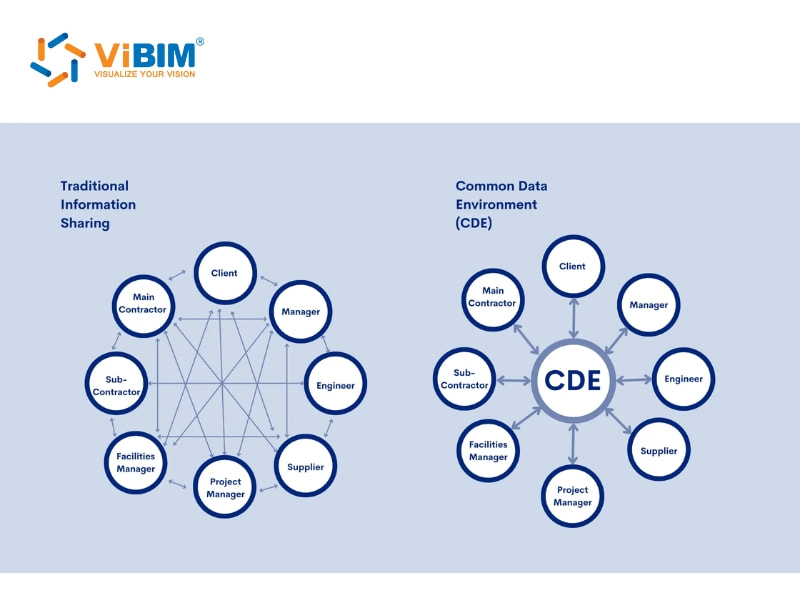
Common Data Environments (CDE): The Collaboration Hub
A Common Data Environment (CDE) functions as a shared platform where all project data is stored, organized, and accessed. According to ISO 19650-1, Clause 3.3.15 (Definition of CDE):
“Common data environment (CDE) is an agreed source of information for any given project or asset, for collecting, managing and disseminating each information container through a managed process.”
Instead of exchanging scattered files, every participant can rely on a single, verified, and updated source of information. This aligns with ISO 19650-1, Clause 12 (Common data environment solution and workflow), which states:
“A CDE solution and workflow should be implemented to allow information to be accessed by those who require it to undertake their function.”
Strict adherence to these standards is often a precursor for organizations seeking ISO 19650 certification. Modern CDEs support advanced functions that include:
- Version control to track model changes over time
- Real-time collaboration so teams can review and update data simultaneously
- Workflow management for approvals and task tracking
- Audit trails and permissions to maintain accountability and data protection
By integrating a CDE into BIM workflows, project teams create a transparent and connected ecosystem that minimizes miscommunication, prevents data duplication, and reduces costly mistakes.
To understand the full scope of what is CDE in construction and how it operates as a single source of truth, it helps to first recognize its definition according to ISO 19650.
BIM data use cases
BIM data supports a wide range of practical use cases that help teams improve productivity, accuracy, and communication across construction projects. These three key applications demonstrate how BIM data is effectively utilized in real-world workflows.
- Accurate drawings and documentation: BIM systems allow project teams to produce highly consistent and up-to-date drawings, schedules, and related documents. Every time design elements are adjusted, connected components and quantities update automatically, keeping all construction documents synchronized and reducing manual errors.
- Automated complex calculations: BIM models automate many technical calculations that were previously done manually. Intelligent elements within the model can compute electrical loads, material quantities, or system capacities, minimizing the risk of human error and improving overall design reliability.
- Improved communication and visualization: BIM data enables stakeholders who are less involved in design to gain a better understanding of project details. Interactive 3D models and shared data environments facilitate easier monitoring of updates, review of potential conflicts, and informed decision-making across various project stages.
The future of BIM data
The future of BIM data is being shaped by three major advancements that are changing how professionals design, manage, and operate buildings in smarter and more connected ways.
- Artificial Intelligence and Machine Learning (AI & ML): AI and ML are reshaping BIM workflows by automating repetitive tasks and improving model intelligence. These technologies analyze design patterns to identify potential clashes, optimize layouts, and use BIM analytics to predict construction risks before they occur. By learning from past data, AI-driven BIM systems enhance project precision, save time, and support energy-efficient design strategies.
- Cloud-Based BIM Solutions: Cloud-based platforms are transforming how teams collaborate and share data across different project stages. They allow multiple users to access and edit the same model simultaneously, maintaining consistent updates and preventing data loss. With hybrid cloud environments combining on-site security and online scalability, construction teams can manage complex models more efficiently while reducing system maintenance and hardware costs.
- Integration with Emerging Technologies: BIM data management is expanding through integration with technologies like AR, IoT, digital twins, smart sensors, and blockchain. These tools connect physical assets to digital models, allowing real-time data exchange that supports monitoring and predictive maintenance. The outcome is a more intelligent and responsive construction process where design, performance, and operation work together seamlessly.
The article has provided a clear overview of what BIM data is, how it is categorized, and how bim data management supports collaboration, efficiency, and data accuracy across project stages. Each section explained how structured and unstructured information, integration methods, and future technologies contribute to better control and transparency in the construction process. By addressing these aspects, the article helped readers understand the full value of managing BIM information effectively.
ViBIM focuses on providing Revit model outsourcing from Point Cloud data (Scan to BIM), specializing in using Revit as the main authoring tool within the Autodesk ecosystem. The company provides detailed BIM models for building surveyors, as well as as-built documentation, design, and engineering projects. Contact ViBIM today to discuss your Revit modeling requirements and receive a complimentary quote for the best services.
Vietnam BIM Consultancy and Technology Application Company Limited (ViBIM)
- Address: 10th floor, CIT Building, No 6, Alley 15, Duy Tan street, Cau Giay ward, Hanoi, Vietnam
- Phone: +84 944 798 298
- Email: info@vibim.com.vn











