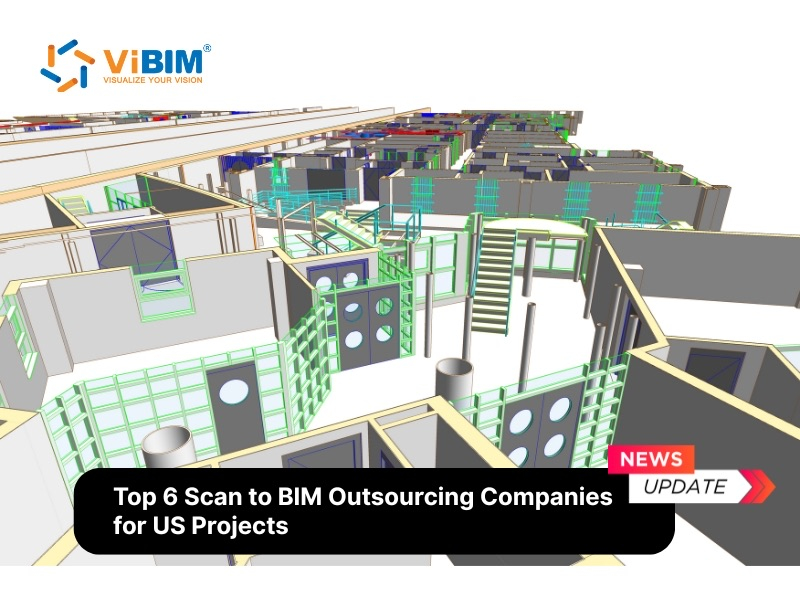
As-built drawings are the final documentation set that compares original design plans with actual construction outcomes. These records capture every physical modification that occurred during the building process—from minor outlet relocations to major structural shifts. Contractors mark these changes using red ink on construction documents, which is why professionals often call them “red-line drawings” or “record drawings.”
Building owners and facility managers depend on accurate as-built documentation for four primary operational purposes: onboarding efficiency, facility maintenance, permit approval, and future renovation planning. These documents require precise site capture through laser scanning, followed by expert BIM modeling to transform point cloud data into coordinated technical models and drawings.
This article explains what as-built drawings are, why they matter for building lifecycle management, who creates them, and what components a complete documentation package includes. You will learn the five-step process for creating accurate documentation and six strategies to improve your final deliverables.

As-Built Drawings Defined
As-built drawings are revised construction documents that reflect all changes made during the building process. The contractor submits these marked-up blueprints upon project completion to show the exact dimensions, geometry, and location of every installed element.
The American Institute of Architects (AIA) distinguishes between “as-built drawings” and “record drawings” in its B101 contract documentation. As-built drawings are the contractor’s marked-up field documents. Record drawings are the professionally updated versions that incorporate all as-built information into a comprehensive final package. Many professionals use these terms interchangeably, though the technical distinction remains important for contract clarity.
Three related document types serve different purposes in construction:
As-designed drawings show the original project intent before construction begins. As-built drawings capture field changes during construction using red-line markups. As-constructed drawings (record drawings) represent the final, professionally formatted documentation delivered to the owner.
The RIBA Plan of Work 2013 defines “as-constructed” information as documentation produced at project completion to represent what has been built. This package comprises a mixture of as-built information from specialist subcontractors and final construction issue documents from design team members—delivered during Stage 6 (Handover and Close Out).
Why Are As-Built Drawings Important?
As-built drawings serve four primary operational purposes throughout a building’s lifecycle: onboarding efficiency, facility maintenance, permit approval, and future renovation planning.
- Onboarding efficiency improves when new team members access verified documentation immediately. Subcontractors start work faster without delays caused by searching for outdated specifications or missing file locations during project handover. This reduces the learning curve for maintenance staff inheriting unfamiliar facilities.
- Facility maintenance becomes more effective when crews can locate hidden systems quickly. Mechanical, electrical, and plumbing components often deviate from original designs during construction. Accurate documentation shows the precise locations of buried utilities, concealed junction boxes, and modified duct runs. Owners reduce long-term operational costs by eliminating guesswork during emergency repairs. Learn how BIM supports facility management throughout the building lifecycle.
- Permit approval processes require accurate as-built documentation in many jurisdictions. Government agencies mandate final record drawings before issuing occupancy certificates. Building inspectors verify code compliance by comparing documented changes against original submissions. Certificate of Occupancy delays often trace back to incomplete or inaccurate documentation packages.
- Future renovations benefit from documented change history. Architects analyze structural modifications to plan retrofits accurately. Investors avoid expensive exploratory demolition by knowing exactly what exists behind walls before design work begins. Industry research consistently shows that poor documentation leads to rework, which accounts for 2-6% of total project costs in commercial construction.
Stephen R. Pettee, CCM, explains in a Construction Management Association of America paper: “They are important for those who use the finished product, as they provide a legacy of what was actually built. This legacy becomes more important, as we continue to build on top of old work, land ownership changes, or for public works, as employees familiar with what was built are replaced over time by attrition.”
Components of As-Built Drawings
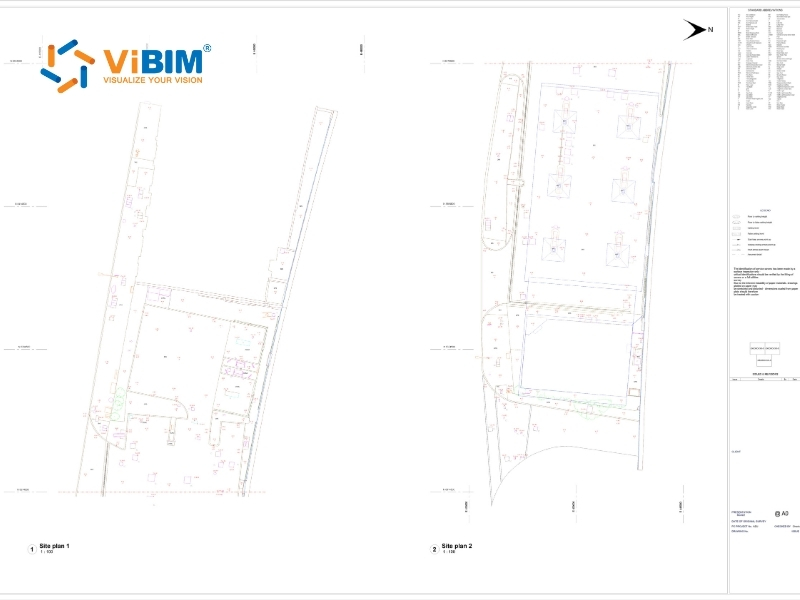
A complete as-built documentation package includes six fundamental categories that define the constructed asset. These categories work together to capture both visible elements (building layout, design features) and hidden systems (MEP, utilities) along with their specifications.
The table below breaks down each component, its contents, and documentation purpose:
| As-Built Component | Description | Documentation Purpose |
| Building Layout and Structure | Floor plans, elevations, structural elements including beams, columns, foundations, and load-bearing walls | Defines the physical framework and spatial relationships |
| Design Features | Architectural details including doors, windows, partition walls, staircases, and lighting arrangements | Documents interior configuration and circulation patterns |
| Mechanical Systems | Diagrams and data for HVAC equipment, plumbing networks, and electrical distribution grids | Supports operational functionality and maintenance planning |
| Utilities | Critical connections and hardware for water supply, sewage lines, gas pipes, and main power feeds | Enables emergency response and system modifications |
| Interior Finishes | Materials selected for flooring surfaces, wall treatments, custom cabinetry, and specific fixture types | Records aesthetic specifications and replacement requirements |
| Specifications | Exact materials used, final measurements, installation methods, testing protocols, and scaled dimensions | Provides technical reference for future work |
Standard Notation Conventions
Standard notation conventions in as-built drawings include revision clouds, delta symbols, annotations, revision blocks, and reference numbers. Drafters apply these five markings to track modifications and make visual identification immediate for reviewers.
- Revision clouds are freeform, cloud-shaped outlines that circle modified sections on drawings. These irregular boundaries draw attention to specific areas where changes occurred, making it easy for reviewers to spot alterations without reading every dimension.
- Delta symbols use a triangular character (Δ) placed adjacent to modified elements. This convention indicates differences between the original bid set and the final constructed result. Some organizations use sequential numbers within the delta to track revision history.
- Annotations provide textual context explaining the alteration. Notes may include the specific date of change, technical reasoning behind the modification, or reference to the authorizing document such as an RFI response or change order.
- Revision blocks are dedicated table areas near the drawing margin. These blocks contain administrative details including modification descriptions, responsible parties, and approval timelines. The revision block creates a formal audit trail for documentation changes.
- Reference numbers are unique numeric identifiers linking every change to external documentation. These numbers connect drawing modifications to approved change orders, RFI responses, or submittal logs maintained in the project files.
Who Creates As-Built Drawings?
Four parties create as-built drawings: general contractors who mark field changes, architects who finalize documentation, survey companies who capture site conditions, and BIM specialists who convert point cloud data into coordinated models. Each role serves distinct functions in the documentation workflow.
Architects typically finalize the documentation process by incorporating raw field data and red-line markups into clean digital files. The AIA B101 contract defines record drawings as documents “revised to reflect and represent the actual conditions of the project as it was constructed, usually based on marked-up prints, drawings, and other data furnished by the contractor to the architect.”
Complex projects require additional expertise from specialized professionals. Survey companies or laser scanning firms capture existing site conditions using terrestrial scanners that record millions of data points. The resulting point cloud datasets form the foundation for accurate 3D modeling.
BIM modeling specialists convert point cloud data into coordinated Revit models across architectural, structural, and MEP disciplines. This As-Built BIM Modeling process requires expertise to interpret dense scan data and create accurate native BIM objects. The skill sets for field scanning and office-based modeling differ significantly—scanning professionals focus on data capture quality, while BIM modelers focus on model coordination and object creation.
The as-built documentation process typically involves all four parties: contractors document field changes, survey teams capture existing conditions, BIM specialists create coordinated models, and architects finalize the deliverable package.
How to Create As-Built Documentation
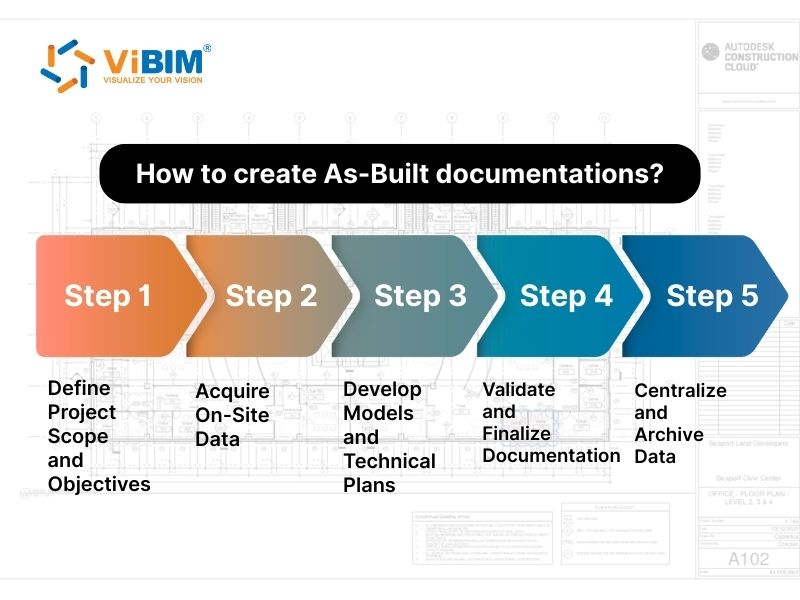
Creating as-built documentation follows a five-step workflow: 1. define scope, 2. acquire data, 3. develop models, 4. validate accuracy and 5. archive records. The timeline and deliverables vary based on project complexity and client requirements.
Step 1: Define Project Scope and Objectives
Project managers must clarify documentation requirements before site work begins. Different goals require varying levels of detail—simple renovations may need basic drawing sets, while complex retrofits demand comprehensive BIM models with full MEP coordination.
- Level of Development (LOD) specifications determine modeling detail. LOD 100 provides basic spatial representation. LOD 200 adds approximate geometry. LOD 300 includes precise dimensions suitable for coordination. LOD 400 provides fabrication-ready detail with exact sizes and connections.
- Deliverable formats should be specified upfront. Common outputs include Revit native files (RVT), Industry Foundation Classes (IFC) for software interoperability, AutoCAD drawings (DWG) for 2D documentation, and PDF exports for distribution.
- Accuracy requirements depend on intended use. Facility management applications typically accept tolerances of 5-10mm. Renovation planning may require 3-5mm accuracy. MEP coordination often demands tighter tolerances to ensure proper clearances.
Step 2: Acquire On-Site Data
Survey teams capture existing site conditions to document every modification from original layouts. Two primary methods exist: traditional manual measurement and laser scanning.
- Traditional measurement uses tape measures and total stations. This approach works for small spaces but consumes significant time on larger projects. Human error introduces inconsistencies, and revisiting the site requires physical return trips.
- Laser scanning has become the industry standard for as-built data capture. Laser scanning captures millions of data points that form the foundation for accurate BIM modeling. Scan quality directly impacts model accuracy—poorly registered scans or gaps in coverage create challenges during the modeling phase. Survey teams deliver registered point cloud files in formats like Autodesk ReCap (RCP/RCS) or E57, which BIM specialists use as reference data for model development. Manufacturer specifications typically claim 1-3mm accuracy at distances up to 100 meters (328 feet), though environmental conditions affect real-world results.
Scanning professionals deliver registered point cloud files in formats like Autodesk ReCap (RCP/RCS) or E57. These files form the foundation for BIM modeling. The investment in quality scan data pays dividends throughout the project lifecycle—teams can revisit the data digitally without returning to the physical location.
Step 3: Develop Models and Technical Plans
BIM specialists develop precise 3D models from collected point cloud data immediately after scanning concludes. The point cloud to BIM process transforms dense scan information into native BIM objects that contain geometric and parametric data.
Modeling Challenges and Solutions:
Point cloud data presents unique interpretation challenges. Occluded areas—spaces blocked from scanner view—require professional judgment to model accurately. Experienced modelers recognize scan shadows behind equipment, inside wall cavities, and above ceiling systems. They apply industry knowledge to complete these gaps without fabricating information.
Material identification from grayscale point clouds demands expertise. Modelers distinguish between concrete and masonry, identify steel versus aluminum framing, and recognize different MEP system types based on shape, size, and routing patterns. This interpretation skill separates accurate as-built models from generic representations.
Discipline-Specific Modeling:
- Architectural modeling documents walls, doors, windows, ceilings, and spatial layouts. Modelers trace point cloud data to create walls at correct locations, insert door and window families at accurate positions, and define room boundaries for area calculations. Wall thickness variations, non-standard openings, and field modifications require careful attention.
- Structural modeling captures beams, columns, foundations, and load-bearing elements. Steel connections, concrete members, and bracing systems require accurate representation for renovation engineering analysis. Hidden structural elements—embedded columns, concealed beams—challenge modelers to balance visible data with logical construction assumptions.
- MEP modeling maps mechanical, electrical, and plumbing systems. These disciplines often deviate significantly from original designs due to field conditions, coordination conflicts, and value engineering changes. Pipe sizing, duct dimensions, and conduit routing must match point cloud evidence precisely. Accurate MEP documentation proves critical for maintenance operations and future renovations.
Quality Benchmarks:
Professional Scan to BIM deliverables meet specific accuracy standards. LOD 300 models position elements within 5-10mm of point cloud reference data. Clash-free coordination between disciplines prevents downstream conflicts. Complete object data—including materials, dimensions, and system classifications—supports facility management applications.
The deliverable package typically includes floor plans, elevations, sections, and detailed schedules extracted from the coordinated 3D model. Turnaround time depends on structure size, LOD requirements, and the modeling team’s expertise.
For organizations lacking in-house expertise, partnering with specialized Scan to BIM providers ensures accurate modeling and faster turnaround times.
Step 4: Validate and Finalize Documentation
Project leads must review completed documentation and obtain approval from all relevant parties before final delivery. This validation step confirms accuracy and identifies remaining discrepancies.
- Quality assurance involves comparing model elements against point cloud data. Modelers verify wall positions, pipe runs, and equipment locations by overlaying the model on the source scan. Deviations exceeding project tolerances require investigation and correction.
- Stakeholder review includes the building owner, general contractor, and relevant design professionals. Each party examines documentation relevant to their responsibilities. Owners verify that deliverables meet contract requirements. Contractors confirm that documented changes match their field records.
- Accuracy verification may involve spot-checking specific elements against physical measurements. Critical dimensions, equipment clearances, and life-safety systems warrant additional validation before final delivery.
Step 5: Centralize and Archive Data
Facilities managers should store final documentation in secure, accessible locations and implement systems for managing future updates. This practice keeps files current and ensures availability when needed.
- Digital storage offers advantages over physical file cabinets. Electronic files support faster searches, enable multiple simultaneous users, and facilitate updates without redrawing entire sheets. Cloud-based systems grant access from any location with internet connectivity.
- Version control tracks changes over time. As buildings undergo modifications, documentation requires updates. A systematic approach prevents confusion between outdated and current files. Clear naming conventions and date stamps help users identify the latest versions.
- Access management balances security with usability. Authorized parties—including facilities staff, contractors, and emergency responders—need appropriate access levels. Read-only permissions protect master files while allowing reference use.
6 Strategies to Improve As-Built Drawings
Six proven strategies enhance as-built documentation quality throughout the project lifecycle:
- Start Early with Cloud Integration. Implement cloud-based storage before construction begins. Real-time data capture prevents the information gaps that occur when teams compile documentation only at project end.
- Train and Align the Team. Establish standardized documentation procedures before work starts. Consistent methods across all subcontractors ensure their contributions integrate into a coherent final package.
- Utilize High-Tech Data Tools. High-quality output requires high-quality input. Three technologies significantly upgrade documentation reliability:
- Laser scanning captures millions of data points that form the foundation for accurate documentation. Scanning companies deliver registered point cloud files in formats like Autodesk ReCap (RCP/RCS) or E57.
- Building Information Modeling transforms scan data into coordinated 3D models across architectural, structural, and MEP disciplines. These as-built models enable precise documentation extraction and support facility management applications.
- Connected construction platforms like Autodesk Build or Autodesk Construction Cloud maintain version control and synchronize all project documentation in accessible ecosystems.
- Add Photographic Evidence. GPS-tagged, time-stamped photos document conditions that drawings cannot fully capture. Visual records create audit trails showing site conditions at specific project milestones.
- Ensure Accessibility and Updates. Treat documentation as living records. Cloud-based systems with proper access controls enable authorized parties to view and update files throughout the building lifecycle.
- Prioritize Searchability and Structure. Organize turnover packages systematically by discipline, floor level, and document type. Searchable databases help facilities teams locate specific information instantly.
As-Built Drawings vs Record Drawings: What’s the Difference?
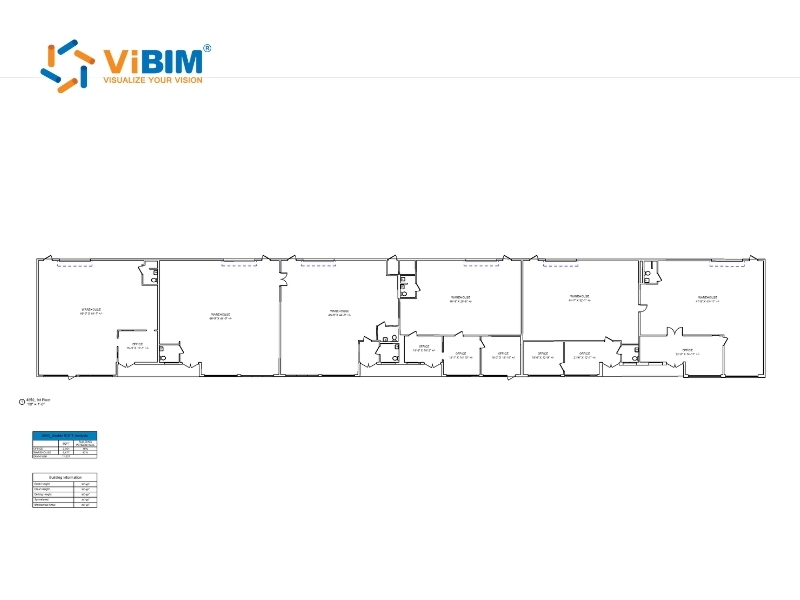
As-built drawings are contractor-maintained field markups, while record drawings are professionally formatted final documents prepared by design teams. The fundamental difference lies in who creates them and when—as-builts during construction by field crews, record drawings after completion by architects or engineers. Understanding the difference prevents confusion during project closeout and contract administration.
- As-built drawings are the marked-up construction documents that capture changes during the building process. Field crews create these red-line annotations in real time as modifications occur. These working documents contain raw information but may lack professional formatting. The contractor maintains these documents on-site throughout construction.
- Record drawings are the formal, professionally updated documents that incorporate all as-built information into a comprehensive final package. Architects or drafters clean up the raw as-built markups, verify accuracy against available information, and produce polished documentation. The AIA Handbook of Professional Practice states that “record drawings” is preferable to “as-built drawings” because the phrase more accurately describes documents based on contractor-furnished information rather than independent verification.
The key distinction: as-builts are working field documents maintained by contractors, while record drawings are final deliverables prepared by design professionals. In practice, many industry participants use these terms interchangeably. Contract language should specify exactly which documents are required and who bears responsibility for preparing them.
Need Professional As-Built Documentation?
ViBIM delivers accurate as-built drawings directly from point cloud data using Revit, ensuring your documentation reflects real-world conditions with millimeter-level precision.
Frequently Asked Questions
What is the difference between as-built and shop drawings?
As-built drawings document actual constructed conditions after work completes. Shop drawings show fabrication details before manufacturing and construction begins. Learn more about the difference between as-built and shop drawings in our detailed comparison.
Are as-built drawings required by law?
Requirements vary by jurisdiction and project type. Many building departments require as-built documentation for permit closeout and Certificate of Occupancy. Federal projects, healthcare facilities, and critical infrastructure typically mandate comprehensive as-built packages. Check local codes and contract documents for specific requirements.
How long should as-built drawings be retained?
Retention periods depend on building type and local regulations. Most commercial facilities maintain as-built documentation for the building’s entire operational life. Some jurisdictions specify minimum retention periods of 10-20 years. Critical facilities like hospitals and government buildings often require indefinite retention with secure backup systems.
What file formats are standard for as-built documentation?
Common formats include DWG (AutoCAD), RVT (Revit), IFC (Industry Foundation Classes), and PDF. Digital twins may incorporate additional formats like point cloud files (RCP, RCS, E57) and 3D models. Specify required formats in project contracts to ensure compatibility with the owner’s facilities management systems.
Can as-built drawings be created from existing buildings?
Yes. Laser scanning enables documentation of existing structures without original construction drawings. Survey teams capture current conditions using terrestrial scanners, then BIM specialists create models and drawings from the point cloud data. This process serves renovation planning, facility management, and historic preservation projects.
Conclusion
ViBIM specializes in the Scan to BIM modeling phase, converting point cloud data into accurate Revit models across architectural, structural, and MEP disciplines. The team delivers LOD 100-400 models with a 99% on-time completion rate and turnaround times up to 30% faster than industry standards.
For scanning professionals: Partner with ViBIM for reliable BIM modeling support. New partners qualify for a complimentary trial project to evaluate modeling quality and workflow compatibility. Send your point cloud data for a project quote.
For building owners and contractors: Ask your laser scanning provider about their BIM modeling capabilities, or contact ViBIM directly to discuss your documentation requirements.
ViBIM – Revit Model Outsourcing
- Address: 10th floor, CIT Building, No 6, Alley 15, Duy Tan street, Cau Giay ward, Hanoi, Vietnam
- Phone: +84 944 798 298
- Email: info@vibim.com.vn