
Autodesk Revit is a cornerstone of modern construction, transforming how professionals design, build, and manage projects. As a premier Building Information Modeling (BIM) software, Revit allows you to create intelligent 3D models that contain a wealth of coordinated data. This guide offers a comprehensive overview, exploring what Revit is, its key features, and how it empowers professionals across the Architecture, Engineering, and Construction (AEC) industry. By understanding its capabilities, you can see how Revit drives efficiency, improves collaboration, and delivers higher-quality results from concept to completion.
What is Revit Software?
Revit is a powerful software from Autodesk for Building Information Modeling (BIM). Originally developed by Charles River Software in 1997 and acquired by Autodesk in 2002, it allows you to create intelligent, three-dimensional models of buildings and infrastructure. These models are built from parametric objects containing precise data, from geometry to material specifications. As a 4D BIM application, Revit includes tools to plan and track the building’s lifecycle, from concept to construction and demolition. Professionals like architects, structural engineers, MEP engineers, and contractors use Revit to design structures, annotate models with 2D drafting elements, and access all project information from the model’s central database, improving collaboration and decision-making.
Revit’s Native File Formats
Revit utilizes a set of distinct, native file formats to manage different aspects of the BIM workflow. These formats separate the overall project environment from the individual components and the templates used to start new projects.
- .rvt (Revit Project File): This is the main project file that contains the complete building model. It houses all the geometry, data, views (plans, sections, elevations), schedules, and sheets required to document the design. All work is centralized and coordinated within this file.
- .rfa (Revit Family File): These files contain individual components, or “families,” that are loaded into a project file. Examples include doors, windows, furniture, and mechanical equipment. .rfa files are created and edited in a separate Family Editor, where their parametric properties (like size and material) are defined.
- .rte (Revit Template File): This file serves as the starting point for a new project (.rvt). A template file pre-sets standards, units, graphical settings, views, and pre-loaded families to ensure consistency across projects.
- .rft (Revit Family Template File): This is the base file for creating new families (.rfa). Family templates provide a framework with predefined parameters and reference planes specific to the type of object being created, such as a wall-based door or a ceiling-hosted light fixture.
Key features of Autodesk Revit
Revit’s robust feature set is designed to support a seamless and integrated BIM workflow. These tools empower you to design with precision, collaborate effortlessly, and visualize your projects with stunning clarity.
- Parametric Modeling: This is the core of Revit. Components are defined by parameters and rules, allowing them to intelligently update across the entire model when a change is made. For example, moving a wall automatically adjusts any connected doors, windows, and roofs.
- 3D Design and Visualization: Revit allows you to work directly in a 3D environment, creating realistic and accurate models. This enables you to visualize complex designs, identify potential issues early, and communicate design intent effectively to clients and stakeholders.
- Worksharing and Collaboration: Multiple team members can access and work on the same centrally shared model simultaneously. This feature streamlines coordination between architects, engineers, and contractors, significantly reducing errors and rework.
- Comprehensive Documentation: You can automatically generate consistent 2D drawings—such as floor plans, sections, and elevations—directly from your 3D model. With tools for tagging, dimensioning, and annotating, any change in the model is automatically reflected in all associated documentation.
- Interoperability: Revit supports seamless data exchange by importing, exporting, and linking with common BIM and CAD file formats, including IFC, DWG, and DGN. This ensures smooth workflows when using multiple software platforms in a project.
- Clash Detection: Revit helps you identify and resolve conflicts between different building systems (e.g., plumbing running through a structural beam) before construction begins. This proactive approach saves significant time and money by preventing costly field modifications.
- Scheduling and Quantity Takeoff: You can quickly extract accurate material quantities and create detailed schedules directly from the model. This feature is invaluable for precise cost estimation, procurement, and project planning.
- Project Phasing: You can define and manage different stages of a project, such as demolition, renovation, and new construction, within a single model. This allows you to create views and schedules that clearly represent the project’s timeline and evolution.
To see how Revit’s extensive feature set stacks up against other industry standards and determine which platform offers the most value for your workflow, read our in-depth review of the best BIM software.
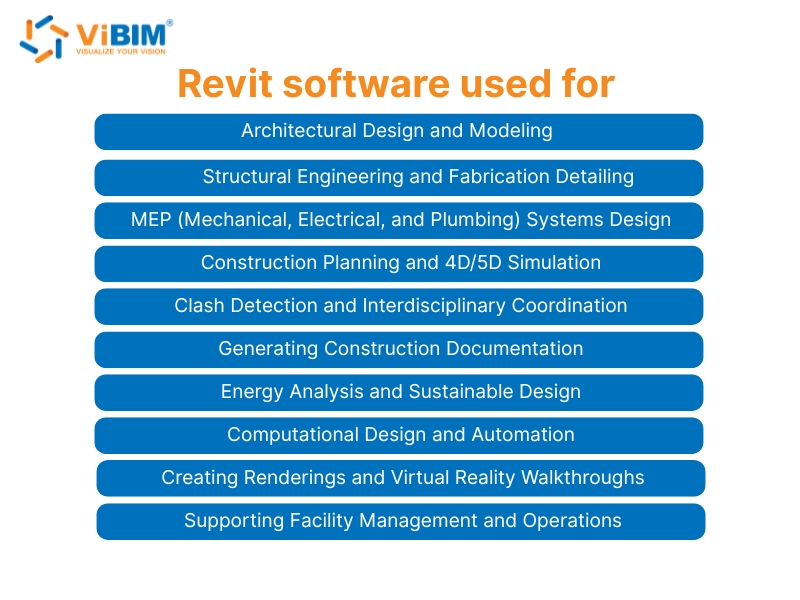
What is revit software used for?
Revit is a versatile platform with a wide range of applications that support every phase of the building lifecycle. Its capabilities extend far beyond simple 3D modeling, enabling you to manage complex data and streamline critical project tasks.
- Architectural Design and Modeling: Developing conceptual designs, detailed floor plans, and complete architectural models.
- Structural Engineering and Fabrication Detailing: Modeling steel, concrete, and wood structures and preparing detailed models for fabrication.
- MEP (Mechanical, Electrical, and Plumbing) Systems Design: Creating and coordinating complex building services, including HVAC, electrical, and plumbing systems.
- Construction Planning and 4D/5D Simulation: Linking models to project timelines (4D) and cost data (5D) to visualize construction sequences and manage budgets.
- Clash Detection and Interdisciplinary Coordination: Identifying and resolving conflicts between architectural, structural, and MEP systems before construction begins.
- Generating Construction Documentation: Producing accurate and consistent construction drawings, schedules, and material quantity takeoffs directly from the model.
- Energy Analysis and Sustainable Design: Performing simulations to analyze building performance, optimize energy efficiency, and support sustainability goals.
- Computational Design and Automation: Using visual programming tools like Dynamo to automate repetitive tasks and explore complex geometric designs.
- Creating Renderings and Virtual Reality Walkthroughs: Generating photorealistic visualizations and immersive VR experiences to communicate design intent to clients and stakeholders.
- Supporting Facility Management and Operations: Providing a data-rich as-built model to owners for streamlined maintenance and long-term facility management post-construction.
What Is the Difference Between Revit and AutoCAD?
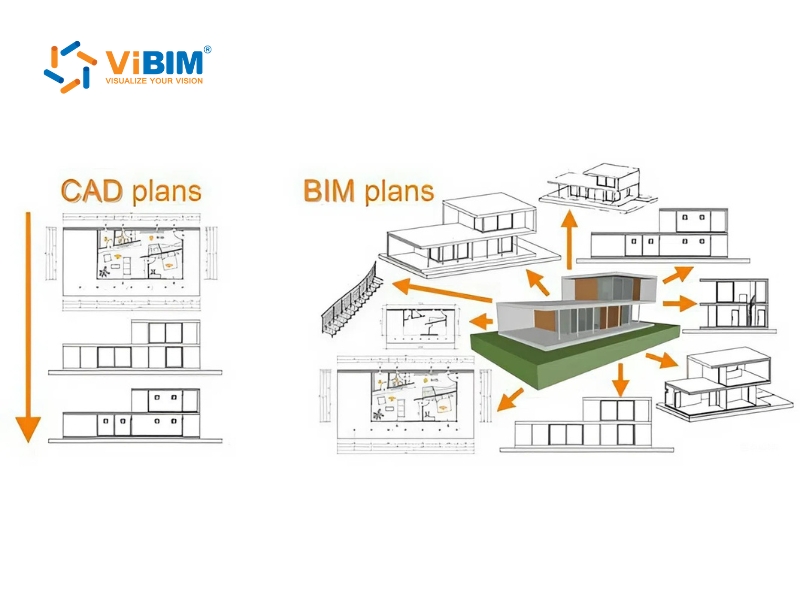
The fundamental difference is that Revit is a BIM software, while AutoCAD is a general-purpose Computer-Aided Design (CAD) software. Think of it this way: In AutoCAD, you draw lines that represent a building, much like a digital drawing board. In Revit, you build an intelligent 3D model using objects (like walls and doors) that contain real-world data and function as a building information database.
The following table provides a detailed breakdown of these key differences:
| Feature | Revit | AutoCAD |
| Primary Focus | Building Information Modeling (BIM): A specialized solution for the Architecture, Engineering, and Construction (AEC) industry. | Computer-Aided Design (CAD): A general-purpose drafting tool used across many industries. |
| Core Technology | Model-Based: You build an intelligent 3D model where each object contains a rich set of data. | Drawing-Based: You create 2D or 3D drawings primarily composed of geometric lines, arcs, and circles. |
| Data Management | Central Database: All project information is stored in a single, unified model, ensuring consistency. | Individual Files: Drawings are stored in separate files that require manual coordination and management. |
| Change Management | Parametric/Automatic: A change made in one view automatically updates across all other views, schedules, and drawings. | Manual: Changes must be manually updated in each individual drawing and file where the element appears. |
| Collaboration | Simultaneous: The worksharing feature allows multiple users to work on the central model at the same time. | Linear: Coordination is typically file-based, involving a back-and-forth exchange of reference drawings (XREFs). |
| Discipline Coordination | Integrated: Natively supports architectural, structural, and MEP disciplines in one model, enabling automated clash detection. | Fragmented: Requires manual overlaying of separate files from different disciplines to check for conflicts. |
While the difference between Revit and AutoCAD is clear, the choice between top-tier BIM tools is more nuanced; explore our detailed analysis of Revit vs Archicad to see how the two biggest competitors stack up.
Source image: www.elogictech.com
Who Uses Revit? 7 Key Professional Roles
Revit’s collaborative environment and discipline-specific toolsets make it an essential platform for a wide range of professionals in the AEC industry. It provides each role with the tools needed to contribute effectively to a unified project model.
Revit for Architects
For architects, Revit is a powerful tool for transforming conceptual ideas into detailed, constructible designs. It streamlines the entire architectural workflow, from initial sketches to final construction documents.
Benefits: Revit allows you to develop and refine designs in 3D, create high-quality visualizations to communicate with clients , and perform early-stage analyses for factors like energy performance.
Applications:
- Developing schematic designs and massing studies.
- Creating detailed floor plans, elevations, and sections.
- Generating photorealistic renderings and walkthroughs.
- Producing comprehensive construction documentation.
Revit for Structural Engineers
Structural engineers use Revit to model, analyze, and document structural systems with high precision. The software integrates seamlessly with analysis and detailing applications, creating an efficient and accurate workflow.
Benefits: You can model concrete, steel, and wood structures with precision, integrate your model with analysis software to verify structural integrity, and produce detailed fabrication drawings.
Applications:
- Modeling concrete reinforcement and structural steel frames.
- Performing structural analysis and checking code compliance.
- Creating detailed shop drawings for fabrication.
- Coordinating with architectural and MEP designs.
Revit for MEP Engineers
Revit provides MEP (Mechanical, Electrical, and Plumbing) engineers with specialized tools to design and coordinate complex building systems. It helps ensure that all systems are fully integrated and free of conflicts.
Benefits: You can design and model HVAC, electrical, and plumbing systems in 3D , perform simulations to analyze system performance, and use clash detection to resolve conflicts before they become problems on site.
Applications:
- Designing ductwork, piping, and electrical systems.
- Calculating heating and cooling loads.
- Coordinating system layouts to avoid interferences.
- Producing detailed installation drawings.
Revit for Surveyors
Surveyors use Revit to translate real-world conditions into precise digital models, which is foundational for renovation and retrofit projects. This process is commonly known as Scan to BIM.
Benefits: You can create highly accurate as-built models from 3D laser scan data (point clouds), providing a reliable digital foundation for designers and engineers and reducing the risks associated with unknown site conditions.
Applications:
- Capturing existing site conditions using 3D laser scanners.
- Processing point cloud data into usable formats.
- Modeling existing architectural, structural, and topographical elements.
- Verifying as-built accuracy against design models.
Revit for Fabricators
Fabricators rely on data-rich Revit models to manufacture building components with precision in a controlled factory environment, supporting the growing trend of off-site construction.
Benefits: Revit improves accuracy for manufacturing, reduces material waste, lowers detailing costs , and allows for the increased use of automated fabrication technologies, which shortens project timelines.
Applications:
- Developing detailed shop drawings from the design model.
- Extracting precise geometric data for CNC machinery.
- Modeling and coordinating pre-fabricated modules (e.g., MEP racks, bathroom pods).
- Planning logistics for component delivery and on-site assembly.
Revit for Construction Managers
Construction managers leverage Revit to plan, coordinate, and execute projects more efficiently. The rich data within the BIM model enables better decision-making and helps keep projects on schedule and within budget.
Benefits: Revit allows you to visualize the entire construction sequence (4D) , link model data to cost information (5D), and identify constructability issues before breaking ground.
Applications:
- Creating construction schedules and phasing plans (4D BIM).
- Performing quantity takeoffs for accurate cost estimating (5D BIM).
- Coordinating trade contractors and resolving field issues.
- Improving on-site safety and logistics planning.
- Manage detailed shop drawing documentation, synchronized with design.
Revit for Project Owners and Investors
For project owners and Investors, Revit provides unparalleled insight into a project from the earliest stages of design through long-term facility management. It ensures the final building meets performance requirements and provides lasting value.
Benefits: You can visualize the final product with greater clarity , track costs more accurately throughout the design process , and receive a data-rich as-built model for efficient facility management.
Applications:
- Assessing design alternatives during the concept phase.
- Monitoring project progress and cost implications.
- Using the as-built model to manage maintenance and operations.
- Planning for future renovations or modifications.
If your project involves capturing existing site conditions for any of these stakeholders, learn how to bridge the gap between the real world and digital design in our guide to Revit point cloud modeling.
How to Optimize Revit Workflows for Large-Scale Projects?
While understanding what Revit is serves as the foundation, implementing it effectively in complex, large-scale projects requires specialized expertise. Many firms struggle with the technical overhead of large models, often leading them to search for a reliable Revit BIM modeling service provider to augment their internal production capacity.
The Strategic Value of Professional Revit Modeling Services
Transitioning from raw data, such as 3D laser scans, to a fully parametric Revit model involves intricate steps that demand precision. Professional point cloud to BIM services offer distinct advantages:
- Verified Accuracy: Utilizing point cloud data to create Scan to BIM models ensures that the digital twin matches as-built conditions with a high degree of fidelity, complying with US and UK industry standards.
- Cost and Time Efficiency: Outsourcing Revit production can be up to 30% faster than market averages. This allows your internal team to focus on high-level design and decision-making rather than repetitive modeling tasks.
- Multi-Disciplinary Integration: Expert modelers ensure that Architecture, Structure, and MEP systems are coordinated within a single central file, facilitating automated clash detection before construction begins.
When Should You Consider Outsourcing Your Revit Production?
If your project involves historical renovation, complex industrial MEP systems, or requires a rapid turnaround for facility management, a specialized partner is essential. ViBIM, with a team of over 30 BIM professionals, provides the scalability needed to handle high-LOD (Level of Development) requirements while maintaining a 99% on-time delivery record.
Understanding the technology stack is just as critical as the modeling itself; discover which tools professionals rely on to maximize accuracy and efficiency in our guide to the best Scan to BIM software.
By leveraging professional Revit modeling, owners and AEC firms can reduce rework, minimize material waste, and ensure a seamless data flow from the concept phase to long-term operations.











