
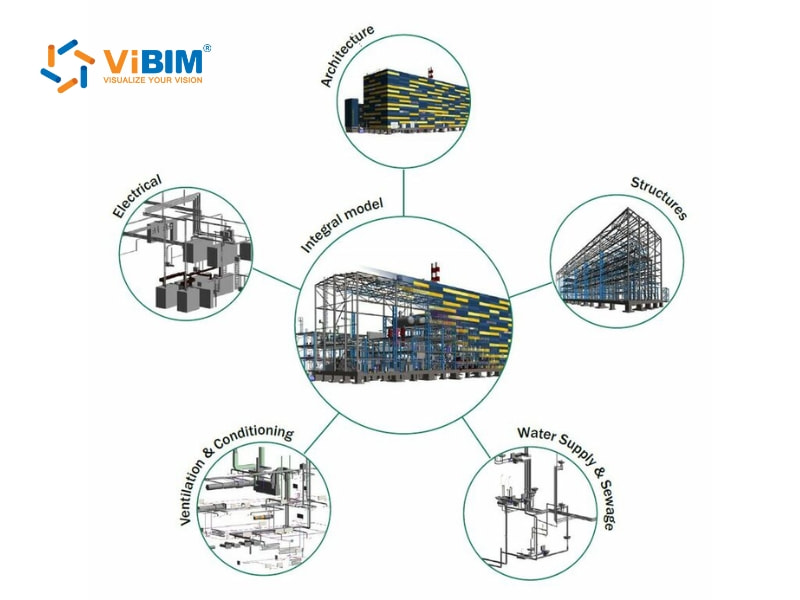
BIM coordination is the process of integrating Building Information Modeling (BIM) data from multiple disciplines, such as architecture, structure, and MEP into a single, unified 3D model. It creates a shared environment where teams can identify design conflicts, align model information, and improve collaboration throughout the project lifecycle.
BIM coordination typically begins early in the design or preconstruction phase, when revisions are easier and more cost-effective to manage. Technical requirements for this process include accurate model placement, compatible coordination tools, standardized model formats, defined model scopes, rule-based clash detection, issue management, communication tracking, and continuous quality control. The coordination workflow follows a clear set of steps, including planning, model preparation, integration, clash analysis, review meetings, issue resolution, documentation, and handover.
This article provides an overview about what is BIM coordination, covering its definition, timing, responsibilities, technical requirements, workflow, benefits, and challenges, to help all project members, from architects to contractors, gain a practical understanding of how coordination enhances efficiency and accuracy in construction projects.
What is BIM Coordination?
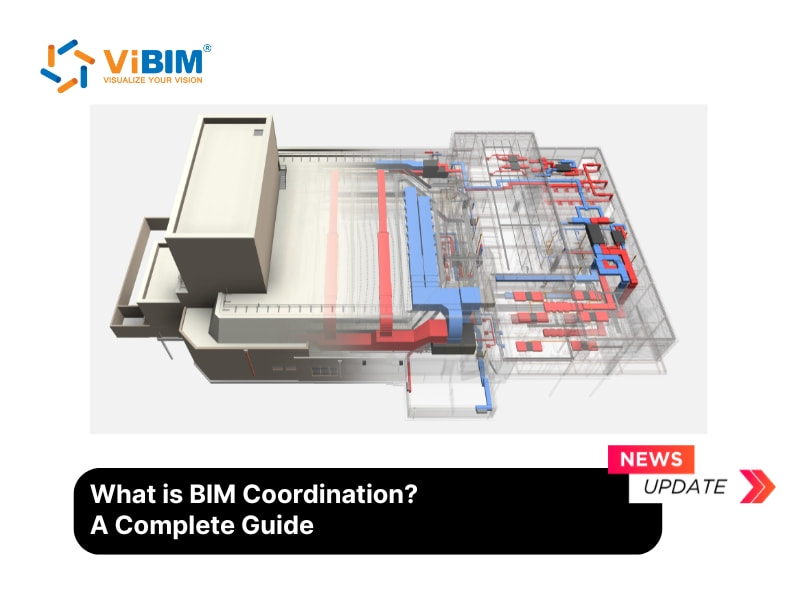
BIM coordination is the process of integrating Building Information Modeling (BIM) data from multiple disciplines, such as architecture, structure, and MEP, into a single, unified 3D model. This integration ensures every building element aligns accurately and prevents conflicts between systems before construction begins.
The coordination process uses techniques like clash detection to identify overlapping or conflicting elements in the model. Model coordination checks the constructability of spaces, verifies the installation sequence, and ensures each component fits within the actual building layout. It helps teams see whether BIM for MEP systems can be installed smoothly without obstruction from structural or architectural elements.
Coordination also evaluates practical details, such as the accessibility of control valves, the placement of maintenance panels, or the separation of hot pipes from heat-sensitive materials. These checks make the model more realistic and help identify potential problems before construction begins.
For a deeper dive into how this automated checking process works to eliminate onsite errors, explore our guide on what is clash detection in BIM.
When should we start BIM coordination?
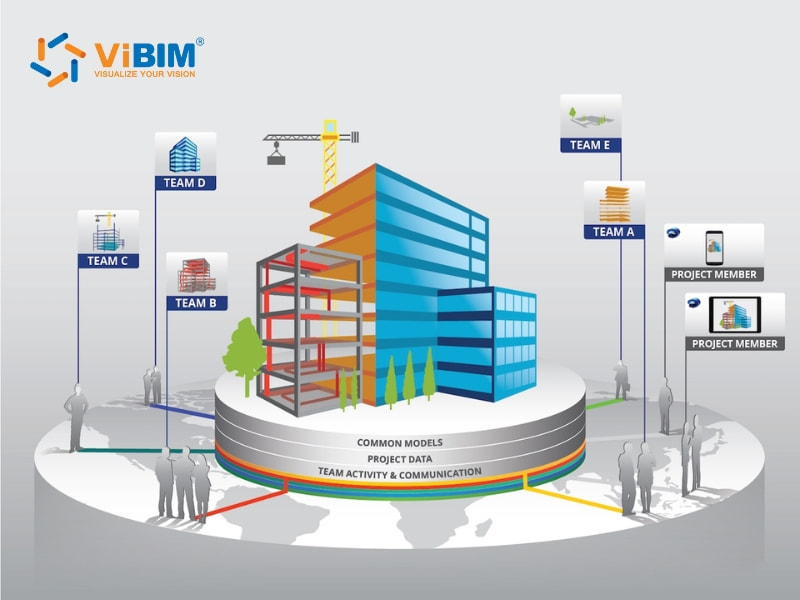
BIM coordination should begin early during the preconstruction or design phase, before any on-site work starts. Early coordination enables project teams to identify and resolve design conflicts virtually, thereby preventing rework, scheduling delays, and material waste.
The exact starting point depends on the project delivery method and contract type:
- Design-Build: Coordination begins in the early design phase to align design and construction teams from the start.
- Design-Bid-Build: Coordination begins after design completion and contractor selection, but before construction commences.
- Construction Management at Risk (CMAR): Coordination typically begins during design development, as the contractor is already involved early in the process.
- Integrated Project Delivery (IPD): Coordination continues throughout the project from inception, driven by collaboration among all parties.
Who is responsible for the BIM coordination?
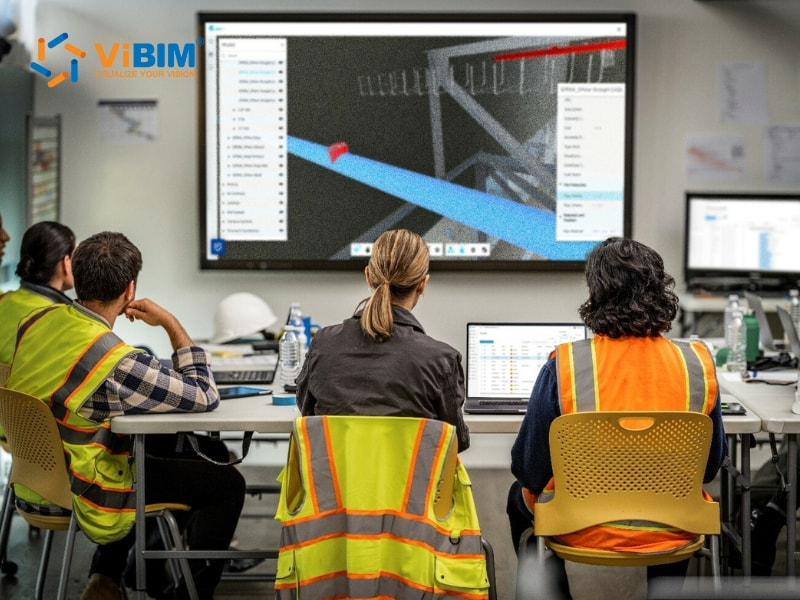
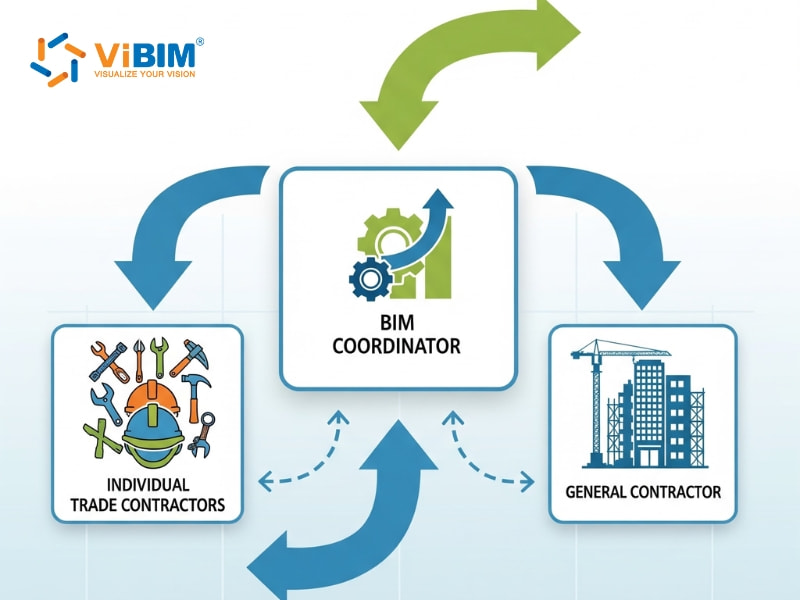
BIM coordination is managed collectively by the BIM Coordinator, individual trade contractors, and the General Contractor, who together maintain model accuracy and project alignment.
BIM Coordinator
The BIM Coordinator is the central figure in the coordination process, overseeing the integration and management of all BIM models. This role connects design and construction teams, keeping project data accurate, structured, and continuously updated.
They take charge of various tasks to maintain consistency and coordination across disciplines, ensuring every model aligns with the project’s goals:
- Model integration: Combining models from architectural, structural, and MEP disciplines into a unified environment to maintain consistency and detect coordination issues early.
- Clash detection & analysis: Leveraging tools for clash detection Navisworks, Revizto, or Autodesk Construction Cloud to identify design or spatial conflicts and confirm model accuracy before construction begins.
- Solution management: Organizing coordination meetings to discuss detected clashes, propose resolutions, and verify that necessary updates are reflected across all models.
- Standards & compliance: Monitoring adherence to the BIM Execution Plan (BEP), project modeling standards, and contractual data requirements for consistent project outcomes.
- Communication & collaboration: Acting as the connection between design teams, contractors, and project managers to keep model information synchronized and easily accessible.
Individual Trade Contractors
A trade contractor is a specialist responsible for a specific aspect of construction, such as plumbing, electrical work, or HVAC systems. Each trade contractor, whether mechanical, electrical, plumbing, or structural, takes on these four key duties to maintain coordination throughout the project:
- Model development: Creating and managing a BIM model for their specific discipline, ensuring that the design reflects accurate details for construction.
- Coordination participation: Attending coordination meetings to review conflicts, discuss model overlaps, and agree on necessary design or layout adjustments with other teams.
- Model updating: Revising their models after each coordination session so that the data stays aligned with the project’s latest approved version.
- Collaborative integration: Working closely with the BIM Coordinator and other trade contractors to maintain consistency and improve constructability across all project disciplines.
General Contractor (GC)
The General Contractor (GC) leads and manages the process to make sure all project elements from different trades align in a single digital model. The GC oversees the overall workflow, keeps the coordination schedule on track.
Their key duties involve guiding the process and keeping every contributor aligned with project goals through structured coordination activities:
- Leadership & Oversight: Managing the coordination schedule, assigning roles, and maintaining cooperation between all design and construction participants.
- Decision-Making: Making final decisions on unresolved clashes or design conflicts that affect cost, schedule, or construction feasibility.
- Alignment with Project Goals: Keeping the result aligned with the project’s quality standards, scope requirements, and financial targets.
- Workflow Management: Establishing procedures, reviewing progress, and maintaining accountability to keep coordination activities consistent from start to finish.
What are the technical requirements for BIM Coordination?
BIM coordination requires a structured technical foundation that connects all project elements into a unified process. Accurate model placement, standardized formats, and appropriate coordination tools form the basis for consistent integration. Clear model scopes, defined rules for clash detection, and well-managed issue workflows maintain coordination efficiency. Continuous analysis, transparent reporting, and regular communication strengthen quality assurance throughout the entire project lifecycle.
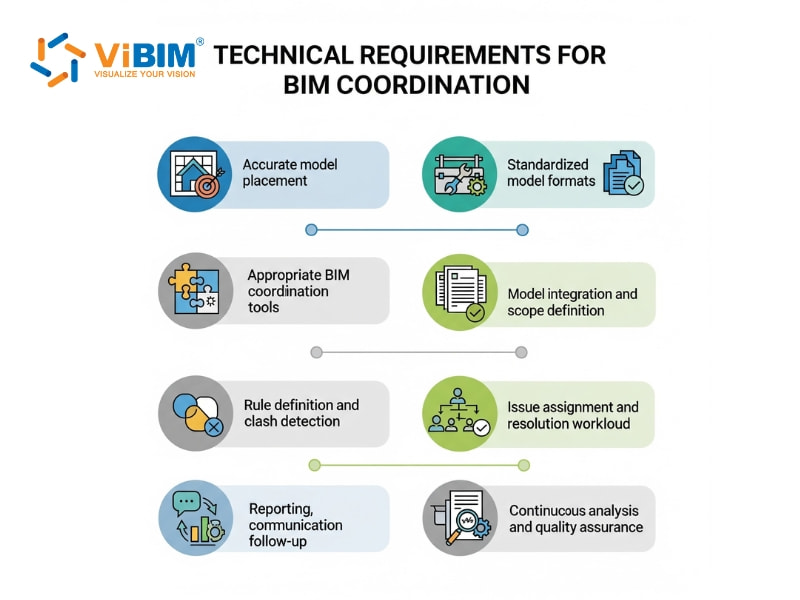
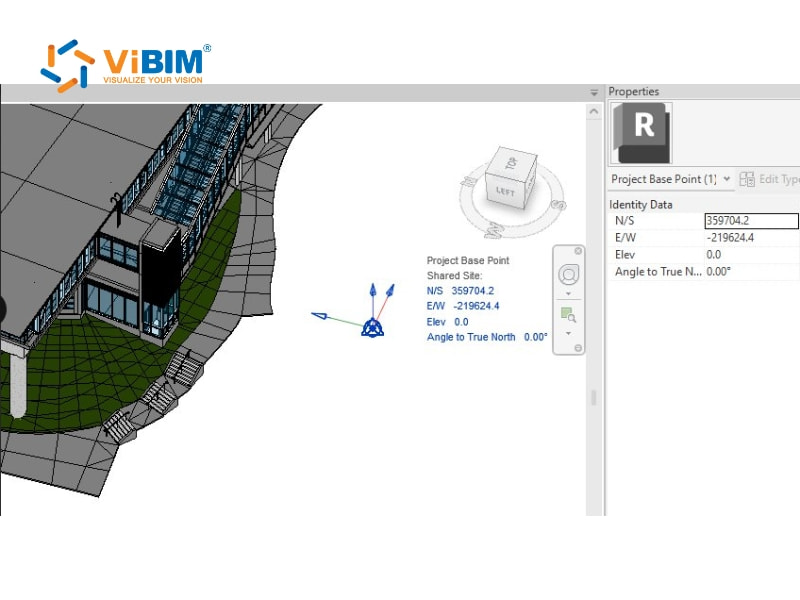
Accurate model placement
Accurate model placement is the foundation of successful BIM coordination, as every discipline model must align perfectly within the shared coordinate system. Even minor coordinate mismatches can cause incorrect clash detections and misaligned construction data. Verifying shared coordinates, checking project base points, and linking models correctly are key tasks. Autodesk Revit supports this process through built-in location controls that help maintain consistent and precise model alignment throughout the project.
Appropriate BIM coordination tools
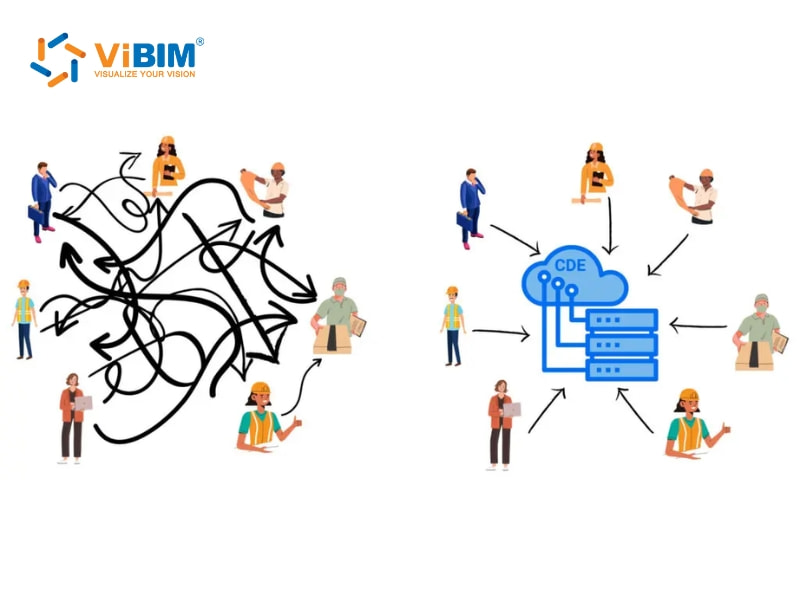
Selecting the right BIM coordination software supports efficient data management, model visualization, and conflict detection throughout the project. The main tool categories include:
- Common Data Environments (CDEs): Cloud systems store shared files, manage versions, and support collaboration via platforms such as Autodesk Construction Cloud or Trimble Connect.
- Modeling Tools: Programs such as Autodesk Revit and Archicad perform internal model checks and detect clashes between linked elements in the same discipline.
- Dedicated Coordination Tools: Software like Navisworks Manage or Solibri Office applies rule-based detection, generates coordination reports, and tracks issues across multiple disciplines.
Standardized model formats
BIM coordination involves models created from different software, such as Revit, Tekla, or Archicad, and they must communicate accurately. So, using a shared file format, such as IFC (Industry Foundation Classes), enables smooth data exchange across platforms, while verifying exported elements helps prevent data loss or model misalignment.
Model integration and scope definition
Model integration combines exported discipline models into a single coordination model using software such as Navisworks or Solibri. Each coordination session requires a clearly defined scope that covers clash types, data accuracy, and MEP compliance, while the LOD and checking frequency must align with each project phase.
Rule definition and clash detection
Rule definition guides how the software detects conflicts and data errors within the model. Each rule may define clearance distances, MEP alignment, or safety spacing. The software applies these rules to run automated or manual clash detection and produces reports listing issue details, coordinates, and assigned disciplines.
Issue assignment and resolution workflow
Issue assignment organizes the detected clashes by linking them to the right disciplines or project teams. Tools like Solibri or BIM Track tag each issue and record its details for tracking and discussion. The BIM Coordinator manages the workflow, reviews updates from team members, and merges approved revisions into the central model to ensure data accuracy.
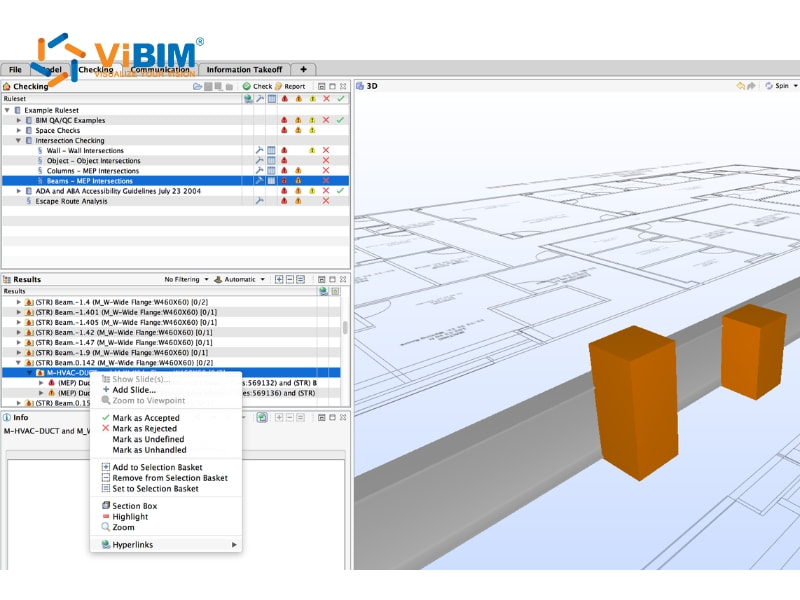
Reporting, communication, and follow-up
Effective communication ensures coordination remains effective and consistent throughout all project stages. Clash reports with visuals are shared among teams, and follow-up actions are assigned to track issue progress. Regular coordination meetings confirm the resolution of items, while version control monitors updates, and the BIM Execution Plan is revised to reflect the latest project status.
Continuous analysis and quality assurance
Quality checks ensure the reliability of the coordinated model and help teams identify recurring problem patterns early. Each updated model is reanalyzed to confirm that all clashes are resolved and that no new conflicts arise after revisions. Consistent reviews enhance modeling accuracy, while recorded results inform future coordination steps and foster teamwork across subsequent project phases.
What is the BIM coordination workflow/process?
The BIM coordination process follows a structured eight-step workflow that connects planning, modeling, and issue management into a continuous cycle of improvement.
- Step 1: Coordination planning and setup
- Step 2: Model authoring and data preparation
- Step 3: Model aggregation and integration
- Step 4: Clash detection and issue analysis
- Step 5: Coordination and review meetings
- Step 6: Issue resolution and model updates
- Step 7: Documentation, approval, and handover
- Step 8: On-site implementation and quality assurance
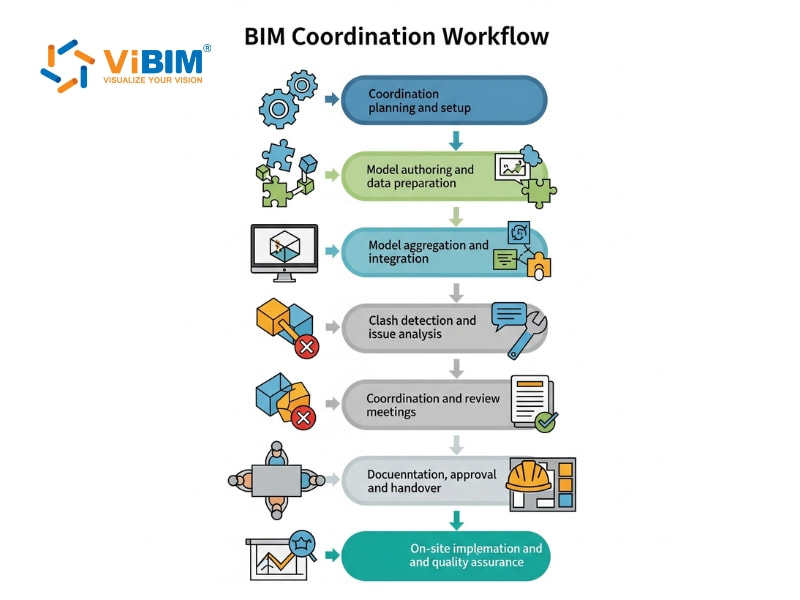
Step 1: Coordination planning and setup
This first stage builds the foundation for collaboration by setting clear coordination rules and organizing how teams will work together effectively.
- Develop a BIM Execution Plan (BEP) that outlines coordination objectives, team roles, communication methods, and procedures for model sharing.
- Define coordination zones, ownership boundaries, and a sequence that matches the overall project timeline.
- Verify that all participants can access the necessary software, shared environments such as Autodesk Construction Cloud or Trimble Connect, and agreed-upon data standards.
- Align naming conventions, file structures, Levels of Detail (LOD), and modeling standards to maintain consistency across all disciplines.
- Conduct kickoff meetings to align expectations, confirm responsibilities, and create a unified understanding of the coordination process.
Step 2: Model authoring and data preparation
This stage focuses on developing detailed discipline-specific BIM models that align with the project’s design intent and coordination standards. Every team contributes its data and design input to build a unified digital representation of the project.
- Create discipline-specific 3D models through BIM for architects, structural, and MEP teams using software such as Revit, Tekla Structures, or ArchiCAD.
- Maintain consistent geometry, naming conventions, and parameter structures to improve collaboration and data exchange.
- Monitor model progress, perform audits, and confirm compliance with BEP requirements through the BIM Coordinator’s oversight.
- Review file organization, element hierarchy, and model size to ensure optimal performance and prevent potential integration issues later.
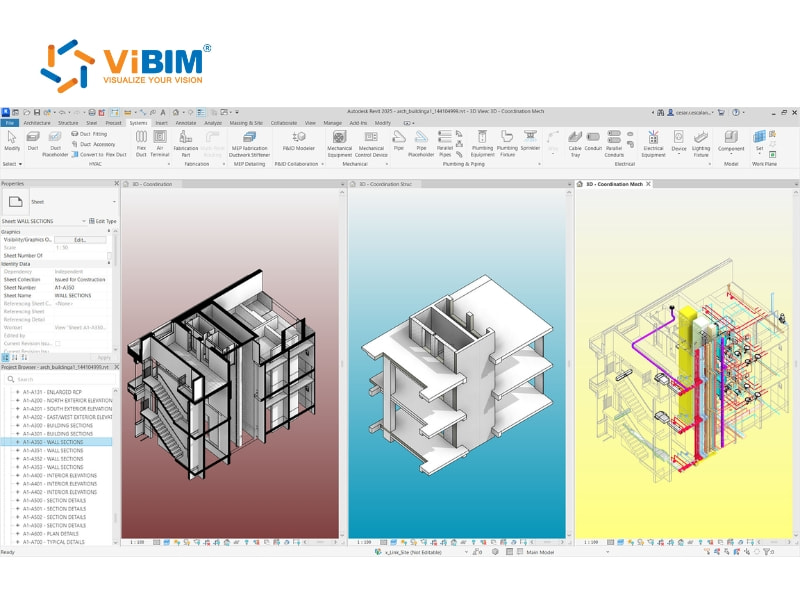
Step 3: Model aggregation and integration
This stage connects all discipline models into one federated model that supports visual coordination and interdisciplinary design review. The integration process links geometry, data, and spatial positioning to create a shared digital workspace.
- Export discipline models into IFC or native file formats that are compatible with the merging platform.
- Align models precisely using shared coordinates, survey points, and base points to achieve accurate positioning.
- Combine models in coordination tools such as Navisworks Manage, Solibri Office, or BIMcollab Zoom for collective analysis.
- Conduct quality checks to confirm alignment accuracy, consistent scale, and complete data before running clash tests.
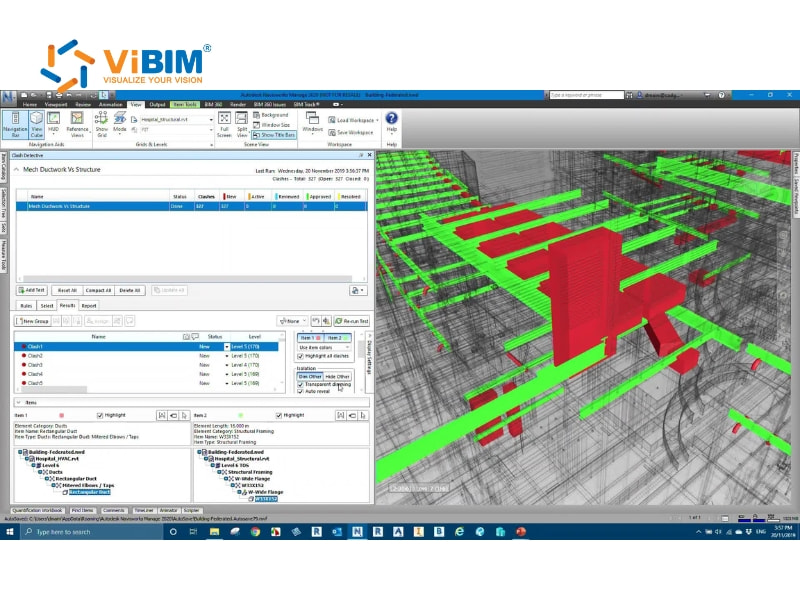
Step 4: Clash detection and issue analysis
This phase focuses on identifying design clashes across disciplines, analyzing models to detect overlaps and coordination conflicts before construction begins. The process helps teams understand problem areas and prepare for resolution discussions.
- Run automated clash detection using Navisworks, Solibri, or BIMcollab to identify both spatial and logical conflicts.
- Categorize detected clashes by severity, location, and responsible trade to support effective issue management.
- Generate clash reports containing visuals, coordinates, and comments to guide further review.
- Evaluate clashes carefully to separate genuine design issues from false positives caused by modeling errors.
- Prepare a preliminary clash resolution log to support upcoming coordination meetings.
Step 5: Coordination and review meetings
This stage focuses on turning detected clashes into coordinated actions, where teams discuss issues together, agree on design adjustments, and track progress transparently. Regular meetings keep communication clear and collaboration active throughout the coordination phase.
- Review updated clash reports and compare current findings with those from previous sessions.
- Discuss proposed design revisions, assess their feasibility, and assign issue ownership to responsible parties.
- Agree on resolution deadlines and record all decisions in systems like BIM Track, Revizto, or Autodesk BIM Collaborate.
- Document meeting minutes, action items, and progress updates to promote accountability among stakeholders.
- Schedule recurring meetings, either weekly or biweekly, to maintain project momentum and consistent coordination flow.
Step 6: Issue resolution and model updates
Following coordination meetings, responsible teams revise their discipline models to apply approved solutions and maintain consistent design integration across all systems. Continuous updates and rechecks keep the project model accurate, aligned, and ready for the next coordination stage.
- Modify discipline models to correct identified clashes and enhance coordination among structural, architectural, and MEP components.
- Verify updated elements to confirm that adjustments align with design intent and follow established project modeling standards.
- Reinstate revised models into the shared federated environment to assess their compatibility and performance in real-time coordination.
- Conduct additional clash detection to check for residual or newly introduced conflicts before approving the updated models.
- Maintain version control logs to record revisions, track responsibilities, and support transparent communication across all project teams.
- Repeat coordination cycles until every major conflict is resolved and the federated model is ready for final approval.
Step 7: Documentation, approval, and handover
Upon successful coordination, the project enters the documentation and approval phase, during which all finalized models and reports are prepared for official submission. This step records the results of collaboration and provides a verified reference for the construction phase.
- Generate coordinated drawings, installation details, and shop drawing packages that reflect the approved final BIM model.
- Create a coordination summary report highlighting resolved issues, outstanding concerns, and results from the final model quality checks.
- Update the master coordination model to serve as the verified digital record and reference throughout construction activities.
- Obtain official sign-offs from project managers, design consultants, and trade contractors to confirm model accuracy and readiness.
- Archive all approved models, reports, and coordination files to maintain traceability and support future facility management operations.
Step 8: On-site implementation and quality assurance
The coordinated model now guides real-world construction, connecting design accuracy with field execution to maintain precision throughout the building phase. Each activity focuses on applying digital coordination to the physical installation while maintaining continuous, reliable data flow.
- Use the approved model to produce fabrication drawings, prefabrication details, and installation plans that support efficient construction workflows.
- Provide site teams with model access via tablets or BIM viewers, enabling accurate references and quick updates during installation work.
- Conduct field verification to check that physical assemblies match the coordinated model and meet alignment and clearance requirements.
- Conduct regular QA inspections to validate construction quality and record any deviations for correction or documentation.
- Update the as-built model continuously with verified field data to maintain its accuracy for maintenance and future BIM for facility management.
What are the benefits of BIM coordination?
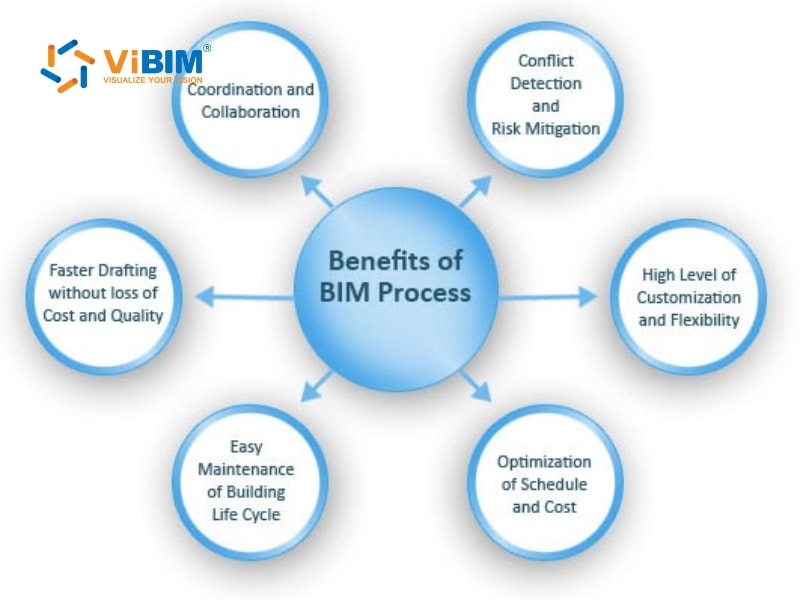
BIM coordination delivers measurable value to construction projects by integrating design accuracy, collaboration, and project management into a unified process:
- Early clash detection and error prevention: Early identification of design conflicts through tools like Navisworks or Solibri prevents costly field rework. Timely adjustments enhance productivity, minimize waste, and maintain construction schedules on track.
- Improved communication and collaboration: A shared BIM model allows all disciplines to work from consistent and updated information. Transparent communication fosters effective teamwork and minimizes design discrepancies among architects, engineers, and contractors.
- Higher design and construction efficiency: Integrated workflows connect all project disciplines in real time, improving scheduling accuracy and minimizing delays. Coordinated updates lead to smoother project execution and faster completion.
- Cost and resource optimization: Coordinated models support accurate quantity takeoffs and material planning. Clear visibility into project needs reduces over-ordering, prevents waste, and helps maintain financial control.
- Better space utilization and design quality: Detailed 3D visualization helps teams refine spatial layouts and coordinate MEP systems more effectively. The final outcome delivers both functionality and design consistency.
- Support for prefabrication and modular building: Accurate BIM models enable off-site prefabrication with precise component fitting, ensuring optimal integration. Controlled production minimizes on-site risks, speeds up installation, and enhances construction reliability.
- Enhanced transparency and risk management: Centralized data systems improve accountability and early risk detection. Clear version control and documented changes provide better project oversight and informed decision-making.
- Sustainability and lifecycle efficiency: Coordinated models contribute to sustainable design by optimizing energy use and minimizing material waste. Accurate digital data also supports long-term facility management and maintenance planning.
Beyond general project efficiency, discover how digital integration is transforming the commercial management workflow by reading about the benefits of BIM for quantity surveyors.
What are the challenges of BIM coordination?
BIM coordination faces several ongoing challenges stemming from technical limitations, inconsistent workflows, and human factors that, together, influence collaboration success:
- Software interoperability issues: Different BIM software platforms often fail to communicate effectively, causing data inconsistencies or file conversion errors. This lack of seamless integration can result in misplaced elements, incomplete information, and extra manual work to correct discrepancies.
- Large file sizes and performance issues: Complex 3D models with detailed geometry and data can become extremely heavy, resulting in reduced software speed and responsiveness. Slow performance makes reviewing models, detecting clashes, and sharing updates between teams more time-consuming.
- Inconsistent levels of detail (LOD): Models developed by different disciplines may differ in their levels of detail, leading to confusion during coordination. Unequal precision complicates clash detection and makes managing revisions or updates more challenging.
- Lack of standardized workflows: The absence of unified modeling standards or BIM execution plans often leads to fragmented project processes. Without consistency in file naming, versioning, and update protocols, collaboration becomes inefficient and prone to mistakes.
- Time constraints: Tight project schedules can limit opportunities for detailed model review and coordination meetings. When deadlines shorten, clash detection and issue resolution may be rushed, increasing the likelihood of errors being carried into construction.
- Resistance to change: Some professionals are reluctant to adapt to new BIM tools or coordination practices, preferring familiar methods. This hesitation can delay adoption and reduce the overall benefit of digital collaboration across project teams.
- Limited BIM expertise: Uneven knowledge levels among project participants can cause poor model handling and misunderstandings of coordination requirements. Without adequate training, even experienced teams may struggle to maintain model accuracy and consistency.
- Communication barriers: Poor communication and unclear responsibilities often result in duplicated work, delayed feedback, and unresolved issues. A lack of coordination between teams can weaken collaboration and negatively impact the overall project quality.
How many BIM coordination meetings are typically required to achieve full building coordination?
Most projects require 8 to 15 BIM coordination meetings to achieve complete building alignment, depending on scope and complexity. These meetings—usually held weekly—bring together project teams to merge architectural, structural, and MEP models into a unified 3D environment. The number of meetings varies based on project type, size, and system density:
- Warehouses or repetitive layouts (e.g., Hotels): Simple, repetitive structures allow faster progress, averaging 7,500 sq. ft. per meeting, or roughly 10 meetings, for a 75,000 sq. ft. building.
- Schools, commercial buildings, or medical office buildings (MOBs): Medium-complex projects typically achieve coordination at about 4,500 sq. ft. per meeting, requiring several more sessions to finalize.
- Wood-structure projects: Less predictable framing and material variations slow coordination, averaging around 3,000 sq. ft. per meeting.
- Localized retrofits: High-detail environments demand careful model adjustments, often covering only 2,000 sq. ft. per meeting.
- Dense industrial facilities: Complex layouts with heavy system overlap must be reviewed on a case-by-case basis, as meeting frequency depends entirely on mechanical and BIM structural density.
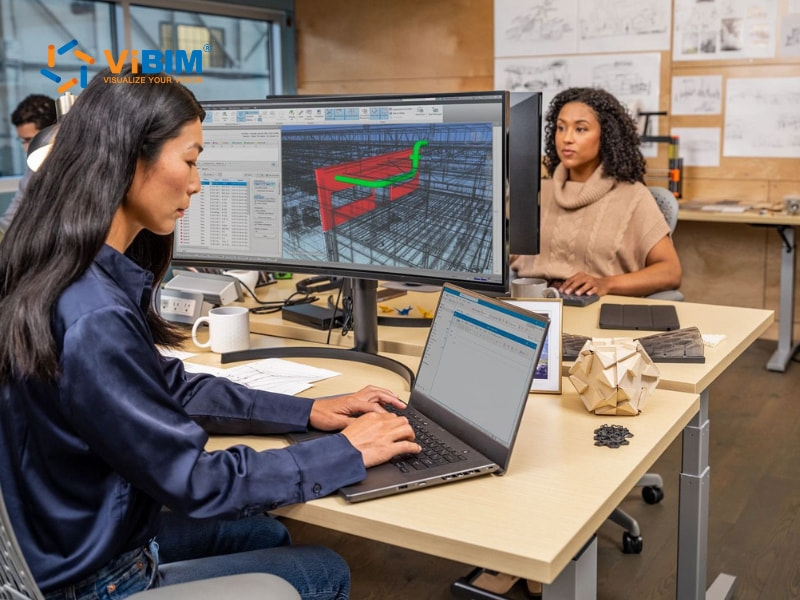
Tips to enhance the BIM coordination
Enhancing BIM coordination requires consistent planning, communication, and model management across all project stages:
- Establish a detailed BIM execution plan (BEP): A well-defined BEP outlines coordination workflows, modeling standards, and deliverable formats, helping teams avoid confusion during project execution.
- Implement strong governance structures: Clear communication channels, escalation steps, and scheduled reviews keep coordination organized. Regular audits also help detect workflow issues early and encourage continuous improvement.
- Promote effective communication: Frequent coordination meetings focused on issue resolution promote active dialogue. Direct collaboration among architects, engineers, and contractors keeps everyone aligned and facilitates faster decision-making.
- Clarify the BIM coordinator’s role: A defined leadership role empowers the coordinator to manage model updates, oversee review cycles, and effectively guide team coordination.
- Apply rigorous verification and quality Control: Regular clash detection, field validation, and model audits help maintain accuracy. Proper documentation of each coordination decision improves accountability and traceability.
- Use centralized collaboration platforms: Cloud-based tools like Autodesk Construction Cloud or Trimble Connect support real-time updates, shared data access, and version control, reducing file duplication and miscommunication.
- Encourage ongoing learning and improvement: Periodic process reviews enable teams to identify gaps and apply feedback effectively. Continuous learning strengthens future coordination practices and team efficiency.
- Conduct post-project evaluations: Project reviews after completion help identify recurring coordination challenges that can be addressed. Lessons learned can be applied to improve workflows for future BIM implementations.
To ensure your Common Data Environment is fully optimized for real-time data sharing and security, explore our specialized solutions for BIM collaboration using ACC.
Optimizing Coordination with Professional Modeling Services
Efficient BIM coordination relies entirely on the accuracy and quality of the input models. If architectural or MEP models lack precise geometry or the correct LOD (Level of Development), the clash detection process becomes cluttered with errors, delaying the entire project schedule.
To streamline this process, many General Contractors and BIM Coordinators partner with specialized Revit modeling outsourcing services like ViBIM. By leveraging Scan to BIM technology, ViBIM converts point cloud data into precise Revit models, ensuring that existing conditions are accurately captured before coordination begins. This approach not only guarantees model integrity for clash detection but also offers a fast turnaround time—up to 30% quicker than industry standards—allowing coordination teams to focus on resolving issues rather than fixing model geometry.
Frequently Asked Questions about BIM coordination
What is the difference between BIM coordination and BIM management?
BIM coordination is the process of combining and aligning models from multiple disciplines to detect and resolve design conflicts before construction begins. It focuses on technical accuracy and collaboration among architecture, structure, and MEP teams. In contrast, BIM management oversees the entire BIM process, including setting standards, managing data, and ensuring alignment with project goals.
Can BIM coordination be applied to small projects?
Yes, BIM coordination can be applied to small projects. Although it is often used in large-scale developments, smaller projects also benefit from reduced errors and improved collaboration. With affordable software and simpler workflows, BIM coordination now supports efficiency even in limited-scope projects.
Which BIM software is best for coordination?
Autodesk Navisworks, BIMcollab, Revizto, Solibri and Trimble Connect are best softwares for BIM coordination:
- Autodesk Navisworks: Industry-standard software for clash detection and coordination, offering strong integration with various BIM tools.
- BIMcollab: Cloud-based issue management platform that supports real-time communication and coordination tracking.
- Revizto: All-in-one coordination tool combining clash detection with 3D visualization and issue management.
- Solibri: Rules-based model checking software that enhances model accuracy and quality control.
- Trimble Connect: Cloud collaboration tool supporting shared model access and coordinated project workflows.
Understanding what is BIM coordination helps project teams create seamless collaboration and eliminate design conflicts before construction begins. This article explained its meaning, benefits, workflow steps, and best practices so that readers can clearly grasp how it improves project efficiency and communication. Each section focused on showing how coordination supports accuracy, saves time, and connects multiple disciplines in one shared model.
The discussion also provided insights that answer common challenges faced by professionals, such as unclear responsibilities or slow clash resolution, helping them work with better control and fewer errors.











